
Affiliate disclosure: FieldOpsLab may earn a commission from some links on this page if affiliate links are added later. Our recommendations are based on evidence and buyer fit, not whether a product has an affiliate program.
Written by: LPSA
Evidence level: research_based
Product information checked: 2026-07-02
Pricing checked: 2026-07-02
Last meaningfully updated: 2026-07-03
Evidence status
Evidence status: This is a research_based migration guide built from public pricing pages, help-center articles, billing and terms pages, payment-processing documentation, import/export documentation, and accounting-integration documentation checked on 2026-07-02. FieldOpsLab did not use a controlled software account, a paid account, a vendor demo, a live residential-cleaning migration, operator interviews, or original screenshots for this article.
Use this page as a planning framework, not as proof that any vendor will migrate your data cleanly in practice. Public documentation is helpful, but it does not prove export completeness, recurring-series portability, staff-permission fit, saved-card portability, onboarding quality, or post-cancellation data access experience. Vendor confirmation is required before purchase and again before cancellation.
Quick answer
If you are switching cleaning software, the safest approach is to treat the move as a data project first and a software purchase second. Before you sign a new annual plan or cancel the old one, inventory every customer record, service address, recurring schedule, future visit, skipped or paused visit history, cleaner assignment, note, checklist, invoice, payment, refund, tax field, and accounting touchpoint that keeps your business running.
For most residential cleaning businesses, the biggest migration mistakes are predictable: assuming customer notes will import because names and phone numbers do, assuming recurring series will survive because one-time jobs import, assuming saved cards can move because both systems say they support cards on file, assuming a QuickBooks logo means the same sync behavior, and canceling an old account before you have sample exports and archive copies in hand. Based on public documentation from Jobber, Housecall Pro, ZenMaid, and BookingKoala, migration support, exports, payment workflows, and downgrade or cancellation rules vary materially by product and plan.
The practical rule is simple: do not cancel old software until you have exported core records, mapped fields into the new system, rebuilt or verified future recurring work, reconciled accounting, and confirmed what will remain accessible after cancellation.
Quick verdict
| Decision point | FieldOpsLab view |
|---|---|
| Best use | Use this checklist before buying new software, during onboarding, and again before canceling the old system. |
| Strongest reason to use it | It forces object-by-object planning for customers, service addresses, recurring series, future visits, staff records, payments, accounting, exports, and archive access. |
| Main migration risk | Signing or canceling before sample exports, import scope, saved-card handling, QuickBooks behavior, and post-cancellation data access are confirmed in writing. |
| Best fit | US residential cleaning businesses with 2-20 field workers and 1-2 office users moving from spreadsheets or switching from one software platform to another. |
| Evidence level | research_based. Public documentation only; FieldOpsLab did not verify a live cleaning-software migration in a controlled account. |
In this article
- Key facts
- Best for
- Avoid if
- Buyer scenario
- Migration map
- Customer and property data checklist
- Jobs, visits, and recurring-series data checklist
- Payments, invoices, saved cards, and accounting data checklist
- Price book, services, forms, and workflow data
- Cleaner, provider, staff, and permissions data
- Import support, onboarding, and migration services
- Export, sample files, and exit readiness before buying
- Cancellation, downgrade, refund, and post-cancellation data risk
- Spreadsheet-to-software migration plan
- Software-to-software migration plan
- Scenario-specific migration risks
- Product-category notes
- Red flags
- Buyer verification checklist
- Follow-up email template
- What we could not verify
- Final recommendation
- Methodology
- Sources
Key facts
| Item | Research-based finding |
|---|---|
| What this guide is | A migration and data-risk guide for US residential cleaning businesses with 2–20 field workers and 1–2 office users. |
| What matters most before switching | Customer and property records, recurring-series logic, future scheduled visits, cleaner assignments, payments, invoice status, and accounting reconciliation. |
| Most dangerous assumption | That saved cards, recurring schedules, notes, checklists, and custom fields will move automatically because a vendor says it offers import help. |
| Highest-risk cutover point | Canceling the old account before you have complete exports, archive copies, and confirmation of what stays accessible after cancellation or downgrade. |
| Payment risk | Cards on file and payment tokens should be treated as processor-specific and vendor-specific. Do not promise portability without written confirmation. |
| Accounting risk | QuickBooks and other accounting syncs are not all the same. Sync direction, trigger rules, mapped fields, refunds, and duplicate-handling vary by product. |
| Migration reality | Some data can usually be imported directly. Other data will need manual cleanup, manual rebuild, temporary parallel operations, or a historical archive outside the new system. |
| Safest buying move | Ask for object-by-object sample exports and import templates before purchase, then repeat the same checklist before cancellation. |
Takeaway: A cleaning-software migration succeeds when business-critical records stay usable, not when a seller says the move will be “easy.”
Best for
- Residential cleaning owners moving off spreadsheets, Google Calendar, texting, paper notes, manual invoices, or disconnected payment tools.
- Teams replacing one software platform with another because recurring scheduling, staffing, reporting, payments, or customer self-service no longer fit.
- Operators who want a repeatable migration checklist before signing a contract, not a product ranking.
- Businesses that need to protect recurring customers, access details, job notes, invoice history, and bookkeeping continuity during a switch.
Avoid if
- You want controlled-account migration proof or a claim that any vendor has already been fully verified in practice.
- You want a universal “best cleaning software” recommendation instead of a diligence framework.
- You are looking for a generic SaaS migration checklist that ignores field scheduling, recurring visits, staff assignments, and customer property notes.
- You are ready to cancel current software before exporting your data and reconciling your accounting.
Buyer scenario
The target buyer is a US residential cleaning business with recurring customers, 2–20 field workers, and 1–2 office users. The current operation may still rely on spreadsheets, shared calendars, manual texts, separate payment tools, paper job notes, and bookkeeping workarounds. The business is evaluating software categories, not trying to turn this page into a Jobber article, a Housecall Pro article, a ZenMaid article, or a BookingKoala article.
For planning purposes, FieldOpsLab uses three team scenarios. These are migration-planning models, not vendor quotes:
| Scenario | Team makeup | Why migration risk changes |
|---|---|---|
| 2 field workers + 1 office user | Small owner-led cleaning team | The software switch is usually simpler, but the owner still needs core customer data, future visits, billing records, and a low-friction cutover. |
| 5 field workers + 1 office user | Growing recurring-cleaning team | Recurring exceptions, team assignment changes, reminders, and payment automation become harder to rebuild manually. |
| 15 field workers + 2 office users | Larger small business with more structure | Permissions, inactive-provider records, exports, payroll-adjacent data, accounting sync, and post-cancellation access become materially riskier. |
Takeaway: The larger the team, the less safe it is to rely on “we’ll clean it up later” during migration.
Migration map
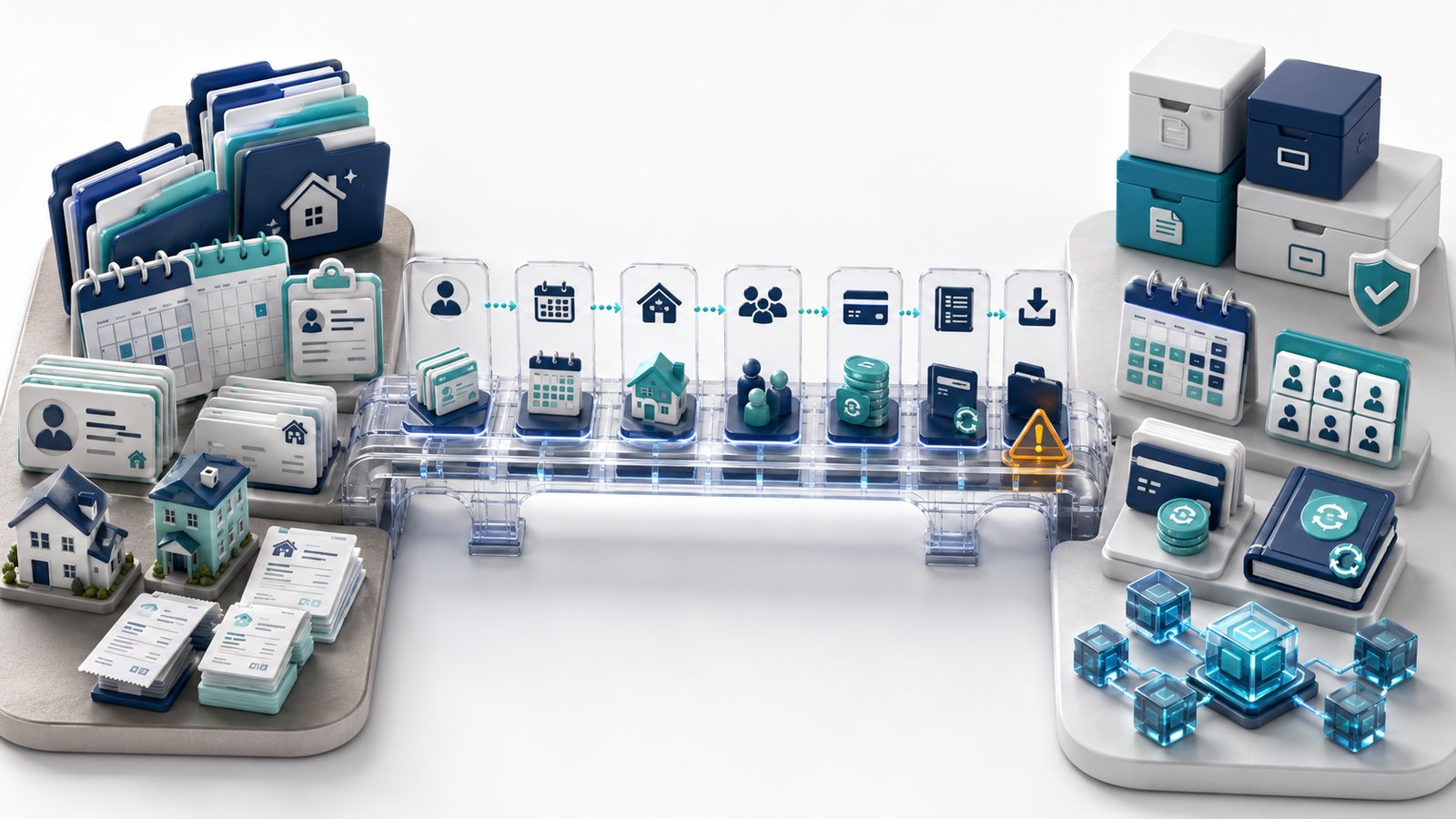
For a residential cleaning company, migration is not one task. It is a chain of decisions across customer records, scheduling, staff access, payments, and accounting. The table below is the practical map to work through before you switch.
| Step | What should happen | Why it matters | What can go wrong | What to verify |
|---|---|---|---|---|
| Inventory current data | List every operational object you use today. | You cannot protect data you never named. | Only contacts get exported; operational detail stays behind. | Create an object list before any demo or import call. |
| Clean duplicates and stale records | Merge duplicate customers, dead service addresses, and retired services. | Bad source data becomes bad imported data. | Duplicate invoices, duplicate customers, and route confusion. | Freeze cleanup rules before export day. |
| Export the old system | Pull your customer, job, invoice, payment, and staff files while access is still live. | Cancellation often changes your leverage. | You discover too late that a lower plan or canceled account limits exports. | Download files before submitting cancellation. |
| Request sample export files | Ask the new vendor for real sample CSV or spreadsheet files by object. | This shows how the vendor thinks about data portability. | You buy first and learn later that the object you need is manual-only. | Request samples before purchase, not after onboarding starts. |
| Map fields into the new system | Match every old field to a destination field, manual note, or archive. | Field mismatches cause silent data loss. | Gate codes land in notes, taxes land nowhere, recurring cadence gets flattened. | Use a field-mapping sheet, not memory. |
| Decide what can be imported directly | Use CSV or native import for clean, supported objects. | This saves time and reduces manual re-entry. | You attempt to import unsupported objects and lose time cleaning failures. | Get the vendor’s current template and supported-field list. |
| Decide what must be rebuilt manually | Mark recurring logic, forms, automations, and security-sensitive notes that need rebuild work. | Not all business logic is exportable. | You assume a rebuild is unnecessary until reminders or charges fail. | Budget manual rebuild time before cutover week. |
| Rebuild recurring schedules | Recreate cadence, future dates, assignees, and skip rules where required. | Recurring revenue lives here. | Weekly clients disappear, drift, or lose their preferred day. | Test a small recurring set before full cutover. |
| Reconnect payments and accounting | Set processor, tax, invoice rules, and QuickBooks behavior. | Cash flow breaks faster than contact data does. | Double charging, missed charges, broken sync, or unreconciled balances. | Do a payment and accounting dry run before going live. |
| Verify cleaner mobile access | Confirm that cleaners can see what they actually need in the field. | Office success does not guarantee field success. | Entry instructions, photos, notes, or checklists stay trapped in the office view. | Use a real cleaner role in testing. |
| Run temporary parallel operations | Keep old data available while new workflows stabilize. | This reduces business interruption. | Cutover happens before the new system is trustworthy. | Set a limited overlap period and clear source-of-truth rules. |
| Reconcile invoices and payments | Match open balances, paid invoices, refunds, tips, and deposits. | Accounting errors survive longer than schedule errors. | Customers show as paid in one place and unpaid in another. | Use a go-live reconciliation worksheet. |
| Test reports | Check recurring work, collections, taxes, and team activity reporting. | A migration is not finished if the owner loses visibility. | Important management reports break or need manual workarounds. | Compare old totals to new totals before trusting the new dashboard. |
| Confirm cancellation and data access | Verify exactly how cancellation, downgrade, and archive access work. | Exit risk starts the day you buy. | Post-cancellation data becomes inaccessible or deleted sooner than expected. | Get written confirmation of access timing and deletion policy. |
| Keep archive copies | Store final exports, accounting backups, templates, and a cutover log outside the vendor app. | Archive copies protect you from future disputes and audits. | You depend on a subscription you no longer control. | Keep offline or cloud archive copies with clear naming. |
Takeaway: The old system should stay available until recurring work, accounting, and field access are all confirmed in the new one.
Customer and property data checklist
Residential cleaning businesses usually underestimate property detail risk. Customer names and phone numbers are easy to remember, but access notes, alarm instructions, pets, supplies, room preferences, parking notes, and special requests are what keep a cleaner from calling the office on every stop. Based on public documentation, some platforms clearly surface visit notes, notes tabs, checklists, and client details in field views, including Jobber’s visit details, ZenMaid’s cleaner app page, and BookingKoala’s provider app overview. That does not mean those objects always export cleanly. It means they are operationally important enough to treat as migration-critical.
| Data object | Why it matters | Export/import risk | What to ask vendor | Verification step |
|---|---|---|---|---|
| Customer full name and status | Core identity and active/inactive filtering. | Usually portable, but duplicates are common. | Can inactive and archived customers be imported or only active ones? | Count customers before and after import. |
| Service address | Routes, recurring visits, and tax logic depend on it. | One customer may have multiple addresses or billing/service mismatches. | How do you handle one billing contact with multiple service properties? | Test a multi-property household. |
| Billing address | Invoice and accounting accuracy. | Often dropped when only service-address data is imported. | Is billing separate from service location in your import template? | Check invoices after import. |
| Phone, email, and contact preference | Reminders and collections use these fields. | Formatting differences can break automations. | Can SMS or email preferences be imported, or must they be reset? | Send a test reminder to migrated records. |
| Tags, segments, lead source, and service area | Useful for routing, reporting, and marketing cleanup. | Tag systems vary between products. | Do tags map directly, flatten into notes, or require manual rebuild? | Import one tagged segment first. |
| Gate codes, alarm notes, keys, parking notes | Cleaner access and property entry. | High sensitivity and poor field-standardization. | Where should secure access instructions live in your system? | Review how the data appears for cleaner roles, not only admins. |
| Pets, supplies, room notes, special requests | Visit quality depends on them. | Often buried in notes or custom fields. | Do structured property-preference fields exist, or should this live in notes or checklists? | Open a migrated field-worker record and confirm visibility. |
| Photos and attachments | Useful for access, before-and-after context, and issue resolution. | High uncertainty; media export is often the weakest documented area. | Can media be exported in bulk with customer or job IDs attached? | Request a sample media export before signing. |
| Customer communication history | Helps with disputes and service continuity. | Frequently missing from standard CSV workflows. | What message history is exportable and in what format? | Assume archive-only unless shown otherwise. |
| Custom fields | Many cleaning teams store critical exceptions here. | Mapping risk is high when field names differ. | Can custom fields be imported one-for-one, and can they be exported later? | Test at least three custom fields end to end. |
Takeaway: If a field matters to a cleaner at the door, it is migration-critical even if it looks “optional” in a CSV template.
Jobs, visits, and recurring-series data checklist
This is the most important section for recurring maid service. Public documentation shows that recurring objects are not all modeled the same way. Jobber separates job-level details from visit-level details and allows some changes to update future visits. Housecall Pro explicitly distinguishes “Only this job” from “This job and all future jobs,” and also distinguishes “This Occurrence” from “This and Future Occurrences” when deleting recurring work. BookingKoala publicly documents customer-facing cancel, postpone, resume, and one-or-all recurring choices. Those differences are exactly why migration should be planned object by object.
| Data object | Why it matters | Migration risk | What to ask vendor | Red flag |
|---|---|---|---|---|
| One-time jobs | Provides historical context and occasional-service continuity. | Usually easier than recurring work, but status fields can still shift. | Can historical one-time jobs be imported with original dates and statuses? | Old jobs import as undated notes only. |
| Recurring customers | Represents active revenue relationships. | Sometimes portable only as contacts, not as scheduling logic. | Do recurring customers import as active recurring series or just client profiles? | The vendor says “we can import customers” without addressing recurrence. |
| Recurring series metadata | Controls cadence, start and end dates, and future generation. | High risk because each product models recurrence differently. | Which recurrence fields are native imports, and which must be rebuilt manually? | No object-by-object answer. |
| Weekly, biweekly, monthly, and custom cadence | Protects route stability and customer expectations. | Biweekly parity and monthly edge cases often break during rebuilds. | Can you preserve cadence exactly, including day-of-week and anchor-date behavior? | “We’ll just recreate them” with no timing review. |
| Future scheduled visits | These are the jobs you are already committed to deliver. | Critical cutover risk. | Can future visits import directly, and can we see a sample future-visits file? | The new schedule starts empty. |
| Completed visit history | Useful for service history, disputes, and reference. | Historical visits may flatten into notes or disappear. | How far back can completed visits be imported usefully? | The answer is only about upcoming work. |
| Skipped visits | Needed for true customer history and billing disputes. | Often not modeled as a first-class export or import object. | Can skipped visits be retained, archived, or at least exported historically? | Skipped history is treated as disposable. |
| Canceled visits | Important for policy enforcement and reporting. | May merge into deleted or missing records. | Can canceled visits be differentiated from deleted ones? | The system cannot tell you why a visit disappeared. |
| Rescheduled visits | Needed when customers move one date without changing the whole series. | History can be overwritten during rebuild. | How is reschedule history shown after migration? | Only the current date survives. |
| Paused or postponed customers | Common in residential cleaning. | Pause logic is often product-specific. | Can paused customers keep their return date and recurrence intent? | Pause requires full cancellation and manual restart. |
| Lockout history | Important for service-policy context and sometimes fees. | Rarely documented in public import or export rules. | If lockouts were tracked historically, where should they live in the new system? | No place for operational exceptions. |
| Cleaner or crew assignment | Protects preferred-team continuity and handoff context. | High risk when teams rotate or pairs matter. | Can future visits retain assignee history or preferred-team notes? | Assignment must be rebuilt visit by visit. |
| Job duration and time windows | Impacts capacity planning and reminders. | Durations often default incorrectly during rebuild. | Will durations, arrival windows, and anytime rules import or reset? | Migrated jobs all show the same default duration. |
| Visit notes and checklists | Service quality and rework prevention. | Notes may move; checklist results often do not. | Can blank checklist templates and completed checklist results both be preserved? | The vendor only discusses template setup. |
| Review and follow-up history | Useful context for customer-service recovery. | Usually weak portability. | What follow-up history is exportable for archive use? | There is no answer beyond “start fresh.” |
Takeaway: A recurring-cleaning migration is not safe until you know what happens to future visits, not just to customer records.
Payments, invoices, saved cards, and accounting data checklist
Billing data has two separate risks. The first is historical accuracy: invoices, payments, refunds, taxes, tips, and balances must still make sense after cutover. The second is future collection risk: saved cards, ACH authorizations, automatic-charge rules, and QuickBooks sync behavior often depend on processor-specific or product-specific logic.
Public documentation makes that distinction very clear. Jobber publicly lists automatic payments for recurring work, online card payments, Tap to Pay, and ACH. Housecall Pro publishes different fee paths for swiped or tapped cards, customer-entered online cards, saved cards on file, and ACH. ZenMaid publicly emphasizes Stripe and Square, cards on file, manual marking of outside payments, and the lack of deposit or pre-authorization support. BookingKoala publicly documents multiple processor options and processor-linked payout logic. None of that proves portability by itself.
| Payment or accounting object | Why it matters | What can usually go wrong | What to ask vendor | Proof to request |
|---|---|---|---|---|
| Estimates and quotes | Useful for first cleans, deep cleans, and sales history. | Status history may not port cleanly. | Can open and accepted estimates be imported, or should they be archived externally? | Sample estimate export. |
| Invoices | Core receivables record. | Numbers, statuses, due dates, and tax detail can shift. | Will invoice numbers and paid or unpaid states be preserved? | Invoice sample export with at least ten rows. |
| Open balances | Needed for collections and customer trust. | Balances can be recreated incorrectly or duplicated. | How do you recommend bringing over open receivables without double billing? | Written migration method for open invoices. |
| Deposits | Relevant for deep cleans or one-time work. | Deposit logic may not exist in the new system. | How are existing deposits represented after cutover? | Object-level explanation, not a sales answer. |
| Refunds | Accounting and dispute history. | Refund records may stay only in the processor or only in accounting. | Can refund history be imported or exported with invoice linkage? | Sample refund-related file or field map. |
| Tips | Many residential teams need accurate tip history. | Tips may sit in payment exports but not invoice exports. | Where do tips appear in exports and reports? | One sample export row with tip data. |
| Discounts and coupons | Affects historical revenue and future pricing rules. | Past discounts and future automation rules often behave differently. | Can discount history be archived separately from live discount setup? | Discount field list. |
| Taxes | Compliance and reconciliation. | Tax codes and tax-inclusive assumptions may not map one-for-one. | Which tax fields import, and what needs manual setup? | Tax-code mapping sheet. |
| Recurring invoices or auto-invoicing rules | Recurring work often depends on automatic billing behavior. | Invoice timing can change during cutover. | What billing trigger is used after migration: visit completion, invoice send, due date, or manual action? | Workflow note with trigger rules. |
| Saved cards and payment tokens | Critical for recurring autopay. | Businesses assume portability when it may require processor-specific work, ACH mandates, or customer re-authorization. | If saved cards can be retained, is that because of the same processor, a processor migration, token matching, or fresh re-collection? | Written processor and vendor confirmation. |
| ACH or bank-payment authorizations | Lower-fee collections can depend on mandate history. | Mandates may not be reusable in a new setup without explicit confirmation. | Can existing ACH mandates be migrated, and what re-authorization is required? | Processor-specific written answer. |
| Payout history and chargebacks | Needed for reconciliation and disputes. | Often lives outside the main operational export. | What payout and dispute history should be exported directly from the processor? | Processor export checklist. |
| Failed payments | Needed so customers are not accidentally treated as current. | Failed-payment follow-up can reset during cutover. | How are failed-payment states and retry rules handled after migration? | One documented example. |
| QuickBooks sync | Bookkeeping continuity. | One-way sync, trigger timing, and mapped fields vary widely. | What syncs, in which direction, and when? | Official integration article and field map. |
| Duplicate invoice and duplicate payment risk | The costliest cutover error. | Open AR is recreated while already-paid invoices also re-sync. | What is your recommended cutover rule to prevent double charging and duplicate accounting entries? | Written cutover procedure reviewed by your bookkeeper. |
Takeaway: Treat cards on file and ACH authorizations as processor projects, not as ordinary CSV fields.
That caution is supported by public payment-provider documentation. Stripe’s payment-method import documentation describes a formal migration process with processor exports, CSV requirements, secure file handling, and ACH mandate requirements. That is very different from dragging a “card on file” column from one app into another. If a vendor says saved cards can move, require written confirmation of the current processor, the target processor, the exact matching or migration method, who handles sensitive data, and whether customer re-authorization is required.
Price book, services, forms, and workflow data
A lot of cleaning businesses focus on customer import and forget the business logic that makes day-to-day admin tolerable. Service packages, add-ons, recurring-clean pricing, one-time deep-clean pricing, coupons, intake forms, booking forms, review-request templates, and automations often need as much attention as customer data.
Public documentation shows meaningful differences here. Housecall Pro documents price-book import and export for services and materials, including category, name, description, price, cost, tax codes, and units of measure. Jobber documents visit-level line items, visit notes, and visit checklists. ZenMaid publicly lists digital checklists, booking forms, reports, and communication-template gates by plan. BookingKoala publicly markets import tools, booking forms, booking export, and customer/provider dashboards. Public evidence suggests this workflow layer deserves explicit field mapping, not a late cleanup pass.
| Workflow object | Why it matters | Import or export risk | What to verify |
|---|---|---|---|
| Service list and price book | Controls quoting, invoicing, and repeat pricing. | Usually more portable than workflow automations, but field names vary. | Request the current import template and a sample export. |
| Recurring-clean pricing vs first-clean pricing | Cleaning businesses often price these differently. | Rules may flatten into one default service. | Can you preserve one-time and recurring price logic separately? |
| Add-ons | Fridge clean, oven clean, inside windows, linen change, and similar extras need structured handling. | Add-ons may be notes in one system and line items in another. | How should add-ons be mapped for quoting and invoicing? |
| Discounts, coupons, gift cards | Promotions and customer-credit handling. | Old offers can create accounting noise if imported blindly. | What should be migrated live, and what should be archived only? |
| Service plans or memberships | Relevant if you use plan-based discounts or recurring commitments. | May require manual rebuild and accounting review. | Does your system support the same logic today, and can legacy records be archived safely? |
| Booking forms and quote forms | Lead intake quality affects customer and service-detail quality. | Embedded forms and website mappings often need rebuild work. | Can current field logic, required fields, and source tracking be recreated? |
| Checklist templates | Important for consistency and training. | Templates may port more easily than completed results. | Can checklist templates be imported, and what happens to checklist history? |
| Checklist results and form responses | Useful for proof of work and quality-control records. | Frequently weak portability. | Is history exportable even if it cannot become live structured data? |
| Custom fields | Often where cleaning-specific exceptions live. | Mapping breaks when names and types differ. | Which custom-field types are supported on import and export? |
| Automations, reminders, and templates | Reduces admin work and customer misses. | Almost always need rebuild and retesting. | Which automations are native, which need Zapier or other tools, and which should stay off until after cutover? |
| Review request templates | Useful but lower priority than scheduling and billing. | Should not go live before payment and reminder timing are correct. | Delay review automations until basic operations are stable. |
Takeaway: A migration can appear “finished” while your forms, reminders, and pricing logic are still broken underneath.
Cleaner, provider, staff, and permissions data
People data is more than a user list. Residential cleaning businesses need role control, mobile access, cleaner availability, preferred pairs, and clean handling of inactive records. Public documentation shows how different the commercial and operational models can be. Jobber says a user is anyone who needs to log in. Housecall Pro publishes user caps by plan and additional-user pricing on MAX. ZenMaid’s terms say workforce composition can affect billing rate or subscription plan. BookingKoala pricing says team members count as providers, and BookingKoala’s downgrade documentation says active and deactivated providers both count toward plan limits.
| People object | Why it matters | Migration risk | What to ask vendor |
|---|---|---|---|
| Cleaner or provider profile | Needed for assignment, mobile access, and history. | Inactive records may still affect pricing or downgrade options. | Do inactive staff count toward plan limits or downgrade restrictions? |
| Office users | Need scheduling, billing, and settings access. | Wrong role design increases cost or risk. | What is the cheapest safe role for office-only work? |
| Crew leads and supervisors | Often need more than cleaner access but less than full admin. | Some platforms force overly broad permissions. | Can we create lead-level access without exposing billing or account settings? |
| Preferred pairs or teams | Important for customer continuity. | Pairs may exist operationally but not as a first-class data object. | How should preferred teams be preserved during migration? |
| Availability and time off | Affects recurring route stability. | Availability settings are often rebuilt, not imported. | Can availability be imported, or should it be recreated manually? |
| Payroll-adjacent fields and pay rates | Some teams keep pay data nearby. | Often sensitive and weakly portable. | What staff data should stay outside the operational migration? |
| Territories and service areas | Useful for route planning and online-booking rules. | May be hidden inside forms or settings rather than staff records. | Where do service-area rules live, and how are they rebuilt? |
| Permissions | Controls security and operational separation. | Permissions rarely map one-for-one between systems. | Can you document role mapping for owner, office, crew lead, and cleaner? |
| Mobile access | Field adoption depends on it. | Field users may see less than expected after go-live. | What exactly can a cleaner role see and do on mobile? |
| Deactivated or historical staff records | Important for old assignments and reporting. | Deleting them can damage history; keeping them may affect costs. | How should deactivated staff be archived without corrupting historical reports? |
Takeaway: Staff migration is partly a data problem and partly a commercial problem because people records can change both workflow and plan cost.
Import support, onboarding, and migration services
“We help with migration” is not a complete answer. You need to know what objects the vendor touches, what format they need, who cleans the data, what stays manual, and whether the service is included, gated, or quote-only. Public documentation offers some useful examples, but not enough to treat any one vendor’s support as fully verified.
| Public example | What public documentation suggests | Migration lesson |
|---|---|---|
| Jobber | Jobber pricing shows onboarding with a dedicated specialist on Plus and a guided API walkthrough on that tier. Public help documentation clearly shows client export and recurring-jobs report export. | Do not assume full migration labor is included on every plan. Confirm import scope and onboarding scope in writing. |
| Housecall Pro | Housecall Pro documents direct Excel or CSV import for jobs and customers, and MAX pricing includes a dedicated onboarding specialist. | CSV import support is useful, but operational success still depends on field mapping, cleanup, and recurring-work rebuild. |
| ZenMaid | ZenMaid pricing publicly lists free 1:1 transfer of contacts and calendar plus a 1:1 optimization call on higher plans. | Transfer help sounds promising, but object-level coverage beyond contacts and calendar should still be confirmed. |
| BookingKoala | BookingKoala pricing advertises an import tool for customer and provider data, booking export, and a same-processor card-matching possibility in some cases. | Import tools do not automatically mean recurring logic, notes, or payment portability are solved. Ask what must still be rebuilt manually. |
Takeaway: Good migration support is object by object, plan-specific, and written down. “Our onboarding team will help” is not enough.
Export, sample files, and exit readiness before buying
One of the strongest diligence moves is to ask the new vendor for sample export files before you buy. A seller that is comfortable with exports and exits will usually be more willing to discuss object-level portability. Public documentation shows that some vendors already document specific exports: Jobber client export, Jobber recurring-jobs report export, Housecall Pro customer and job export, Housecall Pro price-book export, and BookingKoala customer export plus provider export.
| Sample file to request | Why request it before purchase | Minimum fields to look for |
|---|---|---|
| Customer master export | Tests contact, billing, service-address, and tagging depth. | Name, phone, email, service address, billing address, tags, notes, custom fields. |
| Recurring customer or recurring-jobs export | Tests the core recurring model. | Client ID, cadence, start date, end date, billing type, auto-invoicing, assigned team, future-visit count. |
| Future visits export | Tests your real cutover risk. | Date, time window, assigned cleaner or team, status, property, line items. |
| Job history export | Tests historical detail and archive usefulness. | Completed date, duration, notes, line items, status, assignee. |
| Invoice export | Tests accounting continuity. | Invoice number, issue date, due date, total, tax, paid or unpaid status, linked customer. |
| Payment export | Tests cash-history clarity. | Payment date, method, amount, refund status, tip, linked invoice, processor identifier if available. |
| Price book or services export | Tests live pricing rebuild effort. | Service name, description, price, cost, tax code, unit, category. |
| Staff or provider export | Tests assignment and offboarding flexibility. | Name, role, status, tags, activity dates, service-area data if available. |
| Checklist or form export | Tests quality-control portability. | Template name, fields, responses, timestamps, linked job or customer ID. |
| Media or attachment export statement | Tests the hardest-to-port objects. | At minimum, confirm whether bulk media export exists and how files are linked back to jobs or customers. |
Takeaway: If a vendor cannot show you how data comes out, be careful about promises regarding how smoothly data goes in.
Cancellation, downgrade, refund, and post-cancellation data risk
Exit rules are part of migration planning because they shape when you can safely cancel and what you should export first. Public documentation provides strong cautionary examples.
| Vendor example | Public evidence | Migration risk |
|---|---|---|
| Jobber | Jobber Terms of Service say fees are non-refundable, downgrading may cause loss of user content, features, or capacity, and cancellation timing differs for annual subscriptions billed monthly. | Do not assume you can downgrade first and clean up later without losing access or features. |
| Housecall Pro | Housecall Pro billing help says cancellation starts through support chat, billing cannot fully pause until a team member speaks with the account owner, and a documented money-back guarantee only applies in specific first-30-day situations with exclusions. | Build extra time into cancellation planning and do not assume instant self-serve closure. |
| ZenMaid | ZenMaid Terms of Service say service is non-refundable, a valid credit card is required, and downgrading may cause loss of content, features, or capacity. | Treat downgrade as a data event, not only a billing event. |
| BookingKoala | BookingKoala cancellation documentation says canceled accounts are deleted and previously stored data cannot be retrieved. The same help center says there is no pause option and suggests downgrading to retain data. Separate downgrade documentation says active and deactivated providers count toward plan limits. | Export before cancellation, and review provider cleanup before any downgrade attempt. |
Takeaway: The safest time to ask exit questions is before you become dependent on the platform.
Spreadsheet-to-software migration plan
Moving from spreadsheets, Google Calendar, texting, and manual invoices is usually less about export depth and more about standardization. The business often has enough information to operate, but it is spread across tabs, calendars, phones, paper notes, email, and payment tools.
Stage one
Build one clean source file for customers, service addresses, recurring frequency, normal service day, preferred time window, cleaner preference, price, and open balance. Do not start with every historical note. Start with the fields required to operate next week safely.
Stage two
Create a separate property-notes file for access instructions, pets, parking, room priorities, supplies, and special requests. This prevents sensitive operational detail from getting flattened into a generic notes field without review.
Stage three
Decide whether historical invoices and payments should be imported into the new operational tool, rebuilt as opening balances, or archived outside the new tool. Many small teams are better served by preserving history in a clean archive and bringing only open balances into the new system.
Stage four
Recreate recurring customers in small batches, starting with the highest-value weekly and biweekly clients. Confirm future dates, assigned cleaners, reminder timing, and payment-method rules before you migrate the rest.
Stage five
Run one short overlap period where the spreadsheet remains the historical backup while the new platform becomes the source of truth for new scheduling and invoicing. Keep the overlap short enough to avoid confusion but long enough to catch missing fields.
Takeaway: Spreadsheet migrations are won by normalization, not by trying to recreate every old shortcut inside the new software on day one.
Software-to-software migration plan
A software-to-software move is different because the old system already has structure. The main risk is assuming that similarly named objects mean the same thing. They often do not.
Stage one
Inventory the old system by object, not by feature. Separate customers, service addresses, recurring series, future visits, completed visits, invoices, payments, refunds, notes, checklists, forms, attachments, staff, and permissions.
Stage two
Export each supported object while the old account is still fully active. Public documentation shows that exports may live in different places by vendor. For example, Jobber publicly documents client export and recurring-jobs report export, Housecall Pro documents customer and job export plus price-book export, and BookingKoala documents customer and provider export.
Stage three
Field-map old objects into new objects. Mark every item as one of three outcomes: direct import, manual rebuild, or archive only. If an item is business-critical and lands in archive only, decide now how the team will access it later.
Stage four
Do a pilot migration with a small live subset: a mix of weekly, biweekly, and monthly clients; one or two one-time jobs; one customer with saved-card autopay; one customer with ACH if applicable; and one customer with unusual property notes.
Stage five
Reconcile the money. Confirm which invoices will remain historical only, which open balances will move, how future recurring charges will be triggered, and what your bookkeeper wants the cutover journal or matching process to look like.
Stage six
Cancel only after archive files, recurring schedules, payment behavior, and reporting are all confirmed. If cancellation, downgrade, or refund rules are manual or support-led, build extra buffer time.
Takeaway: Software-to-software migration fails when object names look familiar enough to skip field mapping.
Scenario-specific migration risks
| Scenario | Main risk | What to protect first | Recommended migration style |
|---|---|---|---|
| 2 field workers + 1 office user | Under-planning because the business feels “small enough” to rebuild by hand. | Active customers, future visits, access notes, open balances, and one clean customer master file. | Short staged cutover with a simple archive and a limited overlap period. |
| 5 field workers + 1 office user | Recurring exceptions, reminders, and assignee changes become too complex for memory-based rebuild. | Recurring series, preferred days, assigned cleaners, notes, and automatic-charge rules. | Pilot migration on a subset first, then phased recurring cutover. |
| 15 field workers + 2 office users | Permissions, inactive records, provider limits, accounting sync, and staff-data cleanup can delay the whole project. | Role mapping, future recurring work, archive exports, accounting sync rules, and deactivated staff handling. | Formal field map, formal cutover date, formal rollback or archive plan, and bookkeeper review before go-live. |
Takeaway: Small teams can survive a little manual rebuild. Larger small businesses usually cannot.
Product-category notes
Broad field service management platforms
Broad field service management (FSM) platforms such as Jobber and Housecall Pro often provide stronger public evidence for quoting, invoicing, payments, QuickBooks, and staff administration. They can be good migration targets when the business needs broader operational control, but recurring-cleaning detail still needs workflow-specific confirmation.
Cleaning-specific platforms
Cleaning-specific tools such as ZenMaid can be attractive when property details, recurring residential workflows, and cleaner-facing mobile detail matter most. Public evidence suggests strong cleaning fit, but export depth, larger-team commercial logic, and accounting breadth may still need more written confirmation.
Booking-first and customer-self-service platforms
Booking-first tools such as BookingKoala may offer strong customer self-service, provider dashboards, multiple processor options, and flexible forms. The tradeoff is that the business must verify how well back-office recurring history, provider counts, downgrades, and accounting workflows fit its operating model.
Spreadsheet and calendar systems
Spreadsheets and shared calendars can be the cheapest starting point, but they are usually the weakest source for structured recurring-series metadata, staff permissions, processor-linked payment history, and reliable archive quality. Businesses switching from them should expect more cleanup and more manual rebuild work.
Takeaway: The right migration target depends on which category best protects your future recurring work, not only which category has the nicest demo.
Red flags
- The vendor can explain import in general but will not discuss export before purchase.
- The vendor says saved cards “should move” without naming the current processor, target processor, and written process.
- The seller answers a recurring-series question with a customer-import answer.
- No one can explain what happens to skipped, canceled, paused, or rescheduled visit history.
- The product can import contacts but not future visits, and the team expects a same-week cutover anyway.
- The bookkeeper is not involved even though QuickBooks or external accounting is in scope.
- The migration plan assumes all historical invoices should be imported live without discussing duplicate-payment risk.
- The vendor says “downgrade anytime” without discussing data loss, provider counts, or feature loss.
- The team plans to cancel old software before cleaners have tested mobile access in the new system.
- There is no archive plan outside the vendor system.
Buyer verification checklist
| Verification item | What good looks like |
|---|---|
| Customer export | You have a current sample file and know which fields are included. |
| Recurring-series handling | You have a written answer for how recurrence, future visits, and exception history will be migrated or rebuilt. |
| Future schedule | You know exactly whether upcoming visits import directly, need rebuild work, or stay in archive only. |
| Cleaner access | You have tested a cleaner role, not only an admin view. |
| Payments | You know what happens to open balances, stored cards, ACH mandates, and failed-payment rules. |
| Accounting | Your bookkeeper knows the cutover rule, sync direction, and duplicate-entry prevention method. |
| Imports | You have the vendor’s current template and supported-field list. |
| Manual rebuild list | You have a written list of what will not import and who will rebuild it. |
| Cancellation and downgrade | You know how to cancel, what remains accessible, what is deleted, and whether fees are refundable. |
| Archive copies | You have a storage location and naming convention for final exports and cutover records. |
Takeaway: If you cannot check these items off, you are not ready to cancel the old system.
Follow-up email template
Subject: Migration and data-portability follow-up for our residential cleaning workflow
Hello [Vendor Name],
Thank you for the conversation. Before we move forward, we need written confirmation for our migration planning.
Business profile: We are a US residential cleaning company with [2+1 / 5+1 / 15+2] users. We have recurring customers, future scheduled visits, customer property notes, invoice history, and [saved cards / ACH / QuickBooks] in our current workflow.
Please confirm the following:
1. Which objects you can import directly for us today.
2. Which objects must be rebuilt manually.
3. Whether future scheduled recurring visits can be imported directly or must be recreated.
4. How skipped, canceled, rescheduled, and paused visit history should be handled.
5. How cleaner assignments, notes, checklists, custom fields, and attachments are handled during migration.
6. What exports are available to us after purchase and before cancellation.
7. Whether saved cards or ACH authorizations can be retained, and if so, under what processor-specific conditions.
8. What your QuickBooks or accounting sync does and does not sync.
9. What onboarding or migration services are included in our recommended plan, and what is not included.
10. What happens to our data if we downgrade or cancel later.
Please also send:
– a sample customer export,
– a sample recurring-work or future-visits export,
– a sample invoice or payment export,
– a sample service-list or price-book export,
– any current import template we would need to use.
We are using this information for migration planning and need object-by-object clarity before making a purchase decision.
Thank you,
[Your Name]
[Company Name]
What we could not verify
- FieldOpsLab did not verify any vendor in a controlled account, so live migration quality remains unverified in practice.
- We could not verify object-by-object export completeness for every vendor across notes, media, completed checklist results, custom fields, and communication history.
- We could not verify when a migration promise is included versus quote-only unless the public page stated it clearly.
- We could not verify saved-card portability for any specific cleaning-business migration path without processor-specific written confirmation.
- We could not verify whether every QuickBooks edge case, refund workflow, or duplicate-prevention workflow will behave the same in a real account as public documentation suggests.
- We could not verify the exact cleanup effort required when moving from a highly customized old system into a more rigid new one.
Final recommendation
Before switching cleaning software, buy the migration plan before you buy the subscription. In practical terms, that means:
- inventory your business-critical objects,
- export while the old account is still active,
- request sample export files before purchase,
- treat recurring schedules and saved cards as high-risk objects,
- reconcile accounting before go-live, and
- do not cancel until the new system has already proved it can run next week’s work.
For most residential cleaning businesses, the safest path is not the fastest theoretical migration. It is the one that protects future recurring visits, property detail, payment continuity, and bookkeeping accuracy while leaving you with archive copies if the new platform disappoints later.
If a vendor will not answer migration questions object by object, will not discuss export before purchase, or speaks vaguely about saved cards and accounting sync, that is not a small documentation gap. It is a buying warning.
Before you switch: Use the cleaning software demo questions to turn this migration checklist into written vendor confirmation. If you are still comparing software categories, start with the cleaning business software guide.
Methodology
This article uses the research_based evidence level. FieldOpsLab reviewed public product pages, pricing pages, help-center articles, billing and terms pages, payment-processing documentation, and accounting-integration documentation from vendors commonly considered by residential cleaning businesses, including Jobber, Housecall Pro, ZenMaid, and BookingKoala. We also reviewed public payment-provider documentation relevant to payment-method migration risk.
FieldOpsLab did not use a controlled software account, paid account, vendor demo, live migration, or operator interviews for this page. Planning guidance and risk judgments are therefore based on public documentation checked on 2026-07-02, not on controlled-account migration verification.
Sources
- Jobber pricing
- Jobber Help Center: Export Client Information
- Jobber Help Center: Recurring Jobs Report
- Jobber Help Center: Visits
- Jobber Terms of Service
- Housecall Pro pricing
- Housecall Pro Help Center: How to Import & Export Jobs and Customers
- Housecall Pro Help Center: Price Book Import or Export Services and Materials
- Housecall Pro Help Center: Billing and Account Management
- Housecall Pro Help Center: QuickBooks Online Syncing Information from Housecall Pro
- Housecall Pro Help Center: Payment Processing Options
- Housecall Pro Help Center: Create a Recurring Job
- Housecall Pro Help Center: Manage Recurring Jobs
- ZenMaid pricing
- ZenMaid Terms of Service
- ZenMaid: Credit Card Processing for Cleaning Businesses
- ZenMaid: Cleaning Business App
- BookingKoala pricing
- BookingKoala Help Center: How to export customer data
- BookingKoala Help Center: How to export provider data
- BookingKoala Help Center: Close or cancel your account
- BookingKoala Help Center: QuickBooks overview
- BookingKoala Help Center: Provider app overview
- BookingKoala Help Center: Payment processors overview
- BookingKoala Help Center: Upgrade or downgrade your subscription
- BookingKoala Help Center: Customer dashboard explained
- BookingKoala Help Center: Setting up frequencies for every form
- BookingKoala Help Center: Store options scheduling tab
- BookingKoala Help Center: Set up Twilio
- Stripe Docs: Import payment method data