
Affiliate disclosure: FieldOpsLab may earn a commission if you sign up for Workiz through links on this page. This does not change the price you pay. Our recommendations are based on evidence and buyer fit, not affiliate relationships.
Written by: LPSA
Evidence level: research_based
Product information checked: 2026-07-07
Pricing checked: 2026-07-07
Last meaningfully updated: 2026-07-07
Evidence status
Evidence status: This is a research_based workflow guide for US residential cleaning companies with 2–20 field workers and 1–2 office users that want safer quote follow-up after an estimate or quote is sent.
FieldOpsLab reviewed public vendor pricing pages, public product pages, official help-center documentation, payment documentation, QuickBooks or accounting documentation where available, import/export documentation, billing or terms pages where available, and prior FieldOpsLab research context. FieldOpsLab did not use a controlled account, paid account, vendor demo, vendor correspondence, live residential-cleaning quote follow-up workflow, short message service (SMS) deliverability check, email deliverability check, quote-conversion check, quote-response-rate check, payment/deposit behavior check, QuickBooks/accounting sync check, export-completeness check, cancellation-experience check, or operator interview.
Public documentation can support a research-based shortlist and buyer-verification checklist. It cannot prove live quote follow-up behavior, response rate, conversion lift, SMS/email deliverability, customer reply handling, quote-to-job edge cases, quote-to-recurring setup, payment/deposit behavior, failed-payment retry behavior, QuickBooks/accounting sync behavior, export completeness, cancellation experience, support quality, or final payable cost in practice.
Quick answer
Quote follow-up automation for a cleaning business is the pre-job sales workflow that starts after a quote or estimate is sent. It is not the same as creating the quote, sending appointment reminders, chasing invoices, collecting reviews, or adding a basic online booking form. The practical goal is to keep open quotes from disappearing while the office still controls price, scope, customer replies, approval, deposit or payment handoff, recurring-service setup, accounting handoff, and exit risk.
Based on public documentation, Jobber is the strongest broad field service management (FSM) shortlist when quote follow-up needs to sit near quotes, Client Hub, approvals, jobs, invoices, payments, and QuickBooks Online (QBO). Housecall Pro is the strongest broader home-service shortlist when estimates/proposals, online booking, customer communication, payments, QBO, QuickBooks Desktop (QBD), and broader sales workflow matter. ZenMaid is the strongest cleaning-specific shortlist when recurring maid-service workflow, booking forms, reminders, cleaner notes, and simple recurring-service setup matter more than broad FSM depth. BookingKoala is the strongest booking-first shortlist when online booking forms, service questions, add-ons, customer dashboard, provider scheduling, deposits/payments, and customer self-service are the quote-follow-up bottleneck. Workiz is the strongest communications-forward shortlist when follow-up depends on lead intake, phone, SMS, estimates/proposals, automations, missed-call or after-hours intake, client portal, payments, QBO, and artificial intelligence (AI) communication features.
There is no universal winner. The right shortlist depends on where the quote starts, who follows up, how customers reply, whether quotes become one-time jobs or recurring service, how deposits and payments are handled, what your bookkeeper needs, how much SMS/phone/AI usage costs, and what data you can export if you leave later.
Quick verdict
| Option | Scenario-based verdict | Verify first |
|---|---|---|
| Jobber | Strongest shortlist when quote follow-up must sit inside broad FSM workflow, quotes, Client Hub, approvals, jobs, invoices, payments, and QBO. | Plan required, quote follow-up behavior, SMS/email channel behavior, customer replies, payment/deposit flow, QBO behavior, export objects, and cancellation access. |
| Housecall Pro | Strongest shortlist when estimates/proposals, online booking, customer communication, payments, QBO, QBD, and broader sales workflow matter. | Plan gates, proposal and pipeline packaging, user count, QBO/QBD behavior, payment fees, exports, and larger-team pricing. |
| ZenMaid | Strongest shortlist when recurring maid-service workflow, booking forms, reminders, cleaner notes, and simple recurring-service setup matter more than broad FSM depth. | Formal quote/proposal depth, current QuickBooks status, SMS costs, workforce pricing, payment behavior, data export gate, and cancellation terms. |
| BookingKoala | Strongest shortlist when online booking forms, service questions, add-ons, customer dashboard, provider scheduling, deposits/payments, and customer self-service are the quote-follow-up bottleneck. | Provider math, quote/request follow-up behavior, Twilio/SMS setup, payment processor fees, customer reply behavior, exports, and account-cancellation data access. |
| Workiz | Strongest shortlist when follow-up depends on lead intake, phone, SMS, estimates/proposals, automations, missed-call or after-hours intake, client portal, payments, QBO, and AI communication features. | Final quote, user-role treatment, phone/SMS/AI costs, estimate follow-up automation behavior, Workiz Pay behavior, QBO behavior, exports, and contract terms. |
| Manual baseline | Temporary only for very small teams or migration prep. | Quote status tracking, customer reply history, opt-out records, recurring-service setup, deposit/payment handoff, and exportable history. |
Takeaway: Shortlist by workflow location, not by product category alone. Quote follow-up can live inside a broad FSM platform, a home-service sales workflow, a cleaning-specific scheduler, a booking-first customer portal, a communications-forward tool, or a temporary manual process.
In this article
- Key facts
- Best for
- Avoid if
- Buyer scenario
- How quote follow-up differs from quotes, reminders, invoices, booking, and review requests
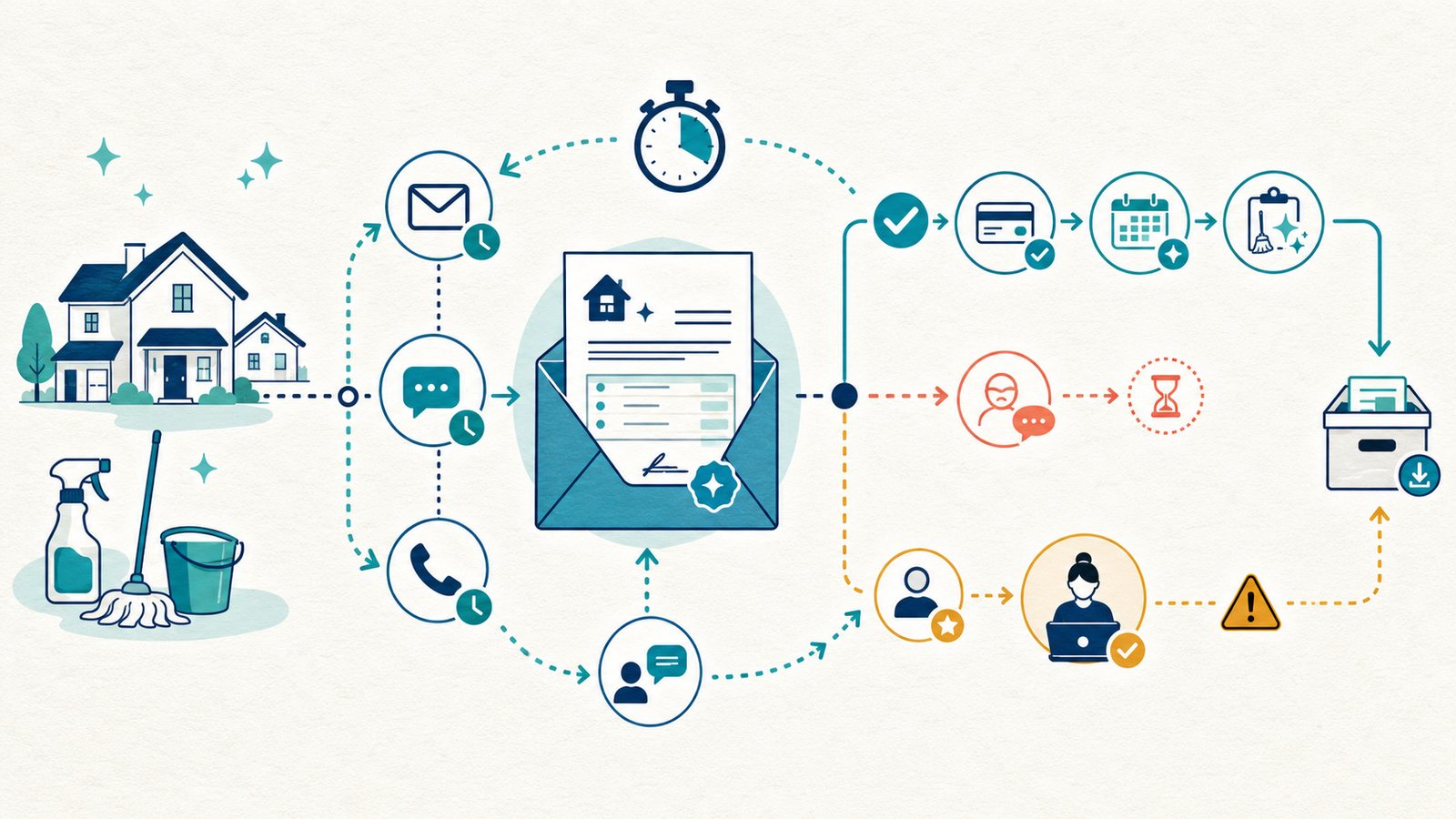
- Quote follow-up workflow map
- Shortlist methodology
- Comparison table
- Scenario: 2 field workers + 1 office user
- Scenario: 5 field workers + 1 office user
- Scenario: 15 field workers + 2 office users
- Jobber quote follow-up notes
- Housecall Pro quote follow-up notes
- ZenMaid quote follow-up notes
- BookingKoala quote follow-up notes
- Workiz quote follow-up notes
- Manual / lightweight baseline
- Quote follow-up sequence examples
- Pricing and hidden costs
- Messaging, consent, payment, and quote-compliance cautions
- Export, migration, cancellation, and quote-history risk
- What we could not verify
- Buyer verification checklist
- Final recommendation
- Methodology
- Sources
Key facts
| Item | Research-based finding |
|---|---|
| Target buyer | US residential cleaning company with 2–20 field workers and 1–2 office users that sends estimates or quotes for one-time cleans, deep cleans, move-out cleans, first-time cleans, and recurring residential service. |
| Workflow boundary | Quote follow-up starts after the quote or estimate is sent and ends when the quote is approved, declined, archived, converted to a job, converted to recurring service, or handed to deposit/payment workflow. |
| Evidence level | research_based. FieldOpsLab used public documentation and prior research context, not controlled account access, paid accounts, vendor demos, live workflow checks, vendor correspondence, or operator interviews. |
| Main decision | Whether the system can manage quote status, follow-up timing, customer replies, approval, quote-to-job conversion, quote-to-recurring setup, deposit/payment handoff, accounting handoff, reporting, export risk, and cancellation risk. |
| Products compared | Jobber, Housecall Pro, ZenMaid, BookingKoala, Workiz, and manual/lightweight baselines such as Gmail templates, Google Sheets, Google Calendar reminders, Google Forms, website forms, QuickBooks estimates, PDF templates, text-message templates, and phone logs. |
| Strongest broad FSM shortlist | Jobber when quote follow-up needs to live close to quotes, Client Hub, approvals, jobs, invoices, payments, and QBO. |
| Strongest broader home-service shortlist | Housecall Pro when estimates/proposals, online booking, customer communication, payments, QBO, QBD, and broader sales workflow matter. |
| Strongest cleaning-specific shortlist | ZenMaid when recurring maid-service scheduling, booking forms, reminders, cleaner notes, and simple recurring-service setup matter more than formal proposal depth. |
| Strongest booking-first shortlist | BookingKoala when online booking forms, service questions, add-ons, customer dashboard, provider scheduling, deposits/payments, and customer self-service are the bottleneck. |
| Strongest communications-forward shortlist | Workiz when lead intake, phone, SMS, estimates/proposals, automations, missed-call or after-hours intake, client portal, payments, QBO, and AI communication features matter. |
| Main pricing caution | Treat all pricing as planning context, not a vendor quote. Subscription, users/seats/providers, quote/proposal gates, automation gates, SMS, phone, AI, payment fees, deposits, accounting, onboarding, migration, exports, cancellation, taxes, annual commitment, and sales-led pricing can change. |
| Main data-risk issue | Quote follow-up history can be harder to migrate than a customer list because messages, opt-outs, approvals, line items, custom-question answers, attachments, deposits, quote-to-job history, and quote-to-recurring history may not export together. |
Takeaway: A cleaning company should evaluate quote follow-up as a connected sales workflow, not as one reminder message.
Best for
- Residential cleaning owners and office managers who send quotes for deep cleans, move-out cleans, one-time first cleans, add-on-heavy jobs, and recurring-service starts.
- Teams that lose track of open quotes after calls, website forms, email requests, PDF quotes, QuickBooks estimates, or manual texts.
- Companies deciding whether quote follow-up belongs in a broad FSM tool, a broader home-service sales workflow, a cleaning-specific scheduler, a booking-first customer portal, or a communications-forward system.
- Buyers who want to ask better demo and pricing questions before relying on quote follow-up automation.
Avoid if
- You want a universal ranking rather than a scenario-based shortlist.
- You need proof that a product will improve quote response rate, booking rate, conversion, or deliverability.
- You want legal, SMS, Telephone Consumer Protection Act (TCPA), 10-digit long code (10DLC), privacy, tax, accounting, payment-compliance, refund, deposit, pricing-strategy, or contract advice.
- You expect public vendor documentation to prove live customer reply handling, quote-to-job edge cases, quote-to-recurring setup, payment behavior, QuickBooks sync, export completeness, cancellation experience, support quality, or final monthly cost.
- You have not decided who owns follow-up, who can change price or scope, who approves deposits, and who updates recurring schedules after a quote is accepted.
Buyer scenario
The target buyer is a US residential cleaning business with 2–20 field workers and 1–2 office users. The company handles recurring weekly, biweekly, monthly, and custom-repeat service, plus one-time deep cleans, first-time cleans, move-out cleans, move-in cleans, and occasional add-on-heavy jobs.
The current workflow may combine phone calls, website forms, emails, PDFs, Google Forms, spreadsheets, manual texts, QuickBooks estimates, Google Calendar reminders, and phone follow-up logs. The office may know how to create a quote, but it may not have a safe way to track which quotes were sent, which customers replied, which quotes need a second reminder, which quotes were approved, which customers need a deposit/payment step, and which recurring-service leads still need scheduling.
| Scenario | Team | Quote-follow-up complexity | Planning assumption |
|---|---|---|---|
| Small local team | 2 field workers + 1 office user | Low quote volume, but owner memory and manual notes can still miss a follow-up after busy days, customer questions, or move-out requests. | Manual tools may be temporary; ZenMaid or BookingKoala may fit if the business is cleaning-specific or booking-first; broader systems need cost verification. |
| Growing local team | 5 field workers + 1 office user | Multiple open quotes, recurring-service leads, customer questions, deposits, and office handoff make spreadsheet-only tracking more fragile. | Structured quote status, follow-up ownership, and workflow-connected software become more important. |
| Larger local operation | 15 field workers + 2 office users | Quote volume, staff handoff, permissions, customer history, deposits, reporting, and export/cancellation risk become material. | Treat this as a vendor-confirmed purchase path, not a self-serve pricing guess. |
Takeaway: Team size changes both the communication problem and the buying risk. A process that works for one office user can become fragile when two office users need the same quote history.
How quote follow-up differs from quotes, reminders, invoices, booking, and review requests
Quote follow-up sits between quote creation and job scheduling. It is the part of the sales workflow where the customer has seen a price or estimate, but the business has not yet won, lost, scheduled, invoiced, or reviewed the job.
| Related workflow | What it covers | How Article 34 is different |
|---|---|---|
| Quote creation | Intake details, pricing logic, service packages, line items, optional add-ons, and sending the estimate or proposal. | Quote follow-up starts after the quote is sent. It focuses on timing, reminders, replies, approval, and the next operational handoff. |
| Generic reminders | Appointment confirmations, visit reminders, job follow-ups, invoice reminders, review requests, and other customer communication. | Quote follow-up is narrower: it is a pre-job sales sequence around an open estimate or proposal. |
| Invoice and payment reminders | Payment collection after an invoice, completed job, card-on-file workflow, or overdue balance. | Quote follow-up happens before the job is fully won. It may hand off to a deposit or payment step, but it is not the same as post-job billing. |
| Online booking | Customer-facing forms, service questions, availability, booking requests, self-service scheduling, and payments or deposits at booking. | Quote follow-up may begin from a booking request, but it is the sequence after a quote or office-reviewed estimate is sent. |
| Review requests | Post-job feedback, Google review links, reputation workflow, and review-response tasks. | Quote follow-up is pre-job and sales-focused. Review requests come after service delivery. |
Takeaway: The cleaner boundary is simple: quote follow-up is about getting a decision on an open quote, not creating the quote, collecting a late invoice, or asking for a review.
Quote follow-up workflow map
A safe quote follow-up workflow should automate status nudges and reminders while keeping human control over pricing, scope, exceptions, sensitive payment steps, and customer questions.
| Workflow step | What should happen | What can be automated | What should stay under office control |
|---|---|---|---|
| Quote request received | A lead arrives through phone, website form, booking form, email, text, or referral. | Acknowledge the request, create a task, capture intake fields, and assign ownership. | Decide whether the request needs an office-reviewed quote, site visit, phone call, or instant booking path. |
| Quote created | The office builds a quote from service type, home details, add-ons, frequency, and schedule constraints. | Use templates, packages, service questions, and reusable line items where the software supports them. | Set final price, scope, exclusions, visit length assumptions, and any custom terms. |
| Quote sent | The customer receives the estimate or proposal by email, SMS, portal, or booking dashboard. | Start quote status tracking and follow-up timing. | Confirm the quote is complete and sent to the right person through an appropriate channel. |
| First follow-up | A gentle reminder asks whether the customer received the quote and has questions. | Send a templated reminder when the quote is still open, if the plan supports it. | Adjust timing for move-out urgency, high-value recurring leads, or customers already in conversation. |
| Second follow-up | The office checks again or tries another channel if the quote remains open. | Trigger a second reminder, task, call prompt, or pipeline move where supported. | Decide when to stop, change channel, or mark the opportunity stale. |
| Customer questions | The customer asks about scope, price, schedule, pets, supplies, access, frequency, or deposit/payment. | Route the message into a customer record or task where supported. | Answer, revise the quote if needed, pause irrelevant reminders, and resend the updated quote. |
| Quote approved | The customer accepts the quote through a link, portal, message, phone call, or office-confirmed step. | Record approval status and trigger next-step tasks where supported. | Confirm scope, date, recurring cadence, deposit/payment process, and internal assignment. |
| Deposit or payment handoff | The quote may lead to a deposit request, payment link, invoice, saved-card step, or manual payment instruction. | Send a payment link or invoice if the platform supports it. | Confirm payment authorization, deposit/refund language, failed-payment handling, and accounting treatment with the vendor and advisors where appropriate. |
| Job or recurring service created | The approved work becomes a scheduled one-time job or a recurring-service series. | Convert quote details into job, visit, booking, or schedule records where supported. | Confirm dates, cleaner assignment, service frequency, notes, access details, and recurring exceptions. |
| Quote declined or no response | The opportunity is closed, archived, or tagged for future reactivation. | Move status, stop reminders, and log reason if known. | Decide whether to retry later, keep the record, or exclude the contact from future outreach. |
| Exportable history | The business preserves customer, quote, message, approval, payment, and scheduling history. | Export documented objects where supported. | Request sample exports before buying and before cancellation because full quote-follow-up history remains unverified across products. |
Takeaway: Automate the repeatable reminders and status moves. Keep price, scope, exceptions, payment language, recurring setup, and cancellation decisions under human control.
Shortlist methodology
FieldOpsLab evaluated each option by how well public documentation suggests it can support the quote-follow-up workflow for small residential cleaning teams. The criteria were:
- Quote/estimate workflow: Whether the product publicly describes estimates, quotes, proposals, booking requests, or quote-like intake.
- Follow-up automation: Whether public documentation describes reminders, automated follow-ups, pipeline automation, or workflow automation related to quotes, estimates, or leads.
- SMS/email/phone support: Whether the product supports the channels cleaning offices actually use, with costs and behavior treated as unverified unless documented.
- Customer approval and self-service: Whether customers can approve, request changes, use a portal, use a dashboard, or respond through a connected channel.
- Quote-to-job and quote-to-recurring fit: Whether the workflow plausibly moves from quote approval to one-time job, first clean, or recurring-service setup.
- Deposit/payment handling: Whether payment links, deposits, invoices, saved cards, or booking payments are part of the product story, with behavior still requiring vendor confirmation.
- Reporting and status visibility: Whether office users can see open quotes, leads, pipelines, bookings, or follow-up tasks.
- Pricing and hidden-cost exposure: Subscription, users/seats/providers, quote/proposal gates, automation gates, SMS, phone, AI, payment fees, taxes, onboarding, migration, exports, cancellation, annual commitment, and quote-only pricing.
- Accounting handoff: Public QBO/QBD/accounting positioning, without treating sync fields, duplicate handling, or error recovery as proven.
- Exit risk: Customer export, quote export, message history, opt-out history, approval history, deposit/payment records, quote-to-job history, quote-to-recurring history, migration support, and post-cancellation access.
Comparison table
| Product | Operating model | Quote follow-up workflow | SMS/email/phone fit | Approval/self-service fit | Quote-to-job fit | Payment/deposit fit | Pricing and export risk |
|---|---|---|---|---|---|---|---|
| Jobber | Broad FSM | Public documentation describes quotes, automated quote follow-ups, Client Hub, custom workflow automations, jobs, invoices, payments, and QBO. | Email/text follow-ups and two-way texting are publicly described in plan or feature contexts; exact costs and behavior need confirmation. | Client Hub publicly describes quote approval and customer self-service. | Strong fit when approved quotes need to sit near jobs, invoices, payments, and QBO. | Public docs describe payments and Client Hub payment/deposit pathways; behavior remains unverified. | User math, plan gates, SMS/two-way messaging, add-ons, export depth, and cancellation access require confirmation. |
| Housecall Pro | Broader home-service platform | Public pricing and feature pages describe quotes/proposals, customer communication, online booking, invoices/payments, review management, pipeline and sales proposal tooling. | Strong communication positioning, but exact estimate follow-up sequence, channels, SMS costs, and AI/phone add-ons need confirmation. | Estimate/proposal approval and customer portal behavior should be shown by the vendor for the exact plan. | Strong fit when estimates/proposals and sales workflow need to become jobs and invoices. | Public docs describe invoices/payments and related workflows; deposit/payment behavior remains unverified. | User thresholds, MAX/add-on packaging, payment fees, QBO/QBD behavior, exports, and larger-team pricing require written confirmation. |
| ZenMaid | Cleaning-specific recurring maid-service platform | Public documentation emphasizes scheduling, booking forms, reminders, cleaner notes, appointment details, invoicing, and online payments more than formal quote automation. | SMS/email templates and reminders are publicly described; SMS charges are not included on the pricing page. | Best when the quote-like step is tied to booking forms and recurring-service intake rather than a complex proposal workflow. | Strongest when approval leads to simple recurring-service setup and cleaner scheduling. | Public pages describe Stripe/Square-connected payments and invoicing; deposit behavior remains unverified. | Workforce pricing, QuickBooks status, SMS spend, formal quote depth, export gate, and cancellation terms need confirmation. |
| BookingKoala | Booking-first customer self-service platform | Public documentation emphasizes booking forms, leads/prospects, customer dashboards, provider dashboards, notifications, payments, and booking-first workflow. | SMS notifications are publicly described; help-center docs describe Twilio setup. Message spend and reply/opt-out behavior need confirmation. | Strong fit when customer dashboard, booking forms, add-ons, and self-service are central. | Strong for booking-to-schedule workflows; quote/request-to-job edge cases require vendor demonstration. | Public help docs describe payment processors; processor fees depend on the connected account. | Provider math, storage/contact thresholds, Premium gates, Twilio setup, payment processor behavior, exports, and account-cancellation data risk need confirmation. |
| Workiz | Communications-forward broad FSM | Public documentation and pricing describe estimates/proposals, automations, client portal, online booking, Workiz Pay, QBO positioning, built-in phone/messages, and AI communication features. | Strong public fit when phone, SMS, missed-call, after-hours, and AI communication are central; exact cost and behavior remain quote-sensitive. | Client portal and proposal behavior should be demonstrated for the buyer’s plan. | Strong fit when lead intake, estimates, dispatch, and payments need to connect. | Public documentation describes payment features; payment/deposit behavior and fees require confirmation. | Base pricing, user-role treatment, phone/SMS/AI costs, QBO behavior, exports, contract terms, and final cost need written confirmation. |
| Manual / lightweight baseline | Temporary process layer | Gmail templates, Google Sheets, Google Calendar reminders, website forms, QuickBooks estimates, PDFs, text templates, and phone logs can manage low quote volume. | Manual email/text/phone works only while one person can reliably maintain the log. | No durable portal or approval history unless manually documented. | Manual re-entry into calendar, job, invoice, or recurring schedule. | Manual payment links or QuickBooks estimates can help, but status handoff is fragile. | Low software cost can hide time cost, lost history, opt-out gaps, duplicate records, and migration cleanup. |
Takeaway: Jobber and Housecall Pro are broader operating systems, ZenMaid is cleaning-specific, BookingKoala is booking-first, Workiz is communications-forward, and manual tools are only a temporary baseline.
Scenario: 2 field workers + 1 office user
At 2 field workers + 1 office user, quote volume may still be low enough for one person to remember most open opportunities. The risk is inconsistency: a deep-clean quote gets sent, a move-out prospect asks one question, a recurring lead says they will think about it, and the office has no clean quote status record a week later.
The best-fit category is usually either a temporary manual process, a cleaning-specific tool if recurring maid-service scheduling is the main workflow, or a booking-first tool if the website form is the source of most quote requests. A broad FSM tool can still make sense if the owner wants to standardize early, but subscription, users, SMS, payment fees, and plan gates should be verified before the business buys more software than it will use.
| Option | 2+1 fit | Why | Main caution | Buyer action | Confidence |
|---|---|---|---|---|---|
| Manual baseline | Strong temporary fit | Low quote volume can be tracked with Gmail templates, a spreadsheet, calendar tasks, and phone logs. | No durable reply history, opt-out history, approval record, or quote-to-recurring handoff. | Use only if one person owns follow-up and records every status change. | Medium |
| ZenMaid | Strong when recurring maid-service scheduling matters | Cleaning-specific scheduling, booking forms, reminders, and cleaner notes may be more relevant than broad FSM depth. | Formal quote/proposal depth, SMS costs, QuickBooks status, and export gate need confirmation. | Ask whether the quote/request workflow fits your real intake path. | Medium |
| BookingKoala | Strong when online forms are the bottleneck | Booking forms, service questions, add-ons, customer dashboard, provider scheduling, and payment processor options can support website-led intake. | Provider math, Twilio setup, and account-cancellation data risk matter even at small size. | Model provider count and request a sample export before committing. | Medium |
| Jobber | Plausible if the owner wants a broad operating system early | Quotes, Client Hub, quote follow-up, jobs, invoices, payments, and QBO can live together. | Plan gates, user cost, SMS/two-way messaging, and exports need confirmation. | Ask Jobber to show the exact quote follow-up flow and required plan. | Medium |
| Housecall Pro | Plausible if proposals and broader sales workflow already matter | Estimates/proposals, online booking, payments, customer communication, QBO/QBD positioning, and sales tools may be valuable. | May be more system than a very small team needs. | Confirm plan, user count, proposal/follow-up packaging, and export coverage. | Medium |
| Workiz | Plausible if calls and missed leads are already painful | Phone, SMS, estimates, lead intake, AI-related communication features, and client portal can matter if inbound communication is the bottleneck. | Public pricing and phone/SMS/AI costs are hard to model without vendor confirmation. | Get a written quote and clarify whether field users need paid access. | Low |
Takeaway: At 2+1, avoid buying a complex sales workflow just because follow-up feels messy. First decide whether the real bottleneck is manual tracking, recurring scheduling, online forms, or phone/SMS intake.
Scenario: 5 field workers + 1 office user
At 5 field workers + 1 office user, quote follow-up usually needs more structure. The office may have multiple open first-clean quotes, recurring-service inquiries, move-out requests, questions about supplies or pets, and customers who approve but have not completed the payment or scheduling step.
The practical need is not merely automation. The office needs quote status visibility, follow-up ownership, customer reply handling, approval records, deposit/payment handoff, and a clean path into scheduling or recurring service.
| Option | 5+1 fit | Why | Main caution | Buyer action | Confidence |
|---|---|---|---|---|---|
| Jobber | Strong broad FSM shortlist | Strong fit when quote follow-up must connect to quotes, Client Hub, jobs, invoices, payments, and QBO. | Plan, user math, SMS/two-way texting, custom automations, export objects, and cancellation access require confirmation. | Ask for a quote-to-job and quote-to-recurring walkthrough with one real cleaning scenario. | Medium |
| Housecall Pro | Strong broader home-service shortlist | Strong fit when estimates/proposals, online booking, customer communication, payments, QBO/QBD positioning, and sales workflow matter. | Proposal/pipeline packaging, user thresholds, add-ons, payment fees, export depth, and larger-team path need confirmation. | Ask which plan includes the exact estimate follow-up and proposal workflow you need. | Medium |
| BookingKoala | Strong booking-first shortlist | Strong fit when quote follow-up starts from online booking forms, service questions, add-ons, dashboards, and provider scheduling. | Provider count, Twilio/SMS setup, payment processor fees, and export/cancellation behavior require written confirmation. | Model five field workers as providers unless BookingKoala confirms a different rule for your account. | Medium |
| ZenMaid | Strong cleaning-specific shortlist | Strong fit when recurring maid-service workflow and cleaner notes matter more than formal proposals. | Quote depth, QuickBooks status, SMS spend, workforce pricing, and data export gate need confirmation. | Ask how quote-like booking requests become recurring schedules. | Medium |
| Workiz | Strong communications-forward shortlist | Strong fit when the quote problem is really calls, SMS, lead intake, estimates, missed-call recovery, client portal, and payments. | Quote-sensitive pricing, phone/SMS/AI costs, user roles, QBO behavior, and export coverage need confirmation. | Ask for written confirmation of user roles and communication add-ons before budgeting. | Low to medium |
| Manual baseline | Fragile | A spreadsheet can still track quotes, but handoff and reply history become harder to control. | Missed replies, duplicated outreach, inconsistent status updates, and weak exportable history. | Use only as a migration-prep tracker, not as the long-term operating system. | Medium |
Takeaway: At 5+1, the strongest shortlist is usually one broad platform plus one specialist option that matches the real bottleneck: recurring cleaning, booking forms, or phone/SMS intake.
Scenario: 15 field workers + 2 office users
At 15 field workers + 2 office users, manual quote follow-up is a high-risk operating model for most residential cleaning teams. Two office users need shared visibility into quote status, customer questions, approval records, payment/deposit handoff, and recurring-service setup. The business also needs to think about permissions, reporting, add-ons, usage fees, export completeness, and cancellation access before it commits.
This scenario should be treated as a vendor-confirmed purchase path. Public pricing pages may not fully resolve user, provider, phone, SMS, AI, payment, onboarding, migration, export, cancellation, and annual-billing costs for a 17-person access model.
| Option | 15+2 fit | Why | Main caution | Buyer action | Confidence |
|---|---|---|---|---|---|
| Jobber | Strong broad FSM candidate | Strong when quote follow-up, approvals, jobs, invoices, payments, QBO, reporting, and team coordination need one operating layer. | User math, plan gates, SMS/two-way texting, custom automations, QBO behavior, exports, onboarding, and cancellation access require written confirmation. | Get a written scenario quote and sample export before annual commitment. | Medium |
| Housecall Pro | Strong broader home-service candidate | Strong when proposals, online booking, payments, QBO/QBD positioning, customer communication, and broader sales workflow matter. | 11+ team pricing, MAX/add-on treatment, proposal/sales tools, payment fees, exports, and cancellation experience require written confirmation. | Ask for a plan-by-feature matrix for the exact team size and sales workflow. | Medium |
| Workiz | Strong communications-forward candidate | Strong when phones, SMS, after-hours intake, missed calls, estimates/proposals, AI communication features, client portal, payments, and QBO positioning drive the quote workflow. | Final quote, phone/SMS/AI costs, user-role design, Workiz Pay behavior, exports, and contract terms are quote-sensitive. | Request written pricing, user-role mapping, and communication-usage assumptions. | Low to medium |
| BookingKoala | Strong booking-first candidate if provider scheduling dominates | Strong if customer self-service, booking forms, add-ons, dashboards, provider scheduling, and payments are the center of quote follow-up. | Provider caps, storage/contact thresholds, Twilio/SMS setup, payment processor behavior, exports, and cancellation data access are material risks. | Request sample exports and confirm provider counting for all active and inactive records. | Medium |
| ZenMaid | Strong cleaning-specific candidate if recurring workflow dominates | Strong when the business values maid-service scheduling, cleaner notes, reminders, and simple recurring setup over broad proposal depth. | Workforce pricing, SMS spend, quote depth, QuickBooks status, export gate, permissions, and cancellation terms need confirmation. | Ask for written larger-team pricing and object-level export detail. | Medium |
| Manual baseline | High risk | Manual tools can be used for migration prep but not for durable shared quote history. | Two office users can easily overwrite, duplicate, or miss follow-up work without a shared system. | Use only to map current process before buying software. | High |
Takeaway: At 15+2, do not budget from the visible subscription price alone. Require written confirmation of the plan, users/providers, communication costs, payment fees, accounting behavior, exports, migration, and cancellation terms.
Jobber quote follow-up notes
Based on public documentation, Jobber is the strongest broad FSM shortlist when quote follow-up needs to sit near quotes, Client Hub, customer approval, jobs, invoices, payments, and QBO.
Best fit for
- Cleaning companies that want one broad system for quotes, customer communication, jobs, invoices, payments, and QBO.
- Teams that want customer approval through a portal-style experience.
- Offices that want open quotes to connect to job and payment workflow rather than live only in email or a spreadsheet.
Cautions
- Public documentation describes quote follow-ups and customer communication features, but FieldOpsLab has not verified trigger behavior, reminder counts, channel behavior, reply handling, approval edge cases, quote-to-job behavior, quote-to-recurring setup, payment/deposit behavior, message-history export, or cancellation access in a controlled account.
- Jobber’s pricing page defines users as people who access the account at the office or in the field. Confirm how that definition applies to cleaners, office staff, crew leads, and any part-time users.
- Two-way SMS, custom workflow automation, AI Receptionist, Pipeline, and other related features may have plan or add-on implications. Vendor confirmation is required for the buyer’s exact scenario.
- Jobber help documentation describes client export, but complete export of quote follow-up messages, opt-outs, approval history, and quote-to-recurring history remains unverified.
What to verify
- Show one residential deep-clean quote sent to a customer.
- Show the first and second follow-up behavior, timing controls, and supported channels.
- Show what happens when the customer replies, asks for a change, approves, declines, or pays a deposit.
- Show quote-to-job and quote-to-recurring setup, including which fields carry over.
- Show QBO handoff, export files, downgrade behavior, cancellation access, and the exact plan required.
Housecall Pro quote follow-up notes
Based on public documentation, Housecall Pro is the strongest broader home-service shortlist when quote follow-up needs to sit near estimates/proposals, online booking, invoices/payments, customer communication, review management, QBO, QBD positioning, and broader sales workflow.
Best fit for
- Cleaning teams that want estimates/proposals, customer communication, online booking, payments, and broader office workflow in one home-service system.
- Buyers who care about proposal presentation, price book structure, online booking, payments, and accounting positioning.
- Offices that want sales opportunities and estimates to be easier to track than a manual spreadsheet.
Cautions
- Public documentation supports a research-based shortlist, but FieldOpsLab has not verified estimate follow-up sequencing, proposal workflows, pipeline behavior, customer reply handling, estimate-to-job edge cases, estimate-to-recurring setup, payment/deposit behavior, QBO/QBD sync behavior, export depth, or cancellation experience in a controlled account.
- Plan packaging, MAX/add-on treatment, proposal tools, pipeline tools, AI or phone add-ons, and larger-team pricing can change and should be confirmed in writing.
- Housecall Pro help-center documentation describes customer/job export and price book import/export. That does not prove complete export of quote follow-up messages, opt-outs, approval history, or quote-to-recurring history.
What to verify
- Show the exact estimate/proposal follow-up workflow for the plan being quoted.
- Show how online booking, estimate approval, proposal options, and customer communication interact.
- Show how approved estimates become jobs, invoices, recurring service, deposits, or payment requests.
- Show QBO and QBD handoff separately, including fields, sync direction, duplicates, and error recovery.
- Show export files for customers, jobs, estimates/proposals, messages, approvals, and payment records.
ZenMaid quote follow-up notes
Based on public documentation, ZenMaid is the strongest cleaning-specific shortlist when quote follow-up needs to stay close to recurring maid-service scheduling, booking forms, customer reminders, cleaner notes, appointment details, and simple recurring-service setup.
Best fit for
- Recurring residential cleaning teams that want a cleaning-specific system rather than a broad trade-service platform.
- Companies where most new quotes are really first-clean or recurring-service intake conversations.
- Teams that care more about booking forms, reminders, cleaner notes, and recurring setup than complex proposal documents.
Cautions
- Public pricing describes Starter, Pro, and Pro Max plan features, SMS charges not included, automated SMS/email communication templates, booking forms, online payments with Stripe and Square, service ratings, data export on Pro Max, and QuickBooks marked as coming soon on the checked page.
- FieldOpsLab has not verified formal quote/proposal depth, quote follow-up behavior, exact template list, SMS spend, payment/deposit behavior, QBO/accounting behavior, export completeness, workforce pricing, or cancellation experience in a controlled account.
- Do not treat the visible plan price as a final larger-team quote. Workforce pricing, appointment volume, SMS spend, exports, and migration support should be confirmed.
What to verify
- Show a quote-like booking form for a first clean and a recurring-service lead.
- Show follow-up templates, reminder timing, SMS/email settings, and customer reply handling.
- Show how an accepted recurring-service lead becomes a recurring schedule with cleaner notes.
- Show payment/deposit behavior and current QuickBooks/accounting status.
- Show data export for customers, appointments, booking form answers, messages, opt-outs, service ratings, and payment-related records.
BookingKoala quote follow-up notes
Based on public documentation, BookingKoala is the strongest booking-first shortlist when quote follow-up starts from online booking forms, service questions, add-ons, booking requests, customer dashboard, provider scheduling, SMS/email notifications, deposits/payments, and customer self-service.
Best fit for
- Cleaning companies whose quote problem starts on the website or booking form.
- Teams that need service questions, add-ons, packages, customer dashboard, provider scheduling, and payment processor options.
- Businesses that want customers to manage more of the intake and booking experience themselves.
Cautions
- Public pricing describes provider/storage/contact-based plan thresholds and defines a provider as someone who performs service. BookingKoala’s pricing page says each team member counts as a provider when teams are used.
- BookingKoala help-center documentation describes Twilio setup for SMS and payment processor options. That does not make SMS spend or processor fees predictable without account-specific confirmation.
- FieldOpsLab has not verified quote/request follow-up behavior, SMS deliverability, customer reply handling, opt-out behavior, deposit/payment behavior, export completeness, provider-count edge cases, cancellation experience, or quote-to-recurring history in practice.
- BookingKoala help-center cancellation documentation warns about account deletion and stored data, so export and post-cancellation data access should be handled before cancellation.
What to verify
- Show an online cleaning form that creates a quote request, booking request, or lead.
- Show how service questions, add-ons, packages, deposits/payments, and customer dashboard status work.
- Show whether quote follow-up is automated, manual, campaign-based, notification-based, or funnel-based.
- Show Twilio/SMS setup, opt-outs, customer replies, payment processor fees, and provider counting.
- Show sample exports and written cancellation/data-access terms before purchase.
Workiz quote follow-up notes
Based on public documentation, Workiz is the strongest communications-forward shortlist when quote follow-up depends on lead intake, phone, SMS, estimates/proposals, automations, missed-call or after-hours intake, client portal, payments, QBO, and AI-related communication features.
Best fit for
- Cleaning offices where inbound calls, texts, missed calls, after-hours intake, estimates, and payment follow-up are the real bottleneck.
- Teams that want phone, SMS, client portal, estimates/proposals, payments, dispatch, and QBO positioning in one communications-heavy system.
- Buyers willing to get written pricing and role confirmation before committing.
Cautions
- Workiz public pricing describes Standard, Pro, and Ultimate plan contexts, estimates, automations, Workiz Communication sold separately, two-way texting, AI answering requiring a phone plan, Workiz Pay, online booking, sales proposals, client portal, and QBO sync positioning.
- FieldOpsLab has not verified estimate follow-up automation behavior, missed-call recovery, AI answering performance, SMS/email deliverability, user-role fit for cleaners, Free User versus Pro User behavior, phone/SMS/AI spend, payment/deposit behavior, QBO sync behavior, export completeness, cancellation experience, or final cost in a controlled account.
- Workiz can be promising for communications-heavy teams, but it is not the easiest product to model from public pricing alone.
What to verify
- Show the full path from lead intake to estimate, follow-up, approval, job, payment, and QBO handoff.
- Show how automations handle unanswered estimates, customer replies, missed calls, after-hours messages, and AI-related actions.
- Show which users need paid access, which users can be limited, and how field cleaners fit the role model.
- Show phone, SMS, AI, Workiz Pay, onboarding, support, contract, export, and cancellation costs in writing.
Manual / lightweight baseline
Manual tools can be useful when a cleaning company is very small, validating its sales process, or preparing to migrate into software. The baseline can include Gmail templates, a Google Sheets quote tracker, Google Calendar reminders, Google Forms or website contact forms, QuickBooks estimates, PDF quote templates, text-message templates, and phone follow-up logs.
| Manual tool | Temporary use | Where it breaks |
|---|---|---|
| Gmail templates | Reusable first and second follow-up messages. | No reliable quote status, opt-out history, approval record, or job handoff. |
| Google Sheets tracker | Quote status, sent date, follow-up date, owner, and outcome. | Easy to forget updates, duplicate outreach, or lose message context. |
| Google Calendar reminders | Owner reminders to call or email prospects. | Does not connect to quote status, approval, payment, or recurring setup. |
| Google Forms / website forms | Collect home details, service type, and contact information. | Does not manage follow-up, quote approval, payment handoff, or scheduling by itself. |
| QuickBooks estimates | Send a simple estimate and keep some accounting-adjacent records. | May not manage cleaning-specific intake, SMS/phone follow-up, recurring setup, or message history. |
| PDF quote templates | Professional-looking quote attachment for low volume. | Hard to track views, approvals, changes, reminders, and exportable history. |
| Manual SMS and phone logs | Direct personal follow-up for very small teams. | Opt-outs, reply history, staff handoff, reporting, and archive quality become fragile. |
Takeaway: Manual tools are useful as a temporary control system, not as a durable operating system once quote volume, office handoff, opt-outs, deposits, recurring setup, and exportable history matter.
Quote follow-up sequence examples
The examples below are workflow patterns, not legal, compliance, payment, deposit, refund, cancellation, or pricing-policy advice. Buyers should adapt timing, wording, channels, opt-out handling, payment authorization, refund/deposit language, and customer consent requirements with the vendor and qualified advisors where appropriate.
One-time deep clean quote follow-up
- Day 0: Send the quote with scope, requested service window, and a clear way to ask questions.
- Day 2 or 3: Send a short reminder asking whether the customer received the quote and has questions.
- Day 5 to 7: Use a different channel or office call if appropriate, then record the status.
- If approved: Move to the business’s normal scheduling and deposit/payment handoff process.
- If no response: Mark the quote stale or closed according to the office process, and stop the sequence.
Recurring cleaning quote follow-up
- Day 0: Send the first-clean or recurring-service quote with frequency options, service scope, and scheduling next step.
- Day 3: Ask whether the customer wants weekly, biweekly, monthly, or first-clean-only scheduling clarification.
- Day 7: Route unresolved questions to a person so the office can discuss scope, cadence, access, and cleaner availability.
- If approved: Confirm whether the system creates one initial job, a recurring series, or a manual recurring setup task.
Move-out clean quote follow-up
- Day 0: Send the quote and include a customer-facing path to ask questions about date, access, appliance cleaning, cabinet cleaning, trash, or add-ons.
- Day 1 or 2: Send a brief check-in because move-out timing is often tighter.
- Day 3 to 5: Escalate to an office task or call if the date is close and the quote is still open.
- If approved: Hand off to the business’s normal deposit/payment and scheduling process.
No-response quote follow-up
- Use one or two reminders, then stop or move the quote to a stale status.
- Log the outcome as no response, lost, delayed, or follow-up later if the customer gave a reason.
- Do not let old no-response quotes remain in the same status as new active opportunities.
Quote approved but deposit or payment not completed
- Send the payment request, invoice, or deposit step through the software if the buyer’s selected workflow supports it.
- If the customer does not complete the payment step, create a task or reminder for the office.
- Have the vendor show how unpaid deposits, failed payments, refunds, saved cards, and authorization records are handled before relying on automation.
Customer has questions before approval
- Pause irrelevant reminders while the customer is actively discussing price, scope, schedule, pets, supplies, or access.
- Have the office answer the question, update the quote if needed, and resend the revised version.
- Restart follow-up timing from the revised quote if the software supports that workflow.
Pricing and hidden costs
Do not treat unknown costs as zero. Quote follow-up automation can look inexpensive when a vendor page shows a low entry subscription, but the real cost is layered. For a broader cost framework, see FieldOpsLab’s hidden cleaning software costs guide.
| Cost category | What to check | Why it matters for quote follow-up |
|---|---|---|
| Subscription | Current official plan price, billing cadence, annual commitment, and sales-led pricing. | The visible plan may not include the quote/proposal, automation, SMS, phone, AI, or export features needed. |
| Users / seats / providers | Vendor-specific definitions for users, office users, field users, providers, technicians, cleaners, or team members. | A 5-field-worker team can price very differently depending on whether every cleaner needs access. |
| Quote/proposal gates | Which plan includes quotes, estimates, proposals, optional line items, customer approval, or sales pipeline tools. | Follow-up may be impossible or limited if the quote workflow itself is gated. |
| Automation/follow-up gates | Which plan includes automated follow-ups, workflow automations, pipeline automations, or task triggers. | A product may create quotes but require a higher plan for follow-up automation. |
| SMS/message costs | Included messages, overage pricing, Twilio setup, phone number setup, templates, opt-outs, and message logs. | SMS is often central to quote follow-up, but usage costs and deliverability remain unverified. |
| Phone/AI costs | Phone system, call tracking, call recording, after-hours answering, AI answering, lead capture, and missed-call workflows. | Communications-forward workflows can become materially more expensive than quote-only workflows. |
| Payment-processing fees | Card, ACH, processor, saved-card, deposit, failed-payment, refund, chargeback, and payout-related costs. | Quote approval often leads to deposit or payment handoff, but software subscription cost does not usually equal payment cost. |
| Deposits/payment behavior | Whether deposits, payment links, invoices, saved cards, failed-payment follow-up, and refunds are supported for your workflow. | Public documentation does not prove deposit/payment behavior in practice. |
| QuickBooks/accounting | QBO/QBD support, sync direction, mapped fields, duplicate handling, item mapping, tax handling, and error recovery. | Accounting handoff after approval can break if quote, invoice, payment, and job records sync differently than expected. |
| Onboarding/migration | Setup help, data import, field mapping, recurring-service rebuild, historical quote import, and training. | Quote history and follow-up records can require manual cleanup. |
| Exports/cancellation | Object-level exports, post-cancellation access, downgrade effects, data deletion, and archive requirements. | Leaving later may be hard if quote follow-up history is not exportable. |
| Taxes and annual commitment | Sales tax, billing terms, renewal terms, refund rules, and annual discounts. | Visible subscription pricing may not equal final payable cost. |
Takeaway: Treat quote follow-up cost as subscription plus people-count math plus communication spend plus payment fees plus accounting setup plus migration/export/cancellation risk.
Before automating quote follow-up: Ask each vendor to confirm the exact plan, user/provider counts, follow-up triggers, SMS/email/phone costs, opt-out handling, approval flow, payment/deposit handoff, QuickBooks behavior, exports, cancellation access, and total monthly cost for your team.
View Jobber pricing | View Housecall Pro pricing | View ZenMaid pricing | View BookingKoala pricing | ask Workiz to confirm pricing and workflow fit
Messaging, consent, payment, and quote-compliance cautions
This article evaluates software workflow only. It does not provide legal, SMS, TCPA, 10DLC, privacy, tax, accounting, payment-compliance, pricing-strategy, contract, refund, deposit, or cancellation-policy advice.
Public vendor documentation does not prove compliance for a specific cleaning business. Buyers should confirm messaging, opt-out, unsubscribe handling, customer replies, payment authorization, refund/deposit language, privacy, accounting, tax, and contract requirements with the vendor and qualified advisors where appropriate.
In demos, ask the vendor to show how opt-outs, unsubscribe handling, customer replies, payment authorization, deposits, refunds, cancellation, and message history are handled for the specific plan, phone number setup, payment processor, and business context.
Export, migration, cancellation, and quote-history risk
Quote follow-up history is often harder to migrate than a basic customer list. A buyer may need customer records, service addresses, quote/estimate records, declined or no-response quote history, follow-up message history, SMS/email opt-out history, quote line items, form/custom-question answers, attachments/photos, approval history, deposit/payment records, quote-to-job history, quote-to-recurring setup history, and import/migration support.
Public documentation does not fully resolve whether each product can export every object in usable form. Buyers should request sample exports before purchase, repeat the export check before cancellation or downgrade, and confirm post-cancellation data access in writing.
| Data object | Research-based caution | Buyer verification step |
|---|---|---|
| Customer export | Some vendors publicly document customer export. That does not mean every quote-follow-up object exports with the customer record. | Request a sample customer export and compare it to a real quote record. |
| Quote/estimate export | Complete export of quote versions, line items, status, approvals, follow-ups, and history remains unresolved across products. | Ask for an object-level quote/estimate export sample. |
| Declined/no-response quotes | Closed quote history may not export the same way as active opportunities. | Include declined, stale, and approved examples in the sample export request. |
| Follow-up message history | Email, SMS, phone, AI, and portal messages may be stored differently from quotes. | Ask whether message history exports with timestamps, channels, users, and customer replies. |
| SMS/email opt-out history | Opt-outs and unsubscribe status may be platform- or provider-specific. | Ask for proof of export or written instructions for preserving do-not-contact data. |
| Quote line items and custom questions | Service items, add-ons, packages, room counts, pet notes, photos, and custom form answers may not migrate cleanly. | Export one complex deep-clean quote and one recurring-service quote. |
| Approval history | Customer approval timestamps, signatures, requested changes, and portal actions may not be included in basic exports. | Ask for a timestamped approval-history export sample. |
| Deposit/payment records | Payment data can be processor-specific and accounting-sensitive. | Ask how deposits, payment links, refunds, failed payments, and saved cards are preserved or archived. |
| Quote-to-job history | The link between original quote, approved job, invoice, and payment may not be exportable as one chain. | Request an export or report that shows the quote-to-job relationship. |
| Quote-to-recurring setup history | Recurring-service setup after quote approval can involve separate scheduling records. | Ask whether original quote details connect to the recurring series after export. |
| Cancellation/downgrade access | Post-cancellation access and downgrade behavior remain high-risk unless written terms and sample exports are clear. | Confirm what remains accessible after downgrade or cancellation before purchase and before cancellation. |
Takeaway: Ask for sample exports before buying. A simple contact export is not enough to prove quote follow-up history can leave with you.
What we could not verify
- Live quote follow-up workflow behavior.
- Quote conversion rate, response rate, or booking lift.
- SMS/email deliverability.
- Customer reply handling in practice.
- Quote approval behavior and edge cases.
- Quote-to-job conversion behavior.
- Quote-to-recurring setup after approval.
- Payment/deposit behavior, failed-payment behavior, refunds, saved-card workflow, or processor outcomes.
- QBO/QBD/accounting sync fields, duplicate handling, sync direction, or error recovery.
- Exact final quote, taxes, add-ons, SMS, phone, AI, payment fees, onboarding, migration, and usage costs.
- Opt-out and unsubscribe handling in practice.
- Migration effort and export completeness.
- Cancellation experience, post-cancellation access, support quality, or account-specific commercial terms.
Buyer verification checklist
- Exact plan and quote: Get written pricing for your 2+1, 5+1, or 15+2 team, including taxes, add-ons, annual commitment, and sales-led terms.
- Who needs logins: Separate office users, field workers, crew leads, providers, technicians, limited users, and anyone who only receives assignments.
- Quote workflow: Ask the vendor to show a quote sent to a customer by email, SMS, portal, dashboard, or booking flow.
- Follow-up timing: Show where first, second, and final follow-up timing is configured.
- SMS/email/phone behavior: Show what happens when the quote is sent by email, SMS, both, phone, portal, or customer dashboard.
- AI or missed-call add-ons: Confirm what is included, what costs extra, and what behavior remains human-reviewed.
- Opt-outs and unsubscribe handling: Ask how opt-outs, unsubscribe records, do-not-contact status, and customer replies are recorded and preserved.
- Customer reply handling: Show an email reply, SMS reply, phone call, portal comment, and change request.
- Quote approval: Show approval, request changes, decline, no response, stale quote, and revised quote behavior.
- Quote-to-job conversion: Approve a quote and show exactly what becomes a job, appointment, visit, invoice, or task.
- Quote-to-recurring conversion: Show how a recurring cleaning quote becomes a recurring schedule and which fields carry over.
- Deposit/payment workflow: Show deposit request, payment link, invoice, saved-card step, refund path, failed payment, and payment follow-up if relevant.
- QuickBooks/accounting handoff: Show QBO and QBD behavior separately if the business uses both or is migrating.
- Reporting: Show outstanding quotes, follow-ups sent, approvals, declines, no-response records, and owner assignment.
- Exports: Request sample exports for customers, quotes, line items, forms, attachments, approvals, messages, opt-outs, deposits/payments, quote-to-job history, and quote-to-recurring history.
- Migration/import: Ask which objects can be imported, which need manual rebuild, and what onboarding or migration support costs.
- Cancellation/downgrade: Confirm refund rules, annual billing, downgrade effects, data access, export timing, and post-cancellation access in writing.
Pair this automation workflow with FieldOpsLab’s estimating and quote software guide for quote creation and the customer reminder guide for post-booking communication.
Final recommendation
For a 2 field workers + 1 office user cleaning business, start by deciding whether the real problem is manual tracking, recurring-service setup, online forms, or calls/texts. Manual tools may be enough temporarily, but use a quote tracker with clear status, owner, next follow-up date, and outcome. Shortlist ZenMaid if the business is recurring maid-service-heavy, BookingKoala if the website form and customer self-service are the bottleneck, Jobber or Housecall Pro if the owner wants a broader operating system early, and Workiz if call/SMS intake is already a real sales problem.
For a 5 field workers + 1 office user cleaning business, public evidence suggests a more formal software workflow becomes more plausible. Shortlist Jobber when quotes, follow-ups, Client Hub, jobs, invoices, payments, and QBO need to connect. Shortlist Housecall Pro when proposals, online booking, customer communication, payments, QBO/QBD positioning, and broader sales workflow matter. Compare ZenMaid, BookingKoala, and Workiz depending on whether the bottleneck is recurring cleaning, booking forms, or communications.
For a 15 field workers + 2 office users cleaning business, require vendor confirmation before purchase. Jobber, Housecall Pro, and Workiz are the most plausible broad or communications-heavy candidates; BookingKoala remains strong if provider scheduling and customer self-service dominate; ZenMaid remains strong if the company is mostly recurring maid-service work. Manual tools should be limited to migration prep or internal process mapping.
The safest final choice is the product that can show your exact quote follow-up workflow: quote sent, reminders, customer reply, approval, deposit/payment handoff, quote-to-job conversion, quote-to-recurring setup, accounting handoff, reporting, export, and cancellation access.
Methodology
FieldOpsLab created this guide as a research_based workflow analysis for Article 34. The research focused on US residential cleaning businesses with 2–20 field workers and 1–2 office users that send estimates or quotes for one-time cleans, deep cleans, move-out cleans, first-time cleans, and recurring residential service.
The products evaluated were Jobber, Housecall Pro, ZenMaid, BookingKoala, Workiz, and manual/lightweight baselines. The evaluation criteria were quote/estimate workflow, follow-up automation, SMS/email/phone support, customer approval and portal/self-service behavior, quote-to-job conversion, deposit/payment handling, recurring-service setup, reporting, user/seat/provider math, SMS/phone/AI/add-on cost exposure, QuickBooks/accounting handoff, export/migration/cancellation risk, and public evidence limitations.
FieldOpsLab used public vendor pricing pages, product pages, help-center documentation, payment documentation, QuickBooks/accounting documentation where available, import/export documentation, billing/cancellation/terms documentation where available, and prior FieldOpsLab research context. FieldOpsLab did not use controlled accounts, paid accounts, vendor demos, vendor correspondence, live quote follow-up workflow checks, deliverability checks, quote conversion checks, operator interviews, first-party product media, or first-party workflow recordings. All pricing discussion should be treated as planning context, not a vendor quote.
Sources
- Jobber pricing
- Jobber quotes
- Jobber customer communication
- Jobber Client Hub
- Jobber Automations
- Jobber export client information
- Housecall Pro pricing
- Housecall Pro Sales Proposal Tool
- Housecall Pro pipeline
- Housecall Pro import/export jobs and customers
- Housecall Pro price book import/export
- Housecall Pro QuickBooks Online integration onboarding guide
- ZenMaid pricing
- ZenMaid cleaning service scheduling software
- ZenMaid cleaning booking software
- ZenMaid invoicing
- ZenMaid Terms of Service
- BookingKoala pricing
- BookingKoala features
- BookingKoala best ways to use leads
- BookingKoala Twilio setup
- BookingKoala payment processors overview
- BookingKoala close/cancel account
- Workiz pricing
- Workiz phone system
- Workiz Terms and Conditions