
Affiliate disclosure: FieldOpsLab may earn a commission from some links on this page if affiliate links are added later. Our recommendations are based on evidence and buyer fit, not whether a product has an affiliate program.
Written by: LPSA
Evidence level: research_based
Product information checked: 2026-07-09
Pricing checked: 2026-07-09
Last meaningfully updated: 2026-07-09
Evidence status
Evidence status: This is a research_based data portability and pre-switch export guide for US residential cleaning companies with 2–20 field workers and 1–2 office users. FieldOpsLab reviewed public vendor pricing pages, official help-center export and import documentation where available, official billing and terms pages where available, official payment and QuickBooks context where relevant, and adjacent FieldOpsLab workflow context.
FieldOpsLab did not use controlled product accounts, paid software accounts, vendor demos, live export checks, live import checks, live migration checks, live cancellation checks, live post-cancellation access checks, original screenshots, vendor correspondence, bookkeeper interviews, accountant interviews, operator interviews, cleaner interviews, customer interviews, or support interaction checks for this article.
FieldOpsLab has not verified export completeness, import behavior, post-cancellation access, QuickBooks/accounting behavior, payment behavior, payroll/time behavior, message export, photo/attachment export, opt-out/unsubscribe export, recurring schedule edge-case export, support responsiveness, downgrade or cancellation experience, or final payable cost. Public documentation can support a planning framework, but it cannot prove exact export fields, exact comma-separated value (CSV) columns, messy-data cleanup quality, payment record portability, payroll handoff, message history export, photo export, or final cost for a specific cleaning business.
This article evaluates software workflow only. Public vendor documentation does not prove legal, tax, accounting, bookkeeping, payroll, privacy, security, payment, messaging, contract, or record-retention compliance for a specific cleaning business. Buyers should confirm sensitive workflows with vendors and qualified advisors where appropriate.
| Evidence item | Status for this article |
|---|---|
| Evidence level | research_based. |
| Research basis | Public official documentation and public pricing pages checked on 2026-07-09, plus FieldOpsLab editorial workflow context. |
| Product access | No controlled account, paid account, or vendor demo was used for Jobber, Housecall Pro, ZenMaid, BookingKoala, Workiz, QuickBooks Online, payment processors, payroll providers, or time-tracking systems. |
| Export and import evidence | No live export, import, migration, cancellation, downgrade, or post-cancellation workflow was confirmed in practice. |
| Behavior not confirmed | Export completeness, message/photo/attachment/opt-out export, QuickBooks/accounting behavior, payment behavior, payroll/time behavior, support responsiveness, cancellation experience, and final payable cost remain unconfirmed. |
| Buyer boundary | Use this as a software-workflow diligence guide. It is not legal, tax, accounting, bookkeeping, payroll, privacy, security, payment-compliance, messaging, contract, or record-retention advice. |
Takeaway: The article can help a cleaning company plan an exit archive, but it should not be treated as proof that any platform exports every object a buyer needs.
Quick answer
Exporting customer and job data before switching platforms is an exit-readiness workflow. It answers a different question from migration planning: what should the business preserve before the old system is downgraded, canceled, inaccessible, or no longer worth keeping active?
A basic customer CSV is rarely a complete operational backup for a residential cleaning business. Names, emails, phone numbers, and addresses matter, but the higher-risk records are often recurring schedules, skipped visits, paused service, cleaner assignments, access instructions, pets, supplies, allergies, customer notes, cleaner notes, checklists, photos, forms, message history, short message service (SMS) opt-outs, quotes, invoices, payments, open balances, payment processor records, QuickBooks Online (QBO) records, payroll/time records, and post-cancellation access.
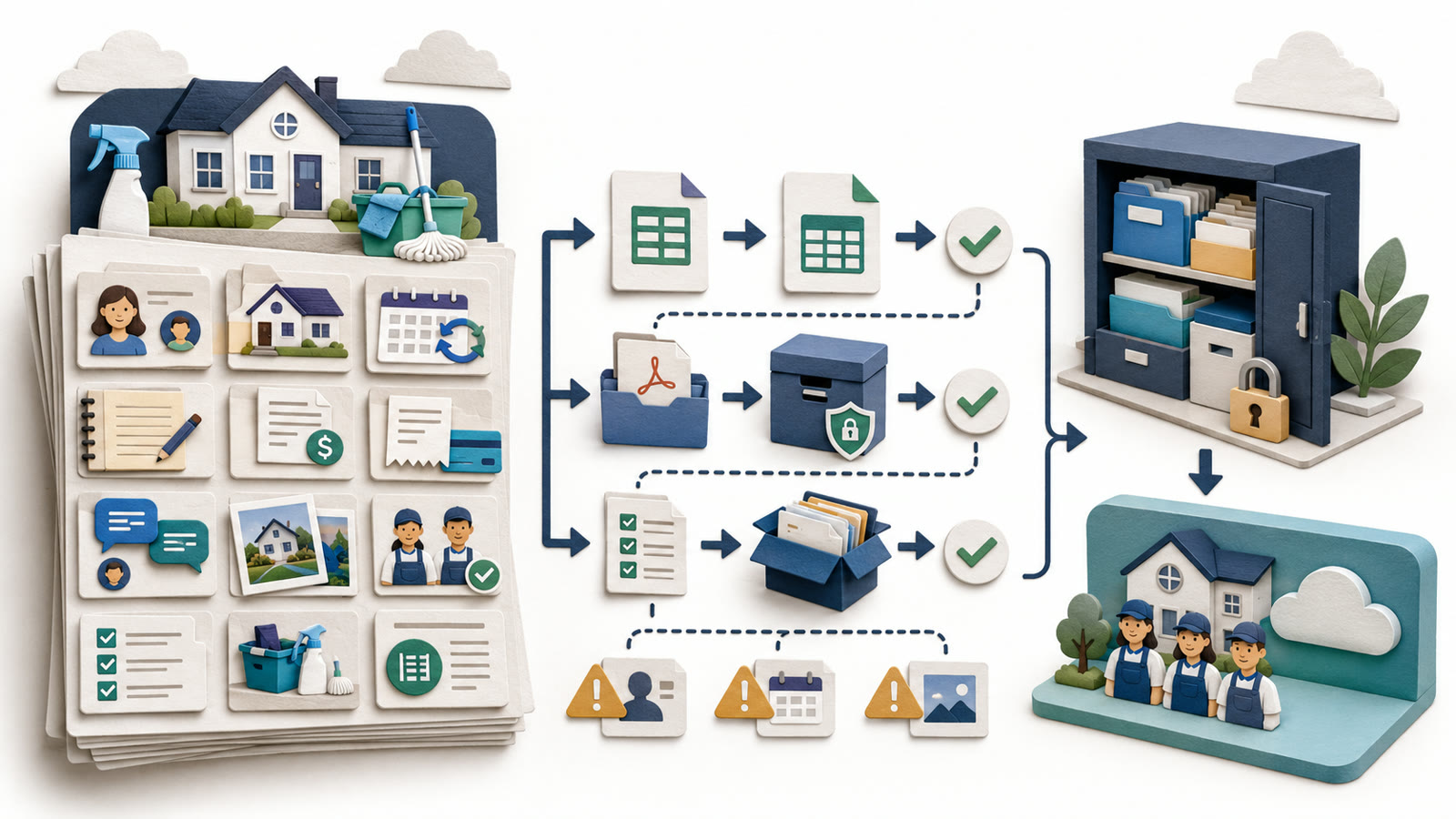
The safer workflow is to inventory every data location, identify the source of truth for each object, request sample exports, export core lists and reports, preserve accounting/payment/payroll records separately, validate row counts and sample records, archive non-CSV records where needed, and ask for written vendor confirmation before cancellation or purchase.
Quick verdict
| Decision point | FieldOpsLab view |
|---|---|
| Core idea | Exporting before switching is about preserving access to historical and operational records before the old platform becomes harder to use or cheaper to cancel. |
| Most dangerous assumption | Assuming a customer CSV, QBO sync, or payment processor login is a full backup of cleaning operations. |
| Highest-risk records | Recurring schedules, exceptions, access notes, cleaner notes, checklists, photos, forms, message history, opt-outs, payment context, and post-cancellation access. |
| Safer sequence | Inventory, sample export, full export, row-count review, critical-record spot check, fallback archive, written vendor confirmation, then cancellation or downgrade. |
| Product stance | Jobber, Housecall Pro, ZenMaid, BookingKoala, and Workiz are examples of different export-risk patterns, not ranked recommendations. |
| Evidence level | research_based. |
Takeaway: Preserve the old system before you ask the new system to replace it. A clean import plan is useful, but it does not replace a complete exit archive.
In this article
- Key facts
- Buyer scenario
- Pre-switch export readiness checklist
- Data inventory: what to export before switching
- Step-by-step pre-switch export workflow
- Product/category export notes
- Customer, schedule, and job export details
- Quotes, invoices, payments, QuickBooks, and open balances
- Messages, reminders, reviews, forms, photos, and attachments
- Export, backup, cancellation, and exit-plan risk
- Vendor demo and verification questions
- What we could not verify
- Final recommendation
Key facts
| Item | Research-based finding |
|---|---|
| Target buyer | US residential cleaning company with 2–20 field workers and 1–2 office users preparing to leave spreadsheets, a cleaning platform, a field service management (FSM) platform, a booking-first tool, or a disconnected app stack. |
| Article type | Data portability and pre-switch export guide. It is not a migration test report, product ranking, legal guide, tax guide, accounting guide, payroll guide, privacy guide, or cancellation-policy guide. |
| Main buyer question | What should the business preserve before the current platform is downgraded, canceled, inaccessible, or no longer economically worth keeping active? |
| Core warning | A customer CSV may preserve basic contact data, but it does not prove preservation of job history, recurring schedule logic, notes, checklists, photos, messages, payments, QBO records, payroll/time records, or post-cancellation access. |
| Most important sources of truth | Cleaning software for operations, QBO or other accounting software for accounting records, payment processors for processor records, payroll/time tools for worker time records, and email/calendar/storage tools for communication and attachments. |
| Formats to plan for | CSV or XLSX for structured lists, PDF for invoices/quotes/agreements, image or file archives for photos/attachments, calendar exports for schedule context, and screenshots or PDFs only as fallback methods where structured export is unavailable. |
| Vendor evidence | Public documentation describes some export paths for Jobber, Housecall Pro, BookingKoala, and selected reports or plan-gated export signals for other platforms. Object-level completeness remains vendor-confirmed. |
| Cost stance | All cost discussion is planning context. Unknown costs are not zero, and planning estimates are not vendor quotes. |
| Evidence level | research_based. |
Takeaway: The practical export question is not “Can we download customers?” It is “Can we still run the business and explain the history after the old system is gone?”
Best for
- Residential cleaning owners and office managers preparing to switch away from a current software platform, spreadsheet stack, booking tool, calendar workflow, or disconnected group of apps.
- Teams with recurring weekly, biweekly, monthly, and custom schedules plus one-time jobs, deep cleans, move-in/move-out work, skipped visits, paused customers, and customer-specific notes.
- Businesses that need to preserve operational records before cancellation, downgrade, annual renewal, platform replacement, or vendor lock-in pressure.
- Office users preparing vendor questions about customer exports, job exports, recurring schedule reports, invoices/payments, QBO, payment processors, payroll/time records, photos, forms, messages, and cancellation access.
- Owners who want a cautious exit checklist before relying on a new platform import.
Avoid if
- You want a product ranking or a universal software recommendation.
- You need proof that a specific vendor exports every customer, job, message, photo, checklist, payment, payroll, or recurring schedule object for your exact account.
- You want legal, tax, accounting, bookkeeping, payroll, privacy, security, payment-compliance, messaging, contract, or record-retention advice.
- You need a final vendor quote for export help, migration assistance, application programming interface (API) access, support, cancellation, or plan-gated exports.
- You are looking for a generic software-as-a-service data portability essay rather than a cleaning-specific exit-readiness workflow.
Buyer scenario
The assumed buyer is a US residential cleaning company with recurring and one-time home-cleaning work, 2–20 field workers, and 1–2 office users. The current workflow may be a spreadsheet, Google Calendar, Gmail, text messages, QuickBooks, a payment processor, paper route sheets, photo folders, online forms, or a cleaning software platform that no longer fits.
The company is not only asking how to move data into a new system. It is asking what historical and operational records should remain usable after the current system is no longer available.
| Scenario | Current workflow complexity | Highest export risk | Planning stance |
|---|---|---|---|
| 2 field workers + 1 office user | Lower volume, often owner-led, with customer details scattered across a spreadsheet, calendar, texts, email, and payment records. | Access notes, prices, first-week schedule, open balances, and a small number of recurring customers that the owner may currently remember personally. | A focused export archive may be enough for day-one operations, but notes, schedule rules, and payment records still need review. |
| 5 field workers + 1 office user | Moderate volume with one office user managing recurring routes, customer messages, cleaner assignments, reminders, payments, and exceptions. | Recurring schedules, skipped visits, cleaner notes, mobile checklists, message history, and open invoices that may not live in one system. | Request sample exports and review critical records before canceling or downgrading the old tool. |
| 15 field workers + 2 office users | Higher complexity with shared office edits, multiple crews, staff turnover, accounting handoff, payroll/time context, and more platform permissions. | Post-cancellation access, recurring schedule edge cases, historical assignments, messages, photos, checklists, payment processor context, and QBO/payroll handoff. | Treat the export as a staged exit project with written vendor confirmation and a fallback archive. |
Takeaway: The larger the team, the less safe it is to treat export as a one-click customer download.
What exporting before switching actually means
Exporting before switching means preserving the records needed to keep operating, answer customer questions, rebuild schedules, review financial handoff, and understand history after the old system changes access. It is not the same as migration, sync, backup, or a screenshot archive.
| Concept | What it means | Why it matters before switching |
|---|---|---|
| Export | Downloading or receiving data from the current system in a usable format such as CSV, XLSX, vCard, PDF, or another file type. | Export creates an archive the business can review even if the old platform is later unavailable. |
| Migration | Moving selected data into a new platform so it can be used operationally there. | A migration can fail or omit fields even when an export exists, so the archive should be preserved separately. |
| Sync | A connection between systems, such as cleaning software and QBO, where selected objects may move between products. | Sync is not a full backup. QBO may hold invoices and payments without preserving recurring schedules, notes, messages, photos, or cleaner checklists. |
| Backup | A preserved copy of important data and files, stored outside the old platform. | A backup helps the business compare row counts, answer questions, and rebuild missing objects. |
| Screenshot or PDF archive | A fallback copy of a screen, setting, quote, agreement, checklist, or message when structured export is unavailable. | Fallback archives can preserve context, but they are not a substitute for structured data when a structured export exists. |
Takeaway: The export archive protects the old record. Migration makes the new system usable. Those two jobs overlap, but they are not the same job.
How this differs from related guides
This guide sits between migration planning, software buying, invoicing, QuickBooks integration, payroll, and hidden-cost analysis. It focuses on preserving customer and job records before leaving a system. For broader category selection, start with FieldOpsLab’s cleaning business software guide.
| Related FieldOpsLab topic | What that topic covers | Export-readiness boundary |
|---|---|---|
| Cleaning software migration checklist | Planning how to move into a new system. | This article focuses on preserving records before leaving the old system. |
| Move from spreadsheets to software | How to turn manual records into a new operational system. | This article covers the reverse and adjacent risk: exporting out before cancellation or downgrade. |
| Hidden costs in cleaning software | Plan gates, add-ons, payment fees, migration effort, and cancellation cost risk. | This article mentions costs only where they affect export readiness and exit timing. |
| Invoicing and payment software | Choosing and operating invoice/payment tools. | This article asks what invoice, payment, processor, and open-balance records need to be preserved before switching. |
| Cancellations and rescheduling | How to manage customer appointment exceptions. | This article asks whether cancellation, skipped-visit, paused-service, and reschedule history will remain available after leaving the platform. |
| QuickBooks integration guides | How QBO connections differ by platform. | This article treats QBO as a separate accounting layer and warns that QBO sync is not a full operational backup. |
| Time tracking and team assignment | How cleaning teams evaluate worker access, assignments, time capture, and payroll-adjacent workflow risk. | This article asks which time, assignment, and payroll-context records should be archived before switching platforms. |
Takeaway: This is not a duplicate migration checklist. It is the exit-readiness layer that should happen before the old system becomes unavailable.
Pre-switch export readiness checklist
- Identify the current platform, spreadsheet stack, accounting system, payment processor, payroll/time tool, email system, SMS system, calendar, form tool, and photo/storage folders.
- Confirm the next renewal date, cancellation deadline, downgrade options, and who has billing authority.
- Confirm admin access and export permission in every system.
- Identify the source of truth for customers, service addresses, recurring schedules, jobs, invoices, payments, QBO/accounting records, payment processor records, and payroll/time records.
- Request sample exports before the final export day.
- Confirm available formats: CSV, XLSX, vCard, PDF, image archive, calendar export, or another file type.
- Ask whether exports are plan-gated or require a higher plan, support ticket, data team, API access, or paid export help.
- Create an archive folder with subfolders for customers, jobs, recurring schedules, quotes, invoices, payments, QBO/accounting, payment processor, payroll/time, messages, forms, photos, attachments, and settings.
- Assign one export owner and one reviewer for row counts and critical records.
- Confirm what remains accessible after downgrade or cancellation.
- Ask for written confirmation before purchase or cancellation when object-level export matters.
Data inventory: what to export before switching
The table below uses cautious planning categories. A row marked “likely export candidate” does not mean every vendor exports the object completely. It means the object is commonly structured enough to ask for a CSV, XLSX, report, or API option. Vendor confirmation is still required for exact fields, row limits, file limits, date filters, and post-cancellation access.
| Data object | Preferred export/backup format | Where it may live | Cautious status | Main risk | Vendor confirmation needed |
|---|---|---|---|---|---|
| Customers | CSV, XLSX, vCard, sample file | Cleaning software, CRM, booking tool, spreadsheet, QBO, email contacts | Likely export candidate | Customer export may omit notes, history, inactive records, tags, or custom fields. | Fields, inactive records, tags, custom fields, row limits. |
| Service addresses | CSV/XLSX; PDF fallback for complex records | Customer profile, job profile, property record, spreadsheet | Likely export candidate, but object structure varies | Multiple addresses may flatten or billing and service addresses may merge. | Multiple-address handling and billing/service separation. |
| Contacts | CSV/XLSX/vCard; manual fallback | Customer profile, contact list, email, phone system | Depends on selected platform | Spouses, property managers, alternate contacts, or communication preferences may be lost. | Multiple contacts and preference fields. |
| Recurring schedules | Schedule report, calendar export, CSV, PDF/screenshot fallback | Cleaning app, Google Calendar, spreadsheet | Depends on selected platform; edge cases often unresolved publicly | Recurrence rules may flatten into future visits or omit exceptions. | Frequency, future visits, one-off changes, pause status, skipped visits. |
| One-time jobs | Jobs report CSV/XLSX; PDFs for critical records | Job module, booking tool, calendar, spreadsheet | Likely export candidate where job export exists | Jobs may export without notes, attachments, payments, or status detail. | Date ranges, statuses, fields, assigned cleaners. |
| Job/visit history | Jobs/visits report CSV/XLSX; PDF fallback | Jobs, visits, reports, calendar | Depends on selected platform | Customer CSV may not include job history at all. | All-time range, completed/canceled jobs, skipped/paused visits. |
| Skipped visits | Recurring report, status report, notes archive | Recurring schedule, cancellation/reschedule logs, notes | Often manual backup or vendor confirmation required | Skips can appear as missing work rather than known exceptions. | Skipped status and export field. |
| Paused service | Customer status export, recurring report, notes | Customer status, recurring series, notes | Often manual backup | Paused customers may be mistaken for active or canceled customers. | Pause status and resume date fields. |
| Cancellation history | Status report, notes, message archive, PDF/screenshot fallback | Job status, recurring series, customer notes, communication logs | Often PDF/screenshot/archive fallback | Reasons and dates may be trapped in notes or message history. | Cancellation reason/history fields. |
| Cleaner assignments | Jobs report, schedule report, time records | Job, visit, dispatch, calendar, payroll/time tool | Likely export candidate if assignment fields exist | New platform may not know preferred cleaner or historical crew. | Assigned users, crew fields, historical assignments. |
| Cleaner notes/checklists | Checklist export, PDF, screenshot, archive fallback | Job details, checklist module, mobile app, attachments | Often manual backup; depends on platform | Quality instructions may not export with a customer CSV. | Completed checklists, checklist templates, note fields. |
| Access instructions | CSV if custom field exports; PDF/screenshot fallback | Customer notes, property notes, custom fields, job notes | Often manual backup unless stored in exportable fields | Gate codes, alarm instructions, key location, and parking details may be lost. | Exact note fields and sensitive-field export behavior. |
| Pets/allergies/supplies/property notes | CSV custom fields; PDF/screenshot/manual archive | Customer profile, custom fields, job notes, booking forms | Depends on selected platform | Customer-specific service details may be flattened or missed. | Custom fields, tags, private notes, property notes. |
| Prices/service items | Price book CSV/XLSX, spreadsheet, PDF | Price book, service menu, QBO products/services, booking forms | Likely export candidate in some platforms; mapping varies | Prices may detach from historical jobs or accounting service items. | Price book export, line items, QBO mapping. |
| Quotes/estimates | PDF, CSV report, accepted/open quote export | Quotes, estimates, proposals, email/PDF folders | Depends on selected platform | Open quotes may not appear in customer or job export. | Status, line items, PDFs, approvals, signatures if used. |
| Invoices | QBO reports, software invoice reports, PDFs | QBO, cleaning software, payment tool | Usually archive from accounting layer plus software where relevant | Accounting record may lack operational job context. | Invoice export fields, PDF access, QBO handoff. |
| Payments/open balances | QBO reports, processor reports, software payment reports | QBO, cleaning app, Stripe, Square, PayPal, bank feed | Depends on source of truth | Paid/unpaid status may not match across systems. | Payment records, open balance fields, processor reports. |
| Deposits/refunds/tips | Processor exports, QBO reports, software payment reports | Payment processor, cleaning app, QBO | Depends on platform and processor | These may not export together with invoice context. | Object-level export and processor-source records. |
| Payment processor records | Processor CSV/reports, payout reports | Stripe, Square, PayPal, Authorize.net, platform payment tools | Usually separate archive outside cleaning software | Cleaning app export may omit processor fees, payouts, disputes, or refunds. | Processor export access after switch. |
| Card-on-file context | Processor records; written vendor/processor confirmation | Payment processor, merchant account, platform token vault | Not portable in ordinary exports unless vendor/processor confirms otherwise | Stored payment methods may not transfer to the new platform. | Written vendor/processor confirmation required. |
| Email/text history | Email export, SMS platform export, phone logs, PDF fallback | Gmail, SMS tool, platform messages, phone system, customer portal | Often archive fallback; platform-dependent | Message history may not export with the customer profile. | Export availability, date range, fields, attachments. |
| SMS opt-outs/unsubscribes | SMS platform export or opt-out report if available | SMS tool, platform messaging, Twilio, phone provider | Vendor confirmation required; do not assume export | Preference status can be separated from customer record exports. | Status field, historical opt-outs, unsubscribed contacts. |
| Review request history | Report, CRM/export, screenshot fallback | Cleaning app, review tool, email/SMS tool | Often manual or platform-dependent | Customer follow-up history may be lost during switch. | Request logs, response status, suppression lists. |
| Payroll/time records | Payroll/time reports, CSV/XLSX, provider exports | Payroll provider, time app, cleaning app, spreadsheet | Often belongs in payroll/time system, not cleaning app alone | Cleaning-app time records may not equal payroll records. | Payroll provider/source-of-record review. |
| QuickBooks records | QBO exports/reports, PDFs, accountant/bookkeeper file workflow where relevant | QBO, QuickBooks Desktop (QBD), bookkeeper system | Separate accounting archive; not a full operations backup | QBO may omit schedules, notes, photos, messages, checklists, and forms. | Accounting source-of-truth and export access. |
| Photos/attachments | File archive, cloud folder export, PDF/image backup | Cleaning app, customer profile, job profile, Google Drive, Dropbox, device photos | Often manual backup unless platform provides attachment export | Photos may be tied to jobs and not included in list exports. | Bulk download, filename/date/customer mapping. |
| Forms/custom questions | CSV/XLSX if available; PDF/screenshot fallback | Website forms, booking forms, customer intake tools | Often manual or platform-dependent | Booking details, add-ons, and service questions may not export with customers. | Field answers, form templates, conditional logic, submissions. |
| Terms/settings/templates | PDF, screenshot, settings export where available | Software settings, reminders, forms, quote templates, invoice templates | Often PDF/screenshot/archive fallback | Business rules may be lost even when records export. | Template export, automation settings, downgrade effects. |
Takeaway: The table is a diligence map, not a promise of exportability. Treat object-level completeness as a vendor-confirmed item.
Step-by-step pre-switch export workflow
- Identify the platform you are leaving. Name every system involved: cleaning app, booking tool, spreadsheet, QBO, payment processor, payroll/time app, calendar, email, SMS, website forms, and cloud storage.
- Check cancellation, renewal, and downgrade dates. Confirm the next billing date, annual renewal date, cancellation process, and whether downgrade changes export access.
- Create an archive folder structure. Use separate folders for customers, jobs, recurring schedules, invoices, payments, QBO/accounting, payroll/time, messages, photos, attachments, forms, and settings.
- Export customers. Include active and inactive records if available, tags, custom fields, service addresses, and a source-system ID where the platform provides one.
- Export service addresses and contacts. Pay special attention to customers with multiple homes, billing contacts, alternate contacts, property managers, or vacation homes.
- Export jobs and visits. Use all-time ranges where appropriate and capture future jobs separately from completed history.
- Export recurring schedule reports. Preserve cadence, day/time, service frequency, assigned cleaners, line items, price, and schedule start/end dates where available.
- Export quotes and estimates. Archive open, accepted, declined, and expired quotes where possible, plus PDFs for important scope agreements.
- Export invoices and payments or confirm they stay in QBO. Separate accounting records from operational job context.
- Export notes, checklists, photos, and attachments if available. Where no structured export exists, use a fallback archive for critical records.
- Export message or communication records if available. Include email, SMS, portal messages, call logs, and opt-out/unsubscribe status where the platform or provider supports export.
- Export time/payroll context from the right system. Ask the payroll or time provider how records should be preserved; use cleaning-app time records as operational context, not as a payroll conclusion.
- Export settings, templates, and forms. Preserve reminder templates, quote templates, invoice templates, booking questions, and form settings as PDF or screenshots if structured export is not available.
- Request sample exports from the new vendor. Confirm what the new platform can import and what it expects in customer, job, address, schedule, and price fields.
- Validate row counts and sample records. Compare counts before and after export, then review customers with multiple addresses, recurring clients, open balances, photos, and messages.
- Store the archive securely. Limit access to sensitive folders and use a clear naming convention such as OldPlatform-export-2026-07-09.
- Confirm what remains accessible after cancellation. Ask for written confirmation of data access, export windows, deletion timing, downgrade effects, and support options.
- Cancel or downgrade only after backup review. Consider keeping the old system active until export files, sample files, row counts, and critical records have been reviewed.
Scenario: 2 field workers + 1 office user
A 2+1 cleaning team may be able to operate from a smaller export package on day one, especially if the owner knows most customers personally. That does not make export optional. The risk is that a small team often stores the most important data in memory, texts, calendar notes, and customer comments rather than in clean fields.
| Export item | 2+1 planning note | Buyer action | Confidence |
|---|---|---|---|
| Customers and addresses | A clean customer CSV may cover many day-one needs if address and phone fields are complete. | Export active and inactive customers, then review the most important recurring clients manually. | Medium |
| Recurring schedules | The schedule volume is lower, but losing cadence or preferred day can still disrupt revenue. | Export a schedule report or calendar backup and mark weekly, biweekly, monthly, and custom clients. | Low to medium |
| Notes and access instructions | Owner memory may hide weak exports until the owner is unavailable. | Create a manual archive for gate codes, alarm notes, pets, supplies, and customer preferences. | Low |
| Invoices and payments | Open balances may be small in count but high in importance. | Confirm whether open invoices live in QBO, the cleaning app, or the payment processor. | Medium |
| Messages | Important schedule changes may live in texts or email rather than the platform. | Archive critical customer communications where structured export is unavailable. | Low |
| Photos/checklists | There may be fewer files, so manual archive is plausible. | Download or copy critical before/after photos, checklist templates, and special instructions. | Low |
| Cancellation timing | Lower cost pressure can make a short overlap more feasible, but unknown costs still matter. | Review exports and critical records before downgrade or cancellation. | Medium |
Takeaway: For a 2+1 team, a customer CSV may support the first week of operations, but it should still be paired with schedule, notes, payment, and message archives.
Scenario: 5 field workers + 1 office user
A 5+1 cleaning team usually has enough recurring volume that incomplete exports can create immediate office bottlenecks. One office user may be responsible for customers, routes, cleaners, reminders, payments, and exception handling. The export needs to preserve more than contacts.
| Export item | 5+1 planning note | Buyer action | Confidence |
|---|---|---|---|
| Customers, addresses, contacts | Duplicates and secondary contacts become more visible at this size. | Export customers, review duplicates, and check customers with multiple properties or alternate contacts. | Medium |
| Recurring schedules | Recurring cadence and exceptions are likely the main operational risk. | Export schedule reports and build a separate future-schedule review list for all active recurring clients. | Low to medium |
| Jobs/visits | Past visit history can help answer customer questions and rebuild service cadence. | Export job/visit history by date range and spot-check completed, skipped, paused, and canceled records. | Medium |
| Cleaner notes/checklists | Cleaner-specific instructions are more likely to be in mobile notes or checklists. | Ask whether completed checklists and notes export; use fallback archives for critical customers. | Low |
| Payments and QBO | Open balances and payment processor records may not match the operations system perfectly. | Separate QBO/accounting records from operational job data and payment processor reports. | Medium |
| Messages and reminders | Customer communication history can matter when one office user is overloaded. | Ask for message export, opt-out status, and reminder history; archive critical conversations if unavailable. | Low |
| Cancellation and access | Canceling before export can create operational backlog quickly. | Request written confirmation of post-cancellation access and export windows. | Medium |
Takeaway: For a 5+1 team, recurring schedule reports, job history, notes, message history, and payment records are often more important than the customer list alone.
Scenario: 15 field workers + 2 office users
A 15+2 cleaning company should treat export as a staged exit project. There are more crews, more shared office edits, more customer messages, more payment records, more permission issues, and more risk if the old platform becomes unavailable before critical records are reviewed.
| Export item | 15+2 planning note | Buyer action | Confidence |
|---|---|---|---|
| Customers and properties | Customer volume, inactive records, duplicate records, and multiple locations become more important. | Request sample exports and review row counts, inactive customers, tags, custom fields, and multi-address records. | Medium |
| Recurring schedules | Recurring schedule rules and exceptions can affect multiple crews and office users. | Export recurring schedule reports, future visits, paused service, skipped visits, and canceled service context where available. | Low to medium |
| Cleaner assignments | Historical and current crew assignments may be needed for customer continuity and route rebuilding. | Export job/visit assignment reports and current schedule by cleaner or crew. | Medium |
| Photos/checklists/attachments | Attachments may contain property condition context, quality records, or customer instructions. | Ask about bulk attachment export; create customer/job folder archives where needed. | Low |
| Messages and calls | Multiple office users need shared history, not private memory. | Ask for message, SMS, portal, call, and opt-out export options; archive critical threads separately if needed. | Low |
| QBO/accounting handoff | Accounting records may be in QBO, but operational context may remain in the cleaning app. | Coordinate source-of-truth rules with the vendor and qualified advisor where relevant. | Medium |
| Payroll/time context | Time records may live in cleaning software, a payroll system, a time-clock app, or spreadsheets. | Ask the payroll/time provider how records should be preserved; export cleaning-app time context if available. | Low to medium |
| Exit timing | Cancellation before review can affect every office workflow at once. | Delay downgrade or cancellation when exports, row counts, or post-cancellation access remain unresolved. | Medium |
Takeaway: For a 15+2 team, export is not clerical cleanup. It is a risk-control project for operations, accounting handoff, staff coordination, and customer continuity.
Product/category export notes
Jobber
Use Jobber as a broad FSM example where public documentation describes some export paths. Jobber’s help center describes exporting client information as CSV or vCard and says client exports can include items such as tags, property addresses, contact information, and custom fields, with plan and permission considerations. Jobber also publishes a Recurring Jobs Report that can be exported to CSV.
Those public pages do not prove full export completeness for job history, recurring exceptions, customer notes, access instructions, attachments, photos, message history, opt-outs, payment context, API extraction, support responsiveness, or post-cancellation access. A Jobber buyer should request sample client exports, recurring schedule reports, job/visit reports, invoice/payment reports, and written confirmation before cancellation.
Housecall Pro
Use Housecall Pro as a broad home-service platform example where public documentation describes import/export paths. Housecall Pro’s help center describes customer and job import/export, admin export permissions, CSV file delivery, and import mapping. Housecall Pro also documents price book import/export for services and materials, including fields such as category, name, description, price, cost, taxable status, and unit of measure.
That documentation does not prove complete export of notes, photos, attachments, messages, recurring exceptions, payment context, QBO or QBD outcomes, or post-cancellation access. Housecall Pro’s billing documentation also makes cancellation process and support interaction part of the diligence checklist. Buyers should ask for sample exports, export assistance scope, any fees, and cancellation/export confirmation in writing.
ZenMaid
Use ZenMaid as a cleaning-specific recurring maid-service example. ZenMaid’s public pricing page checked on 2026-07-09 listed “Export of your data” on Pro Max and listed QuickBooks integration as “COMING SOON.” It also described cleaning-specific scheduling, reminders, digital checklists, booking forms, Stripe/Square payments, and SMS charges not included.
Public documentation reviewed for this article did not fully resolve object-level export coverage for customers, appointments, recurring schedule history, cleaner notes, checklists, payments, photos, messages, or post-cancellation access. A ZenMaid buyer should verify whether export is plan-gated, whether an object-level export article exists, what the export contains, whether appointment details and recurring schedules are included, and how QBO/payment records should be handled.
BookingKoala
Use BookingKoala as a booking-first example. BookingKoala’s public documentation describes customer CSV export and provider CSV export, with filters for date created, active/inactive status, tags, and selected fields. Its pricing page describes booking forms, dashboards, provider/storage/contact units, and a provider definition that can matter for cleaning teams.
BookingKoala’s cancellation help article says cancellation deletes the entire account and that previously stored data such as customers, providers, leads, and booking form settings cannot be retrieved. That visible policy text makes export timing especially important, but it is still not a live cancellation check for a specific account.
BookingKoala buyers should verify bookings, booking form answers, charges, refunds, gift cards, customer dashboard history, provider dashboard history, payment processor records, QuickBooks/bulk sync context if used, and any post-cancellation access before cancellation.
Workiz
Use Workiz as a communications-forward broad FSM example. Public Workiz materials describe field service software, communication tools, phone and messages, online payments, QuickBooks integration, plans, paid users, and terms language. Workiz’s public QuickBooks page describes one-way flow from Workiz to QuickBooks and buyer-controlled sync timing, but FieldOpsLab has not confirmed live sync behavior in a controlled account.
The export risk is that a cleaning company may assume operational records also preserve phone calls, SMS, call recordings, transcriptions, AI/call metadata, leads, estimates, invoices, payments, attachments, and portal messages. Use vendor confirmation for customers/clients, leads, jobs, estimates, invoices, payments, calls, SMS, recordings, attachments, QBO records, API/export access, renewal terms, termination terms, and post-termination access.
Spreadsheet/manual archive
A spreadsheet can be a useful transition archive for structured data: customer names, addresses, service frequency, prices, assigned cleaners, tags, source-system IDs, and notes. It usually does not preserve photos, attachments, message threads, call recordings, PDF agreements, payment processor context, stored-payment-method tokens, complex recurrence rules, or exact application settings unless those are archived separately.
After the switch, the archive should not remain the long-term operating system. It should be a fallback record that helps the business validate imports, answer questions, and rebuild records when the new system lacks a field.
Customer, schedule, and job export details
Customer, schedule, and job exports should be treated as separate objects. A customer file may include the name, email, phone, address, tags, and custom fields. It may not include the job history, future schedule, recurring cadence, customer notes, access instructions, cleaner assignment, or the reason a recurring customer paused.
For residential cleaning, the practical field checklist includes:
- Customer name, company name if used, customer ID, active/inactive status, tags, and custom fields.
- Billing address, service address, multiple service addresses, property notes, and address-specific access instructions.
- Primary contact, secondary contacts, property manager contacts, email, phone, and communication preferences.
- Recurring frequency, day/time, arrival window, start date, end date if any, active/paused/canceled status, and future scheduled visits.
- Skipped visits, paused service, canceled jobs, rescheduled jobs, one-time deep cleans, move-in/move-out jobs, and first-time cleans.
- Crew assignment, preferred cleaner, cleaner restrictions, job status, service item names, price, and service duration where used.
- Customer notes, job notes, access notes, pets, allergies, supplies, parking instructions, alarm instructions, and quality instructions.
Where the current system does not export a field, decide whether the field must be rebuilt manually, preserved as a PDF/screenshot/archive, or left behind after written review.
Quotes, invoices, payments, QuickBooks, and open balances
Quotes, invoices, payments, and accounting records need a source-of-truth decision before cancellation. A cleaning company might quote in one system, invoice in another, collect payment through a processor, and review accounting records in QBO. That does not mean every layer is a complete backup of the others.
QBO is usually the accounting layer. Cleaning software is usually the operations layer. QBO may preserve invoices, payments, customers, products/services, and open balances depending on the workflow, but it does not automatically preserve recurring schedules, access instructions, cleaner notes, photos, messages, forms, checklists, or cancellation history. If QuickBooks Desktop (QBD) is part of the workflow, treat QBD as its own accounting source and confirm export/access separately.
Before switching, review:
- Open quotes and estimates, including line items, accepted status, expiration, PDFs, and approvals if used.
- Open invoices, paid invoices, voided/canceled invoices, payment links, and customer balances.
- Deposits, refunds, tips, discounts, processing fees, chargebacks, payouts, and partial payments if used.
- Payment processor records from Stripe, Square, PayPal, Authorize.net, Jobber Payments, Housecall Pro payments, Workiz Pay, or another provider.
- Card-on-file context, which should not be assumed portable without written vendor/processor confirmation.
- Service item and price mapping between the operations system and QBO or other accounting records.
- Bookkeeper/accountant review where sensitive accounting workflow decisions matter.
This section is software-workflow diligence only. It is not accounting, bookkeeping, tax, refund, payment-compliance, or contract advice.
Messages, reminders, reviews, forms, photos, and attachments
Communication and media records are often the gap between a clean customer export and a usable operational archive. Customer messages may explain a schedule change, a lockout, a paused service, a price change, a refund request, a pet note, or an opt-out. Photos and attachments may explain property condition, special instructions, damage concerns, inspection context, or completed work. Forms and custom questions may hold the details customers entered during booking.
Before switching, ask whether the current platform can export:
- Email history, SMS history, phone/call logs, call recordings, portal messages, and customer replies.
- Opt-outs, unsubscribes, do-not-message status, and communication preference fields.
- Review request history, referral logs, campaign lists, and suppression lists if used.
- Booking forms, intake forms, custom questions, service add-ons, conditional logic, and form submissions.
- Photos, attachments, before/after images, PDFs, signed agreements, uploaded documents, and route-sheet attachments.
- Checklist templates, completed checklists, cleaner notes, private notes, and quality notes.
Structured export is preferable when available. Screenshots, PDFs, and manual archives should be treated as fallback methods where structured export is not available or where a vendor confirms the object cannot be exported in a reusable format.
This section is not privacy, security, messaging, or record-retention advice. Ask a qualified privacy/security advisor where sensitive records, opt-outs, stored payment context, customer notes, attachments, and retention requirements matter.
Time tracking, payroll context, and cleaner assignment records
Time and payroll records may live in a cleaning app, payroll provider, time-clock tool, QBO-connected payroll system, spreadsheet, or paper process. Cleaning software may hold cleaner assignments, clock-in/out context, route history, job duration, or completed-visit status, but payroll-specific records may belong in the payroll provider or another time system.
Before switching, identify:
- Cleaner names, worker status, active/inactive staff, crew membership, and current team assignments.
- Time sheets, clock-in/out records, GPS/time context where used, missed punches, edited time, and approvals.
- Cleaner assignment history by job or visit, including substitute cleaners and pair/crew jobs.
- Pay rates if stored in the cleaning app, job-costing notes, or labor-cost reports if used.
- Payroll provider records, payroll reports, employee records, contractor records if relevant, and timecard exports.
- What should remain in the payroll provider versus what should be exported from the cleaning software as operational context.
Ask the payroll provider, time-tracking provider, or qualified advisor how payroll/time records should be preserved. This section is software-workflow diligence only; it is not payroll, employment-law, wage-and-hour, tax, accounting, or record-retention advice.
Pricing and hidden costs
Export planning can affect cost, but this article does not create a universal total cost. Treat every cost item as a planning estimate, not a vendor quote. Pricing, packaging, usage fees, add-ons, export help, API access, payment fees, SMS, phone, artificial intelligence (AI), imports, exports, cancellation, and terms can change.
| Cost layer | Why it matters before switching | Buyer diligence question |
|---|---|---|
| Subscription renewal timing | An annual renewal can create pressure to cancel before export readiness. | What is the cancellation deadline, and can export be completed before renewal? |
| Downgrade risk | Some export or report features may be plan-gated. | What export tools disappear after downgrade? |
| Export assistance fees | Support-assisted exports or complex file formatting may cost extra. | Is export help included, limited, or separately billed? |
| Onboarding/migration help | The new vendor’s import help may not cover everything the old vendor can export. | Which objects are imported, rebuilt, ignored, or archived? |
| API access or developer effort | API access may be plan-gated, limited, or require technical work. | Is API access available for the objects we need, and what does it cost? |
| Data cleanup time | Duplicates, stale customers, bad addresses, and inconsistent notes create labor cost. | Who will clean the files before import or archive review? |
| Payment processor exports | Payouts, fees, refunds, and disputes may require processor reports outside the software. | What processor reports are needed and who can access them? |
| SMS, phone, and AI data | Message and call history may sit in communication add-ons or external providers. | Can message history, call logs, recordings, or opt-outs be exported? |
| QBO/accounting cleanup | Operations exports and accounting records may not match perfectly. | What should the bookkeeper or accountant review before cutover? |
| Payroll/time handoff | Cleaning-app time records may differ from payroll provider records. | Which provider holds the source record, and what exports are needed? |
| Training and overlap | Keeping the old system active during review may cost money but reduce risk. | How long should the old system remain accessible while files are reviewed? |
| Cancellation terms and taxes | Final invoices, taxes, non-refundable fees, and quote-only items can change the real cost. | What is the written cancellation/export cost and final billing treatment? |
Takeaway: Unknown costs are not zero. Export help, plan gates, API access, payment records, communications data, old-system overlap, and advisor review can all affect the real cost of switching.
Export, backup, cancellation, and exit-plan risk
The safest time to export is before cancellation, downgrade, annual renewal pressure, or a rushed migration. Once access changes, the business may lose admin permissions, report access, export features, support leverage, or the ability to review records in context.
The main exit-plan risks are:
- Customer exports that do not include job history, notes, inactive records, or multiple service addresses.
- Job exports that do not include recurring schedule rules, skipped visits, paused service, attachments, or messages.
- Recurring schedules that export as individual appointments rather than reusable recurrence rules.
- Notes, checklists, photos, and attachments that require a manual archive.
- Message history, call history, and opt-out status that may sit in a separate communication layer.
- Invoice and payment exports that do not match QBO, payment processor, or open-balance expectations.
- Time/payroll records that live in a payroll provider, time app, or manual file rather than the cleaning app.
- QBO sync being mistaken for a full operational backup.
- Downgrade or cancellation changing access before files are reviewed.
- Post-cancellation access being assumed rather than confirmed in writing.
When to delay switching or cancellation
Consider delaying switching, downgrade, or cancellation when critical export questions remain unresolved. The goal is not to keep the old system forever. The goal is to avoid leaving before the business knows what it has preserved.
- Customer data export is incomplete or sample files have not been reviewed.
- Service address handling is unclear.
- Recurring schedules are not preserved or cannot be rebuilt from the archive.
- Future jobs/visits are not accounted for.
- Skipped, paused, or canceled visit treatment is unresolved.
- Customer notes, access instructions, pet/allergy/supply notes, or cleaner notes remain trapped in the current platform.
- Open balances or payment status are unclear.
- QBO/accounting workflow is unresolved.
- Payment processor records, refunds, tips, deposits, chargebacks, or payout reports are unresolved.
- Payroll/time records are messy or the payroll provider has not answered preservation questions.
- No sample import or sample export has been reviewed in the new platform.
- No row-count validation has been performed.
- Support has not answered object-level export questions.
- No fallback archive exists.
- Cancellation terms, downgrade effects, or post-cancellation access remain unclear.
- Annual renewal pressure is driving timing before export readiness is complete.
Vendor demo and verification questions
Ask the current vendor, the new vendor, or both to demonstrate the export workflow and provide written confirmation. Focus on objects, files, fields, limits, and access after cancellation.
- Can you show customer export, service-address export, contact export, and inactive/deactivated customer treatment?
- Can you show job/visit export, recurring schedule export or report, and future-visit export?
- How are skipped, paused, canceled, and rescheduled visits represented in exports?
- Can you show quote/estimate export, invoice export, payment export, and open-balance fields?
- Can you show notes, cleaner notes, checklists, photos, attachments, forms, custom questions, and template exports where available?
- Can you show message history, SMS history, opt-out/unsubscribe status, call logs, portal messages, and review request history where available?
- Can you show time, payroll-context, cleaner assignment, and staff/provider export options if relevant?
- Can you show the QBO/accounting handoff and what does not sync?
- Can you show payment processor handoff, refunds, tips, deposits, chargebacks, fees, payouts, and card-on-file handling?
- Can you provide sample CSV, XLSX, PDF, image, or archive files before purchase or cancellation?
- What row limits, file limits, date filters, permissions, plan gates, or API restrictions apply?
- What disappears after downgrade?
- What remains accessible after cancellation?
- Does export assistance cost extra?
- Can you provide written export and cancellation confirmation?
What we could not verify
Public documentation is useful for building a buyer checklist, but it cannot prove account-specific export outcomes. Treat the following as unresolved unless the vendor demonstrates the workflow or provides current written confirmation.
- Live export behavior and export completeness.
- Sample file accuracy, exact field mapping, CSV column contents, and file-size or row limits unless specifically documented and current.
- Messy-data cleanup quality.
- Custom fields, tags, inactive records, and multiple service address export beyond the exact documented objects.
- Recurring schedule edge cases, skipped visits, paused service, and canceled visit export.
- Customer notes, access instructions, cleaner notes, checklists, photos, attachments, messages, opt-outs, unsubscribes, and review request logs.
- Payment records, open balances, deposits, refunds, tips, processor fees, payout reports, chargebacks, and stored-payment-method behavior.
- QuickBooks/accounting sync behavior, disconnect behavior, and accounting export behavior.
- Payment processor record portability.
- Payroll/time tracking handoff.
- Support responsiveness, import/migration effort, downgrade or cancellation experience, post-cancellation access, and final cost after taxes, add-ons, export help, API access, payment fees, SMS, phone, AI, training, migration, and usage.
Buyer verification checklist
- Exact cancellation date confirmed.
- Renewal deadline confirmed.
- Admin access and export permission confirmed.
- Current source-of-truth systems identified.
- Customer, service address, contact, job/visit, and recurring schedule export samples reviewed.
- Skipped, paused, canceled, and rescheduled visit treatment reviewed.
- Quote/estimate export or PDF archive reviewed.
- Invoice/payment export or accounting source reviewed.
- Payment processor reports identified.
- Deposits, refunds, tips, fees, payouts, and chargebacks reviewed with vendor or advisor where relevant.
- Card-on-file portability not assumed; vendor/processor confirmation requested.
- Notes, checklists, photos, attachments, messages, email, SMS, opt-outs, forms, and custom questions reviewed.
- QBO/accounting handoff reviewed with vendor and qualified advisor where relevant.
- Time/payroll handoff reviewed with payroll provider or qualified advisor where relevant.
- Sample import in the new platform requested if migration is planned.
- Archive folder created.
- Row-count validation plan created.
- Critical sample records checked manually.
- Post-cancellation access confirmed in writing.
- Written vendor confirmation requested before cancellation or purchase.
Before you cancel the old system: use the cleaning software migration checklist, spreadsheet-to-software guide, and hidden-cost guide to confirm exports, migration scope, access after cancellation, and total cost in writing.
Use the spreadsheet-to-software migration guide to plan the operational cutover, and compare vendor exit conditions in FieldOpsLab’s data portability and cancellation risk guide.
Final recommendation
For a residential cleaning company switching platforms, export planning should happen before cancellation, downgrade, renewal pressure, or a rushed migration. Start with the customer list, but do not stop there. Preserve service addresses, recurring schedules, future visits, job history, skipped and paused service context, notes, checklists, photos, attachments, forms, messages, quotes, invoices, payments, processor records, QBO/accounting records, payroll/time records, settings, templates, and written vendor answers.
The safest public-facing rule is simple: a customer CSV is a starting file, not a full operational backup. QBO may preserve accounting records, but it should not be treated as a full archive of cleaning operations. Payment processors and payroll providers may hold records the cleaning platform does not export. Screenshots and PDFs can help where structured exports are unavailable, but they should be fallback methods, not the primary plan where structured data exists.
Before canceling or downgrading, ask vendors to demonstrate the export workflow, provide sample files, confirm what remains accessible after cancellation, and put object-level answers in writing. If sensitive accounting, payroll, payment, privacy, messaging, security, contract, or record-retention questions matter, ask a qualified advisor to review those workflows.
Methodology
FieldOpsLab built this guide from public official vendor sources and adjacent FieldOpsLab workflow research. Public product information and pricing were checked on 2026-07-09.
The research prioritized official pricing pages, official help-center import/export articles, official billing and cancellation pages, official terms pages, official payment documentation where relevant, official QuickBooks/accounting integration pages where relevant, and official product pages. Third-party reviews, affiliate pages, forums, Reddit, G2, Capterra, and vendor comparison pages were not used as proof of export behavior.
The article separates public documentation claims from FieldOpsLab editorial conclusions. Vendor help-center instructions are treated as public vendor documentation, not as account-confirmed export outcomes. Related FieldOpsLab articles are used as workflow context, not as proof of vendor claims. When public documentation does not resolve object-level export coverage, the article uses “vendor confirmation required” or equivalent cautious language.
Sources
- Jobber pricing — official pricing page checked on 2026-07-09.
- Jobber: Export Client Information — official help-center article checked on 2026-07-09.
- Jobber: Recurring Jobs Report — official help-center article checked on 2026-07-09.
- Housecall Pro pricing — official pricing page checked on 2026-07-09.
- Housecall Pro: How to Import & Export Jobs and Customers — official help-center article checked on 2026-07-09.
- Housecall Pro: Price Book Import or Export Services and Materials — official help-center article checked on 2026-07-09.
- Housecall Pro Billing and Account Management — official help-center article checked on 2026-07-09.
- ZenMaid pricing — official pricing page checked on 2026-07-09.
- ZenMaid Terms of Service — official terms page checked on 2026-07-09.
- BookingKoala pricing — official pricing page checked on 2026-07-09.
- BookingKoala: How to export customer data — official help-center article checked on 2026-07-09.
- BookingKoala: How to export provider data — official help-center article checked on 2026-07-09.
- BookingKoala: Close/cancel your account — official help-center article checked on 2026-07-09.
- BookingKoala: Payment processors overview — official help-center article checked on 2026-07-09.
- Workiz pricing plans — official pricing page checked on 2026-07-09.
- Workiz QuickBooks integration — official product page checked on 2026-07-09.
- Workiz Communications Suite — official product page checked on 2026-07-09.
- Workiz online payments — official product page checked on 2026-07-09.
- Workiz Terms and Conditions — official terms page checked on 2026-07-09.
- FieldOpsLab cleaning business software guide — related FieldOpsLab reading, verified live on 2026-07-09.