
Affiliate disclosure: FieldOpsLab may earn a commission if you sign up for Workiz through links on this page. This does not change the price you pay. Our recommendations are based on evidence and buyer fit, not affiliate relationships.
Written by: LPSA
Evidence level: research_based
Product information checked: 2026-07-09
Pricing checked: 2026-07-09
Last meaningfully updated: 2026-07-09
Evidence status
Evidence status: This is a research_based buyer-risk and workflow-fit guide for US residential cleaning companies with 2–20 field workers and 1–2 office users evaluating artificial intelligence (AI) receptionists, human answering services, hybrid answering services, missed-call workflows, and manual call handling. FieldOpsLab reviewed public vendor product pages, public pricing pages where available, official help or feature documentation where available, public privacy/security/terms context where available, and prior FieldOpsLab workflow context for customer relationship management (CRM), field service management (FSM), online booking, quote follow-up, reminders, cancellations, rescheduling, exports, and hidden costs.
FieldOpsLab did not use controlled AI receptionist accounts. FieldOpsLab did not use paid AI receptionist accounts. FieldOpsLab did not use vendor demos. FieldOpsLab did not run live AI call tests. FieldOpsLab did not use live call recordings. FieldOpsLab did not use live call transcripts. FieldOpsLab did not use original screenshots. FieldOpsLab did not use vendor correspondence. FieldOpsLab did not use operator interviews. FieldOpsLab did not use customer interviews. FieldOpsLab did not use receptionist interviews. FieldOpsLab did not use call-center interviews.
FieldOpsLab did not verify live AI call quality, caller satisfaction, missed-call recovery, booking accuracy, quote-intake accuracy, cancellation or rescheduling handling, complaint handling, emergency or urgent escalation behavior, short message service (SMS) deliverability, CRM integration behavior, cleaning-software integration behavior, transcript accuracy, noisy-call or accented-caller performance, privacy, call-recording, SMS, Telephone Consumer Protection Act (TCPA), 10-digit long code (10DLC), Payment Card Industry (PCI), Health Insurance Portability and Accountability Act (HIPAA), AI-data, data-security, or compliance behavior. FieldOpsLab did not verify support quality, cancellation experience, export completeness, transcript or call-recording portability, or final payable cost.
This article evaluates software workflow and buyer diligence only. Public vendor documentation does not prove legal, privacy, call-recording, SMS, payment, AI-data, data-security, contract, or state/local compliance for a specific cleaning business. Buyers should confirm call recording, consent, SMS, privacy, data retention, transcript storage, AI training or data usage, payment-data handling, and contract requirements with vendors and qualified advisors where appropriate.
| Evidence item | Status for this article |
|---|---|
| Public evidence level | research_based. |
| Research basis | Public official documentation, public pricing pages where available, and FieldOpsLab editorial workflow context checked on 2026-07-09. |
| Product access | No controlled AI receptionist account, paid AI receptionist account, live vendor account, or vendor-led product session was used. |
| Call evidence | No live AI calls, call recordings, call transcripts, call-quality measurements, caller-satisfaction measurements, or noisy-call/accented-caller checks were used. |
| Integration evidence | No CRM integration behavior, cleaning-software integration behavior, transcript export, call-recording portability, SMS deliverability, or final payable cost was confirmed in practice. |
| Buyer boundary | Use this as a software-workflow diligence guide, not as legal, privacy, call-recording, SMS/TCPA/10DLC, payment-compliance, PCI, HIPAA, cybersecurity, employment, state/local, or contract advice. |
Takeaway: Public documentation can support a practical buying framework. It cannot prove that any AI receptionist, human answering service, CRM, FSM platform, or cleaning software will handle a specific cleaning company’s calls correctly in practice.
Quick answer
An AI receptionist can be worth considering for a residential cleaning company when the business has a real call-handling bottleneck: missed calls during jobs, after-hours quote requests, voicemail that customers do not use, office interruptions, slow lead response, or basic intake that can be safely routed into a follow-up workflow.
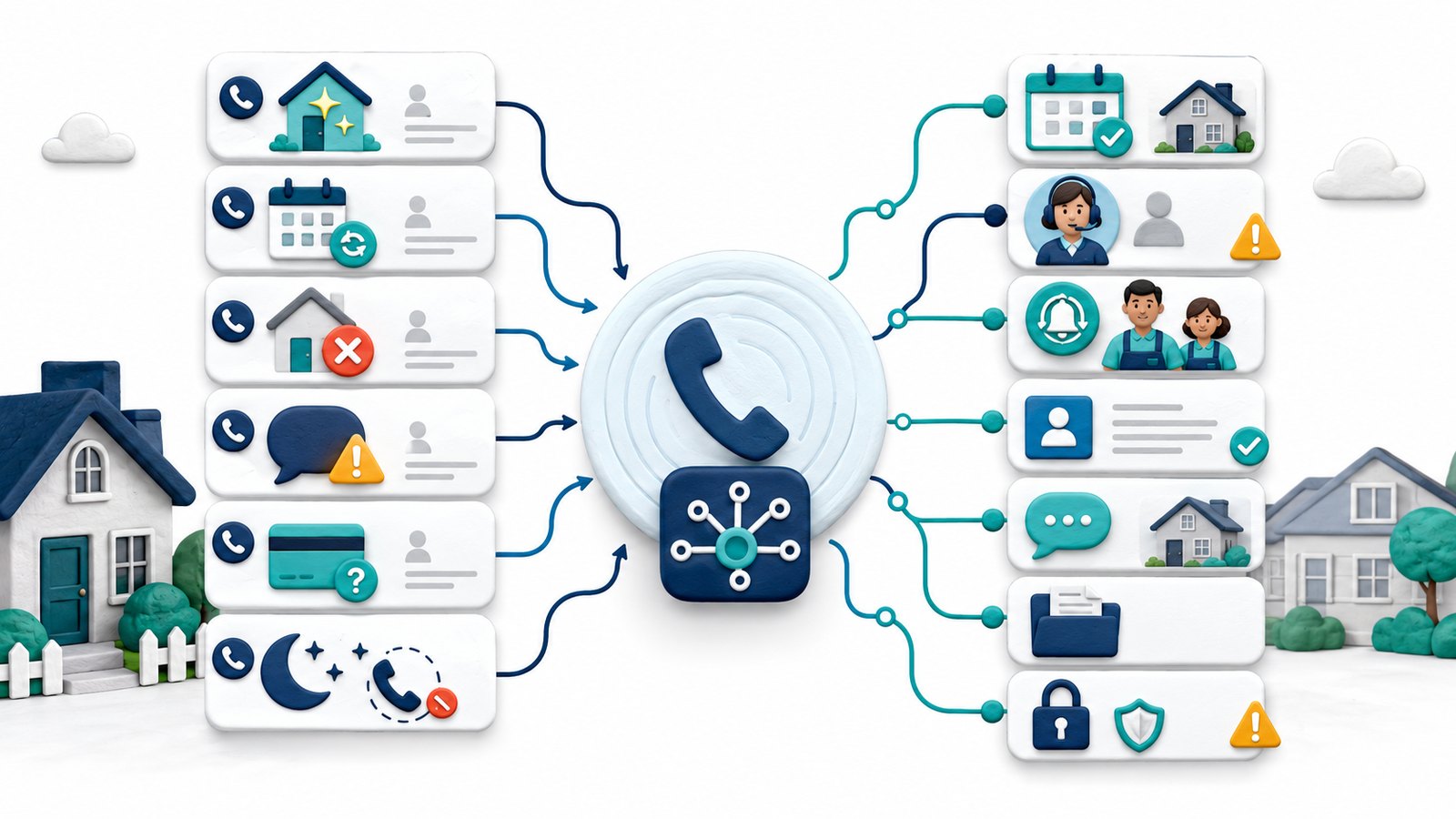
It is not automatically worth buying. The safer question is: which call types are safe for AI intake, and which calls still need a person? New-lead intake, basic service-area questions, after-hours message capture, missed-call follow-up, and routing to the right office user are more plausible AI roles. Complaints, cancellation-fee disputes, refund questions, payment issues, same-day access problems, cleaner callouts, and anything that needs judgment or empathy should usually stay human-led or require fast human escalation.
For a 2-field-worker team with one office user, voicemail plus fast SMS follow-up may still be enough. For a 5-field-worker team with one office user, AI or human answering becomes more plausible if phone work interrupts quotes, scheduling, and customer follow-up. For a 15-field-worker team with two office users, the call-handling system needs routing rules, call logs, escalation paths, and software handoff more than it needs AI hype.
Quick verdict
| Decision point | FieldOpsLab view |
|---|---|
| AI receptionist is worth considering if | The business misses calls, receives after-hours quote requests, needs structured lead intake, and can define what the AI may answer, capture, route, or escalate. |
| Human answering is safer if | Calls often involve complaints, cancellations, rescheduling exceptions, payment questions, refunds, deposits, access issues, cleaner callouts, upset customers, or policy judgment. |
| Missed-call SMS may be enough if | The team is small, missed calls are occasional, the owner can respond quickly, and the business mainly needs a simple callback path rather than full call handling. |
| Online booking may be better if | The real bottleneck is standardized website intake, service-package selection, customer self-service, or booking-form completion rather than phone answering. |
| Do not buy yet if | Pricing rules, booking rules, cancellation rules, escalation rules, software handoff, transcript access, call-recording questions, and cancellation terms are not clear. |
| Evidence level | research_based. Public documentation and workflow analysis only; live AI call behavior remains unverified in practice. |
Takeaway: The safest answer is not “AI” or “no AI.” It is a call-type map: automate only the calls that can be safely captured, routed, or handed off without overpromising price, booking, cancellation, refund, or emergency outcomes.
In this article
- Key facts
- Best for
- Avoid if
- Buyer scenario
- What an AI receptionist means for a cleaning company
- How AI receptionists differ from related workflows
- Call-type fit framework
- Scenario: 2 field workers + 1 office user
- Scenario: 5 field workers + 1 office user
- Scenario: 15 field workers + 2 office users
- Product/category notes
- Pricing and hidden costs
- Software handoff: CRM, cleaning software, booking, and SMS
- Customer experience, brand risk, and failure modes
- Privacy, call recording, SMS, and AI-data cautions
- When not to buy an AI receptionist yet
- Vendor demo and verification questions
- What we could not verify
- Buyer verification checklist
- Final recommendation
- Methodology
- Sources
Key facts
| Item | Research-based finding |
|---|---|
| Target buyer | US residential cleaning company with 2–20 field workers and 1–2 office users handling phone calls, missed calls, voicemail, website leads, booking requests, price questions, cancellations, rescheduling, quote requests, and after-hours inquiries. |
| Core buyer question | Is an AI receptionist worth considering, and what must the owner verify before allowing AI, humans, or a hybrid service to answer calls? |
| Most plausible AI role | Structured intake, basic FAQ routing, after-hours message capture, missed-call follow-up, and handoff to the right person or system. |
| Highest-risk calls | Complaints, cancellation-fee disputes, refund/deposit questions, payment problems, access issues, cleaner callouts, urgent same-day problems, and anything requiring judgment or empathy. |
| Human or hybrid value | Human or hybrid answering may be safer when callers need nuance, reassurance, policy judgment, or escalation beyond a script. |
| Software handoff risk | A call is only useful if the result reaches the right place: lead, contact, quote request, booking request, task, cancellation note, reschedule note, transcript, call summary, or follow-up message. |
| Pricing stance | Treat pricing as planning context, not a vendor quote. Unknown costs are not zero. Verify current plan gates, minutes, calls, SMS, phone numbers, transfers, setup, integrations, exports, cancellation, and taxes before purchase. |
| Evidence limitation | FieldOpsLab has not verified live AI call quality, missed-call recovery, booking behavior, quote-intake behavior, cancellation or rescheduling handling, complaint handling, escalation reliability, SMS deliverability, integration behavior, transcript accuracy, privacy behavior, support quality, cancellation experience, or final payable cost. |
Takeaway: The buying decision should start with call types and failure modes, not with a vendor list.
Best for
- Cleaning businesses that miss real customer calls while the owner or office user is quoting, scheduling, driving, supervising cleaners, or handling customer issues.
- Teams that receive after-hours quote requests, move-out clean inquiries, recurring-service questions, and voicemail messages that need faster capture.
- Owners who can define safe call rules: what the system may answer, what it may not promise, when it should transfer, and what it should write into the CRM, cleaning software, calendar, or task list.
- Companies that can review call summaries or transcripts regularly and correct scripts, routing, pricing language, and escalation rules.
- Teams comparing standalone AI receptionists, human answering services, hybrid answering services, FSM phone features, CRM lead-intake tools, and manual call workflows.
Avoid if
- You need proof that a specific AI tool will improve revenue, bookings, conversion, caller satisfaction, staffing cost, or missed-call recovery for your exact cleaning business.
- Your calls are dominated by complaints, cancellation disputes, refund requests, payment questions, lockouts, cleaner callouts, access issues, or emotionally sensitive customer conversations.
- Your business has not documented pricing rules, quote rules, booking rules, cancellation and rescheduling rules, escalation rules, and handoff rules.
- The vendor cannot show call logs, summaries, transcript access, export options, data-retention settings, cancellation terms, and written pricing definitions.
- You need legal, privacy, call-recording, SMS/TCPA/10DLC, payment-compliance, PCI, HIPAA, cybersecurity, employment, state/local, or contract advice from a software article.
Buyer scenario
The assumed buyer is a US residential cleaning company with recurring and one-time residential cleaning jobs, 2–20 field workers, and 1–2 office users. Calls may include new leads, quote requests, price-range questions, recurring-service inquiries, move-in or move-out clean requests, deep-clean requests, cancellation calls, rescheduling calls, cleaner callouts, same-day lockouts, access questions, complaints, payment questions, after-hours inquiries, spam calls, and voicemail replacement needs.
The current phone workflow may be owner answering, office answering, voicemail, Google Voice, call forwarding, missed-call SMS templates, website forms, online booking forms, or an outsourced human answering service. The buying problem is not only whether calls get answered. It is whether the right call outcome reaches the right operational system without creating bad promises, duplicate records, missing notes, or unresolved customer issues.
| Scenario | Current call pressure | Most likely bottleneck | Planning stance |
|---|---|---|---|
| 2 field workers + 1 office user | Lower call pressure, often owner-led, with calls folded into daily cleaning operations and customer follow-up. | Missed calls may be painful but still visible. Owner judgment may still handle quote nuance and customer exceptions. | Start with fast callback, voicemail cleanup, missed-call SMS, and better intake forms before buying complex AI. |
| 5 field workers + 1 office user | Moderate call pressure. One office user may be interrupted by quotes, reschedules, cancellations, reminders, payments, and cleaner questions. | Office interruption, after-hours capture, and lead follow-up gaps become more visible. | Evaluate AI, human answering, or hybrid answering if safe call rules and handoff rules are clear. |
| 15 field workers + 2 office users | Higher pressure. More calls need routing, shared notes, escalation, accountability, and records that more than one office user can trust. | Call logging, escalation, software handoff, and ownership matter more than simply answering the phone. | Use a structured call-handling workflow with human override, written escalation rules, and vendor confirmation before expanding AI scope. |
Takeaway: AI is more plausible as call pressure grows, but the risk also grows. A larger team needs better rules, not just a faster voice on the phone.
What an AI receptionist means for a cleaning company
For a residential cleaning company, an AI receptionist is software that answers or responds to inbound calls or messages using AI voice or conversational automation. Depending on vendor documentation and setup, it may be positioned to greet callers, ask intake questions, answer basic frequently asked questions, take messages, transfer calls, send follow-up messages, summarize calls, create tasks, or pass information into a CRM, cleaning software, booking tool, calendar, or helpdesk.
That definition is broad. It includes standalone AI receptionist platforms, AI voice agent tools, AI answering services, and AI features inside broader home-service or FSM platforms. It may also overlap with human answering services that add AI tooling, call summaries, call routing, or automated follow-up.
The important cleaning-business question is not whether a tool calls itself an AI receptionist. It is what the tool is allowed to do for each call type. A safe setup may allow the AI to capture a quote request but not quote a final price. It may allow the AI to collect a preferred service date but not promise a booking. It may allow a cancellation note but route cancellation-fee disputes to a human. It may answer basic service-area questions but escalate complaints, payment disputes, and access problems.
How AI receptionists differ from related workflows
AI receptionists overlap with voicemail, missed-call text-back, CRM automation, online booking, and human answering services, but they are not the same workflow. A cleaning business should separate these layers before buying.
| Workflow | What it usually does | Where it stops | Cleaning-business caution |
|---|---|---|---|
| Owner or office answering | Uses human judgment, context, and customer history in real time. | Coverage is limited by availability, interruptions, and after-hours boundaries. | Works well at low volume but becomes fragile when every call interrupts quoting, scheduling, and customer follow-up. |
| Voicemail | Lets callers leave a message when no one answers. | Does not qualify, route, book, or reassure the caller in real time. | May be acceptable for low-volume teams, but urgent quote requests and frustrated customers may not leave useful messages. |
| Missed-call SMS | Sends a text after a missed call, often asking the customer to reply with details. | Does not hold a voice conversation or decide complex routing alone. | Useful as a lightweight baseline, but not a substitute for judgment on complaints, cancellations, or access issues. |
| Online booking form | Collects standardized service details and may let customers request or book time online. | Only works when the customer uses the form and the booking rules are safe. | Often stronger than AI for structured intake if pricing, availability, and service rules are already defined. |
| CRM automation | Tracks leads, stages, tasks, follow-up, and sales notes. | Does not automatically solve phone answering unless connected to voice or intake tools. | Useful after a call, but the call still needs accurate capture and source-of-truth rules. |
| Human answering service | Uses trained people to answer calls, take messages, route calls, and sometimes schedule appointments. | Quality, script fit, coverage, cost, and booking accuracy still require verification. | Plausibly safer for nuance, but not automatically safe for cleaning-specific pricing, cancellation, or payment rules. |
| AI receptionist | Uses AI to answer, ask questions, route, summarize, text, or hand off calls based on configured rules. | Live performance, accuracy, judgment, escalation reliability, and integration behavior remain vendor-confirmed unless validated in the buyer’s own workflow. | Best limited to safe intake and routing until the business proves the workflow in its own buying process. |
| FSM or cleaning software phone features | May combine phone, SMS, call logs, client records, jobs, scheduling, and AI-adjacent features inside an operations system. | May not be a full AI receptionist, and behavior can depend on plan, add-ons, and settings. | Verify whether the feature answers calls, takes messages, books, routes, logs, or only supports communication around jobs. |
Takeaway: The phone workflow and the operations workflow must meet. Answering a call is only the first step; the business still needs the right note, task, quote request, booking request, or escalation record.
Call-type fit framework
The safest way to evaluate an AI receptionist is to map call types. Some cleaning calls are structured enough for AI intake. Others carry brand, payment, access, or emotional risk and should stay human-led unless the vendor demonstrates a safe escalation workflow and the business accepts the risk.
| Call type | AI fit | Human fit | Main risk | Safe AI role | Verification question | Confidence |
|---|---|---|---|---|---|---|
| New lead asking for price | Medium | Medium | AI may overstate or understate pricing, scope, or availability. | Collect home size, service type, address, timing, and contact details; avoid final quote unless rules are written. | Can the vendor show how price ranges, exclusions, and quote-required language are controlled? | Medium |
| Quote request | Medium | Medium | Incomplete intake creates weak quotes or extra callbacks. | Ask structured questions and create a quote-request task. | Can the tool pass all required intake fields into the CRM or cleaning software? | Medium |
| Recurring cleaning inquiry | Medium | Medium | Frequency, first-clean pricing, skipped visits, and cleaner assignment can be nuanced. | Capture frequency interest and route to office follow-up. | Can it distinguish weekly, biweekly, monthly, first clean, and recurring maintenance questions? | Medium |
| Move-out, move-in, or deep-clean inquiry | Medium | Medium | Scope is variable and may require office judgment. | Collect deadline, home size, condition, extras, and access notes. | Can it avoid promising availability or final price before office review? | Medium |
| Customer wants to reschedule | Low to medium | High | Wrong date, route gap, or recurring-series mistake. | Take request, summarize urgency, and send to office unless booking rules are strict. | Can it distinguish one-visit reschedule from recurring-series change? | Medium |
| Customer wants to cancel | Low | High | Cancellation fee, recurring-series ending, retention, or upset customer. | Take message and escalate to office; do not resolve policy questions alone. | Can it route cancellation intent without promising fees, refunds, or final cancellation outcome? | High |
| Same-day lockout or access issue | Low | High | Crew time, route disruption, customer frustration, and payment questions. | Escalate immediately by call, SMS, or office alert. | What happens if the customer says the cleaners cannot get in right now? | High |
| Cleaner callout | Low | High | Staffing, route capacity, customer communication, and employment-sensitive context. | Route to owner or office user, not customer-facing AI. | Can staff calls be separated from customer calls and routed differently? | High |
| Complaint | Low | High | Brand damage, empathy gap, refund demand, or unresolved service failure. | Capture facts, apologize neutrally, and escalate to a human fast. | Can it identify complaint language and trigger immediate human review? | High |
| Payment question | Low | High | Saved card, invoice, failed payment, charge, refund, or accounting issue. | Route to office or billing contact; take message only. | Can it avoid discussing card details, refunds, or account-specific payment decisions? | High |
| Refund or deposit question | Low | High | Policy, contract, payment, and customer-experience risk. | Take details and escalate. | Can refund and deposit terms be blocked from AI improvisation? | High |
| After-hours voicemail replacement | Medium to high | Medium | Caller may expect a faster or firmer answer than the business can provide. | Capture reason for call, urgency, contact details, and next-step expectations. | Can after-hours calls be labeled, summarized, and routed to the correct morning task queue? | Medium |
| Spam or sales call | Medium | Low | Call minutes or per-call charges can be wasted. | Filter, label, and avoid creating tasks for obvious spam. | How are spam calls billed, filtered, logged, and reviewed? | Low to medium |
| Emergency or urgent escalation | Low | High | AI may misunderstand urgency or route too slowly. | Escalate immediately based on keywords and caller intent. | What is the exact fallback if urgent words, lockout, accident, damage, or safety concerns appear? | High |
Takeaway: AI fit is strongest where the caller needs intake and routing. Human fit is strongest where the caller needs judgment, empathy, policy interpretation, or immediate operational decision-making.
Scenario: 2 field workers + 1 office user
For a 2-field-worker cleaning business with one office user, call pressure is usually lower and the owner may still know most customers personally. That makes manual judgment valuable. A full AI receptionist may be unnecessary if the business has a small number of missed calls, a reliable callback routine, and a simple website form for quote requests.
AI becomes more plausible only when missed calls are visible and painful: for example, recurring after-hours quote requests, voicemail messages that arrive too late, or calls that interrupt cleaning work and quoting. Even then, the safest first role is message capture, structured intake, and routing, not final price quoting or cancellation handling.
| Option | 2+1 fit | Why | Main risk | Buyer action | Confidence |
|---|---|---|---|---|---|
| Owner or office answering | High | Human context is still practical at low volume. | Calls may interrupt field work or quote follow-up. | Track missed calls for two to four weeks before buying a new system. | Medium |
| Voicemail plus fast SMS follow-up | High | Low-complexity way to capture occasional missed calls. | Some callers may not leave messages or may choose another cleaner. | Use a clear missed-call reply and a quote-request form link. | Medium |
| Standalone AI receptionist | Low to medium | Useful only if missed-call pain is already proven. | Cost and setup effort may exceed the problem. | Limit scope to after-hours intake and message capture if piloted. | Medium |
| Human answering service | Low to medium | Useful if the owner cannot answer during jobs or wants a warmer voice after hours. | Scripts may not reflect cleaning-specific pricing and policy nuance. | Ask for cleaning intake scripts and escalation rules before purchase. | Medium |
| Online booking or quote form | Medium to high | Often solves structured intake without adding live call complexity. | Only helps callers who are willing to use the form. | Make the form easy and connect it to office follow-up. | Medium |
Takeaway: A 2+1 team should not buy AI just because it exists. Prove the missed-call problem first, then choose the lowest-risk workflow that fixes it.
Scenario: 5 field workers + 1 office user
For a 5-field-worker cleaning business with one office user, call-handling pressure is more plausible. One person may be juggling quotes, recurring schedule changes, customer reminders, invoice questions, cleaner communication, and new leads. Calls can interrupt the exact work that keeps the schedule full.
This is often the first scenario where AI, human answering, or hybrid answering deserves a serious look. The buyer should still define safe call types first. New-lead intake, after-hours quote capture, service-area questions, move-out inquiry capture, and missed-call follow-up are plausible. Cancellations, rescheduling exceptions, payment questions, complaints, and access issues should remain human-led or escalate quickly.
| Option | 5+1 fit | Why | Main risk | Buyer action | Confidence |
|---|---|---|---|---|---|
| Owner or office answering | Medium | Still possible, but interruptions may now affect quotes and scheduling. | One office user becomes the bottleneck. | Measure missed calls, callbacks, voicemail age, and quote-response delays. | Medium |
| AI receptionist | Medium | Structured intake and after-hours capture can reduce office interruption if rules are clear. | Wrong promise, weak escalation, duplicate records, or incomplete handoff. | Ask the vendor to demonstrate cleaning-specific intake and handoff before purchase. | Medium |
| Human answering service | Medium to high | Human nuance may be safer for live callers while still protecting the office user. | Call scripts, booking rules, cost, and cleaning-specific accuracy remain unverified. | Confirm coverage, scripts, escalation, cost unit, and call logs in writing. | Medium |
| Hybrid AI + human answering | Medium to high | AI can handle basic capture while humans take exceptions if the routing works. | Handoff failure or unclear billing for human backup. | Verify when a human joins, how the call is billed, and how the outcome is logged. | Medium |
| FSM or cleaning-software phone features | Medium | Call handling is more valuable when connected to jobs, quotes, clients, and tasks. | Feature may be phone/SMS-adjacent rather than full AI answering. | Ask whether the tool answers calls, texts back, creates tasks, books, or only logs communication. | Medium |
Takeaway: A 5+1 team should evaluate AI or human answering only after defining the office bottleneck and the exact handoff the office needs after each call.
Scenario: 15 field workers + 2 office users
For a 15-field-worker cleaning company with two office users, call handling becomes a shared operations workflow. The business needs call routing, ownership, escalation, records, software handoff, and accountability. AI may help triage, but human override and written rules matter more than the label on the tool.
At this size, a missed call or wrong call outcome can affect multiple crews, recurring routes, customer retention, and office trust. The system should identify the caller, classify the call type, route urgent issues, create the right task or record, preserve summary context, and let office users review what happened. For sensitive calls, a human path should be clear.
| Option | 15+2 fit | Why | Main risk | Buyer action | Confidence |
|---|---|---|---|---|---|
| Owner or office answering only | Low to medium | Two office users may still answer, but shared accountability becomes harder. | Unlogged calls, inconsistent decisions, and lost context. | Use a shared call log, task queue, and escalation rules even before AI. | Medium |
| AI receptionist for triage | Medium | AI may help classify calls, capture details, and route after-hours issues. | Escalation failure, wrong booking promise, or incomplete CRM/FSM record. | Require written routing rules and a review process before expanding scope. | Medium |
| Human answering service | Medium to high | More call volume and customer nuance can justify trained live coverage. | Cost, script accuracy, scheduling integration, and escalation reliability still need confirmation. | Confirm scripts, coverage, transfer rules, booking limits, call logs, recordings, exports, and cost units. | Medium |
| Hybrid answering | Medium to high | Potential fit when basic intake is frequent but exceptions need humans. | Confusing caller experience or unclear handoff responsibility. | Ask for a workflow map showing AI, human agent, office user, and software outcome. | Medium |
| FSM / CRM-integrated workflow | High | Call value depends on reliable records, tasks, lead stages, and customer notes. | Integration claims may not match the exact cleaning workflow. | Ask for written confirmation of objects created, fields mapped, export access, and failure handling. | Medium |
Takeaway: A 15+2 team should not evaluate AI as a standalone voice. It should evaluate the full call-routing, logging, escalation, and software-handoff system.
Product/category notes
The products below are examples of categories a cleaning business may encounter. FieldOpsLab is not ranking them here. Public documentation describes capabilities, pricing models, and product positioning, but FieldOpsLab has not verified live cleaning-business call behavior for any vendor in a live buyer environment.
Standalone AI receptionist platforms
Standalone AI receptionist and voice-agent platforms include companies such as Smith.ai, Goodcall, Dialzara, Bland AI, Retell AI, and Synthflow. Vendor documentation commonly describes some combination of AI call answering, lead capture, appointment or scheduling flows, routing, summaries, CRM or calendar integrations, analytics, and fallback rules. Some tools position themselves for small businesses; others lean toward enterprise voice AI or developer-driven workflows.
For cleaning companies, the strongest possible fit is structured intake: name, phone, email, service address, home size, service type, preferred timing, recurring versus one-time service, and urgency. The biggest caution is live behavior. Public claims do not prove cleaning-specific price handling, booking accuracy, cancellation handling, complaint handling, escalation reliability, noisy-call performance, or integration behavior for a specific account.
- Best fit: after-hours intake, missed-call capture, basic FAQs, routing, and call summaries when scripts are clear.
- Not best for: payment disputes, refunds, cancellation fees, urgent access issues, complaints, and unclear pricing exceptions.
- Pricing cautions: monthly fees, per-minute pricing, usage limits, phone numbers, transfers, SMS, setup, overages, and cancellation terms can materially change cost.
- Integration cautions: CRM, calendar, booking, Zapier, webhook, or application programming interface (API) claims need written confirmation for the exact cleaning workflow.
- What to verify: call logs, summaries, transcripts, recordings, exports, escalation, retention, human fallback, and post-cancellation access.
Human or hybrid answering services
Human or hybrid answering services include options such as Abby Connect, Ruby, Nexa, AnswerConnect, Smith.ai hybrid services, and Housecall Pro HCP Assist. Public documentation often describes live call answering, after-hours coverage, appointment scheduling or booking support, call scripts, call transfer, call logs, and integrations. Some vendors also offer AI receptionists, AI support, or human backup for AI calls.
Human answering is plausibly safer when callers need tone, empathy, judgment, and de-escalation. That does not mean human services automatically solve cleaning-specific workflow. Buyers still need to verify call scripts, service-area rules, quote intake, recurring-service language, cancellation/rescheduling rules, payment escalation, call recordings, call logs, and cost units.
- Best fit: businesses that need a warmer live voice, after-hours coverage, overflow support, or human handling for exceptions.
- Not best for: owners who cannot define scripts, booking authority, escalation rules, or final cost tolerance.
- Pricing cautions: plans may use included minutes, monthly tiers, setup fees, overages, after-hours coverage, or custom pricing.
- Integration cautions: appointment booking, CRM notes, and cleaning-software updates should be demonstrated and confirmed in writing.
- What to verify: who answers, when they answer, what they may promise, how they escalate, how calls are billed, and what records you can export.
Cleaning software / FSM phone or AI features
Some FSM, home-service, or cleaning software platforms now include phone, messaging, missed-call, AI, or answering-service context. Public documentation checked for this article shows examples such as Jobber AI Receptionist, Housecall Pro HCP Assist, Housecall Pro Voice, Housecall Pro CSR AI, Workiz Genius Answering, Workiz communications features, and Workiz Genius context. ZenMaid and BookingKoala are better treated as cleaning-specific or booking-first workflow context unless current vendor documentation shows a full AI receptionist feature relevant to the buyer.
The advantage of this category is handoff potential. If the call system lives near customers, jobs, schedules, quotes, bookings, invoices, and tasks, the office may get a cleaner operational record. The caution is that a phone, SMS, or AI-adjacent feature is not automatically a full AI receptionist, and public documentation does not prove live workflow quality.
- Best fit: teams that want call results connected to jobs, requests, clients, notes, scheduling, and follow-up.
- Not best for: businesses that only need a low-cost answering layer and do not want to change the operations system.
- Pricing cautions: AI or phone features may be add-ons, plan-gated, included only in higher tiers, usage-based, or sales-confirmed.
- Integration cautions: same-platform handoff still requires verification of fields, tasks, logs, summaries, and permissions.
- What to verify: whether the feature answers calls, texts back, books, creates requests, creates tasks, transfers, records calls, exports transcripts, or only supports communications.
CRM / lead-intake tools
A standalone CRM or lead-intake system can be useful when the business mainly needs lead stages, quote follow-up, call notes, sales tasks, lead sources, and reporting. A CRM does not automatically answer calls. It needs a phone, form, answering, or AI layer to create accurate records from inbound calls.
- Best fit: teams with meaningful lead volume and a clear sales pipeline.
- Not best for: businesses whose main problem is recurring schedule control, cleaner assignments, route changes, or customer access notes.
- Pricing cautions: contacts, users, automations, phone integrations, SMS, workflow tools, and API access may add cost.
- What to verify: duplicate handling, field mapping, lead ownership, opt-out records, call notes, exports, and which system is the source of truth.
Manual baseline
The manual baseline includes owner or office answering, voicemail, Google Voice, call forwarding, missed-call SMS templates, website contact forms, online booking forms, spreadsheets, and manual follow-up logs. It can be acceptable when call pressure is low and the owner can respond quickly.
Manual stops being durable when after-hours lead volume, quote requests, cancellation/rescheduling exceptions, complaints, access issues, and software handoff become too frequent for memory. At that point, the business should still improve scripts and rules before adding AI or outsourcing calls.
Pricing and hidden costs
AI receptionist pricing can look simple on a vendor page and become more complex in real use. A cleaning company should treat the visible monthly subscription as the first layer only. Unknown costs are not zero, and planning estimates are not vendor quotes.
| Cost category | What it can mean | Why it matters for cleaning companies | Buyer verification question |
|---|---|---|---|
| Monthly subscription | Base plan fee for AI, human answering, hybrid answering, phone, or CRM/FSM feature access. | Often only the starting point. | What is included in our exact plan, and what requires an upgrade? |
| Per-minute pricing | Charges based on call duration or handling time. | Long quote calls, complaint calls, and spam can increase cost. | How are minutes counted, rounded, and billed? |
| Per-call pricing | Charges based on call count rather than minutes. | Spam, short calls, and hangups may still matter. | Which calls count, and are unanswered, spam, transfer, or hangup calls billed? |
| Per-booking pricing | Charges tied to booked appointments or converted calls. | Booking definitions can be unclear for quote requests and recurring-service inquiries. | What counts as a booking, quote request, qualified lead, or billable outcome? |
| Setup fee | Initial configuration, script setup, onboarding, or call-flow build. | Cleaning-specific rules may require more setup than a generic script. | Is setup included, required, refundable, or billed separately? |
| Phone number fee | New number, porting, call forwarding, or carrier-related fee. | Some teams need to keep an existing brand number. | Can we keep our number, and what does forwarding or porting cost? |
| SMS cost | Text messages, missed-call replies, confirmations, or follow-up messages. | SMS spend and deliverability remain unverified without vendor confirmation. | What SMS is included, restricted, or billed separately? |
| Call transfer cost | Live transfers, warm transfers, or escalation to staff. | Escalation is central for complaints, cancellations, and access issues. | Are transfers included, and how are transferred minutes billed? |
| Human handoff cost | AI-to-human backup, live agent time, or hybrid service usage. | Human backup may be valuable but not automatically included. | When does a human join, and how does that change the bill? |
| After-hours cost | Evening, weekend, holiday, or 24/7 coverage. | Cleaning leads often arrive after normal office hours. | Are after-hours calls covered, and are there surcharges or different rules? |
| Integration/API/Zapier cost | Connecting to CRM, FSM, cleaning software, calendar, forms, or task tools. | The call outcome must reach the right system. | Which integrations are included, plan-gated, or billed by usage? |
| Training/configuration cost | Script writing, prompt tuning, knowledge base setup, FAQ setup, or ongoing updates. | Cleaning policies change with service type, route capacity, and seasonality. | Who updates scripts and how quickly can rules change? |
| Overage fees | Extra minutes, extra calls, extra texts, extra bookings, or extra contacts. | Seasonal demand and spam can create surprise usage. | What are the overage rates and alerts before overage begins? |
| Transcript/call-recording access | Access to summaries, transcripts, recordings, or analytics. | Office review depends on records that remain available. | Are transcripts and recordings included, exportable, and portable after cancellation? |
| Cancellation/contract risk | Renewal, downgrade, refund, termination, and post-cancellation access terms. | A bad fit should not trap call history or lead records. | What happens to calls, transcripts, recordings, numbers, and exports if we leave? |
| Taxes and telecom fees | Sales tax, telecom fees, carrier fees, or usage-related charges. | Not always visible in headline pricing. | Which taxes and telecom fees apply to our plan? |
Takeaway: Do not compare AI and human answering only by monthly price. Compare the full call-handling cost layer: usage, overages, transfers, SMS, phone numbers, setup, integrations, transcripts, exports, cancellation, and taxes.
Before buying an AI receptionist: Ask the vendor to prove call handling, escalation rules, pricing units, SMS cost, privacy controls, transcript export, and software handoff in writing.
Use FieldOpsLab’s cleaning software demo questions guide to structure the verification call.
If Workiz is on your shortlist for phone, SMS, and AI answering, ask Workiz to confirm pricing and workflow fit.
Software handoff: CRM, cleaning software, booking, and SMS
The value of a call depends on what happens after the call. A lead that stays in a transcript but never reaches the office task list is still operationally risky. A cancellation request that becomes a generic note instead of a reschedule or cancellation task can create customer-service problems later.
| Call outcome | Where it should go | Why it matters | What to verify |
|---|---|---|---|
| New lead | CRM lead, cleaning-software request, sales pipeline, or office task. | Prevents leads from staying only in voicemail or transcript history. | Does the system create a lead with source, service type, contact info, and call summary? |
| Contact creation | CRM, FSM, cleaning software, or booking tool. | Duplicate contacts create confusion and weak follow-up. | How does the vendor match existing customers versus new callers? |
| Quote request | Quote queue, estimate request, or sales task. | Quote quality depends on complete intake. | Which required fields are captured, and what happens when the caller is vague? |
| Booking request | Booking request queue, calendar hold, or office approval task. | Cleaning availability may depend on route, cleaner, and service type. | Does the system request a booking, hold a slot, or actually book the job? |
| Cancellation request | Customer note plus cancellation review task. | Wrong cancellation handling can affect recurring schedules and payment review. | Can cancellation intent be escalated without promising final cancellation or fees? |
| Rescheduling request | Reschedule task, calendar review, or office queue. | Recurring schedules and routes can be affected by one change. | Can it distinguish one-time reschedule from future-series change? |
| Complaint | Urgent office task, manager alert, customer history note. | Complaint handling affects retention and brand trust. | How are complaint keywords detected, escalated, and reviewed? |
| Transcript or call summary | Call log, customer note, task attachment, or exportable record. | Office users need context without replaying every call. | Are summaries accurate enough, editable, searchable, and exportable? |
| SMS follow-up | SMS thread, CRM note, cleaning-software communication log, or manual queue. | Follow-up must be visible to office users. | Can staff see what was sent, what the customer replied, and whether delivery succeeded? |
| Calendar handoff | Booking calendar, dispatch calendar, or approval queue. | Calendar mistakes can affect cleaners, routes, and customers. | Is the AI allowed to book directly, request a booking, or only send a task? |
Takeaway: The buyer should ask vendors to show the record created after each call, not just the conversation itself.
Customer experience, brand risk, and failure modes
AI receptionist failure is not only technical. It can be a bad price promise, a weak apology, a missing escalation, a duplicate lead, or a call summary that leaves out the one detail the office needed. Human answering can also fail if scripts are weak, agents are rushed, or booking rules are unclear.
| Failure mode | Why it matters | Safer buyer rule |
|---|---|---|
| Wrong price quote | Cleaning price depends on home size, condition, extras, first clean, frequency, and policies. | Use AI for intake and price-range language only if written rules are clear. |
| Wrong booking promise | Route capacity, cleaner availability, service duration, and geography matter. | Use booking requests or office approval unless direct booking is confirmed safe. |
| Poor escalation | Urgent access, complaints, or cancellation issues may need immediate attention. | Define keywords, escalation contacts, fallback numbers, and after-hours rules. |
| Robotic experience | Callers may lose confidence if the voice cannot handle nuance. | Use clear disclosure and human fallback where appropriate. |
| Accent, noise, or speaker problems | Residential cleaning calls may happen from cars, job sites, or noisy homes. | Ask how the vendor handles uncertain transcription and missing information. |
| Complaint mishandling | Upset customers often need empathy, ownership, and a next step. | Route complaints to humans quickly and preserve the call summary. |
| Payment or refund mishandling | Billing and refund questions can create trust and record problems. | Do not let AI make payment or refund decisions without written rules and review. |
| Duplicate lead creation | Existing customers can be treated like new leads. | Verify caller matching, duplicate handling, and source-of-truth rules. |
| Policy hallucination | AI may produce language the business never approved. | Use approved scripts, blocked topics, and regular call-summary review. |
| Lost transcript or recording | The office may not know what the caller said later. | Verify retention, search, export, and post-cancellation access. |
| Spam call cost | Usage-based plans can charge for junk calls. | Ask how spam is filtered, labeled, billed, and reviewed. |
| After-hours escalation failure | Urgent customer issues may wait until morning. | Define after-hours escalation tiers and what counts as urgent. |
Takeaway: The highest-risk failures happen when the call needs judgment but the system treats it like routine intake.
Privacy, call recording, SMS, and AI-data cautions
This article evaluates software workflow only. Public vendor documentation does not prove legal, privacy, call-recording, SMS, payment, AI-data, data-security, contract, or state/local compliance for a specific cleaning business.
Buyers should confirm call recording, consent, SMS, privacy, data retention, transcript storage, AI training or data usage, payment-data handling, and contract requirements with vendors and qualified advisors where appropriate. Ask vendors to demonstrate the workflow and provide written confirmation. Ask a qualified attorney, privacy/security advisor, or other appropriate advisor to review sensitive workflows where relevant.
For software diligence, the practical questions are operational: what data is collected, where it is stored, who can access it, whether recordings or transcripts are created, whether summaries can be exported, whether SMS replies are visible, whether payment information is captured or avoided, whether data can be deleted or retained, and what happens after downgrade or cancellation.
When not to buy an AI receptionist yet
Delay purchase if the call workflow itself is not ready. AI will not fix unclear pricing, unclear booking rules, unclear cancellation rules, unclear escalation paths, or disconnected software handoff.
- No written call script or service-intake checklist.
- No clear pricing or quote-request rules.
- No booking authority rules: request only, hold slot, or book directly.
- No cancellation and rescheduling rules for one-time jobs versus recurring service.
- No escalation rules for complaints, access issues, cleaner callouts, payment questions, refunds, deposits, urgent issues, or upset customers.
- No plan for CRM, cleaning software, booking, calendar, task, transcript, or SMS handoff.
- Unresolved call-recording, privacy, SMS, AI-data, payment-data, or contract questions.
- Sensitive calls dominate the call mix.
- No one in the office can review call summaries or transcripts.
- The vendor cannot show call logs, export options, or cancellation terms.
- The buyer is pressured into an annual contract before a narrow pilot or workflow review.
Vendor demo and verification questions
Ask vendors to demonstrate the workflow using cleaning-specific examples. The goal is not to watch a polished generic demo. The goal is to find failure modes before the system talks to real customers.
| Ask the vendor to show | Why it matters | Written confirmation to request |
|---|---|---|
| New lead asking for price | Price language is one of the easiest places to overpromise. | Approved price-range wording, exclusions, and quote-required rules. |
| Cleaning quote request | Incomplete intake causes extra callbacks and weak quotes. | Required fields and where the quote request is created. |
| Recurring cleaning inquiry | Frequency and first-clean rules can be nuanced. | How weekly, biweekly, monthly, and custom-frequency requests are captured. |
| Move-out or deep-clean inquiry | Deadlines, condition, extras, and access can affect scope. | How the system avoids promising final price or availability. |
| Rescheduling request | A one-time date change can affect a route or recurring series. | Whether the system books, requests, or escalates reschedules. |
| Cancellation request | Cancellation may involve retention, fees, or recurring-series changes. | Rules for escalating without promising final outcome. |
| Complaint escalation | Upset customers need fast human attention. | Escalation trigger words, response time, and notification path. |
| Payment or refund question | Payment issues should not be improvised. | Blocked topics and human escalation rules. |
| After-hours call | After-hours behavior is a major reason to buy. | Coverage hours, emergency rules, morning task routing, and after-hours billing. |
| Spam call | Spam can waste usage-based minutes or calls. | Spam filtering, billing, and review process. |
| SMS follow-up | Missed-call texts and follow-up texts need visibility. | Message content, delivery records, opt-out handling as a vendor-confirmed workflow item, and cost. |
| CRM or cleaning-software handoff | Call data must become operational data. | Objects created, fields mapped, duplicates handled, and failure alerts. |
| Transcript or call summary | Office users need fast context. | Accuracy review process, export, retention, and post-cancellation access. |
| Data export and cancellation terms | Leaving should not trap call records. | Export formats, recording portability, transcript portability, downgrade, renewal, refund, and cancellation terms. |
| Pricing and usage limits | Unknown costs can change the decision. | Current plan, included usage, minutes, calls, SMS, transfers, setup, overages, taxes, and add-ons. |
Takeaway: A useful vendor conversation ends with written workflow limits, pricing definitions, and escalation rules—not just a promise that the system can answer calls.
What we could not verify
Public vendor pages can describe features and prices, but they cannot prove the live behavior of a specific cleaning-company setup. FieldOpsLab did not verify the following in practice:
- Live AI call quality.
- Caller satisfaction.
- Missed-call recovery.
- Booking accuracy.
- Quote-intake accuracy.
- Cancellation or rescheduling handling.
- Complaint handling.
- Emergency or urgent escalation behavior.
- SMS deliverability.
- CRM integration behavior.
- Cleaning-software integration behavior.
- Transcript accuracy.
- Noisy-call or accented-caller performance.
- Privacy, call-recording, SMS, TCPA, 10DLC, PCI, HIPAA, AI-data, data-security, or compliance behavior.
- Support quality.
- Cancellation experience.
- Export completeness or transcript/call-recording portability.
- Final payable cost after minutes, calls, SMS, setup, transfers, integrations, overages, taxes, add-ons, and contract terms.
Buyer verification checklist
- Write the exact reason for considering AI: missed calls, after-hours capture, office interruption, lead intake, or routing.
- Count current missed calls, voicemails, after-hours calls, quote calls, cancellation calls, rescheduling calls, complaints, payment calls, and spam calls.
- Separate call types to automate from call types to keep human-led.
- Define price and quote rules.
- Define booking authority: take request, hold time, or book directly.
- Define cancellation and rescheduling rules for one-time jobs and recurring service.
- Define escalation rules for complaints, access issues, cleaner callouts, payment questions, refunds, deposits, and urgent issues.
- Decide where each call outcome should go: CRM, cleaning software, booking tool, calendar, task list, email, SMS thread, or manual queue.
- Ask for transcript, call summary, call log, recording, export, retention, and post-cancellation access details.
- Confirm current monthly plan, per-minute pricing, per-call pricing, per-booking pricing, setup fee, phone number fee, SMS cost, transfer cost, human handoff cost, overage cost, taxes, and cancellation terms.
- Ask for written vendor confirmation before purchase.
- Ask qualified advisors to review sensitive privacy, call-recording, SMS, payment-data, AI-data, data-security, and contract questions where appropriate.
Before buying, run FieldOpsLab’s 50-scenario AI receptionist test plan and model the upside with the missed-call revenue calculator. The CRM vs cleaning software guide helps place the call-handling layer in the wider stack.
Final recommendation
AI receptionists are worth considering for residential cleaning companies that have a real call-handling bottleneck and can define safe, narrow roles for the system. The strongest starting roles are structured lead intake, after-hours message capture, basic FAQ routing, missed-call follow-up, and office handoff. The weakest roles are judgment-heavy calls: complaints, cancellations, refund or deposit questions, payment disputes, lockouts, cleaner callouts, urgent escalations, and sensitive customer issues.
For a 2 field workers + 1 office user team, the safest first step is often a better manual workflow: answer when possible, improve voicemail, add missed-call SMS, tighten the website form, and measure missed-call pain. For a 5 field workers + 1 office user team, AI or human answering becomes more plausible if phone interruptions and after-hours leads are disrupting office work. For a 15 field workers + 2 office users team, the decision should be treated as a call-routing and accountability project with logs, escalation rules, software handoff, human override, and export planning.
A human answering service may be safer than pure AI when callers need nuance, empathy, or judgment. A pure AI receptionist may be most useful for structured intake and routing. The safest model for many cleaning businesses may be hybrid: AI for basic capture and routing, humans for exceptions, and office users for final decisions. Vendor confirmation is required before purchase.
Methodology
This article uses the public evidence level research_based. FieldOpsLab reviewed public official vendor product pages, public pricing pages where available, feature documentation, help or support pages where available, security/privacy/terms context where available, and prior FieldOpsLab editorial workflow context for residential cleaning software decisions.
The vendor and category examples include standalone AI receptionist or voice-agent platforms, human answering services, hybrid answering services, FSM and home-service platforms with phone or AI context, CRM or lead-intake workflows, and manual baselines such as owner answering, voicemail, Google Voice, call forwarding, missed-call SMS templates, website forms, and online booking forms.
Pricing was treated as planning context only. Exact final cost depends on current plan, included usage, calls, minutes, SMS, transfers, phone numbers, setup, training, scripts, integrations, API or Zapier usage, human handoff, overages, taxes, exports, recordings, transcripts, cancellation, renewal, downgrade, and contract terms. FieldOpsLab did not treat unknown costs as zero.
FieldOpsLab did not use controlled AI receptionist accounts, paid AI receptionist accounts, vendor demos, live AI call checks, live recordings, transcripts, original screenshots, vendor correspondence, operator interviews, customer interviews, receptionist interviews, or call-center interviews. FieldOpsLab did not verify live call quality, caller satisfaction, booking accuracy, quote-intake accuracy, cancellation or rescheduling handling, complaint handling, escalation reliability, SMS deliverability, integration behavior, transcript accuracy, privacy behavior, support quality, cancellation experience, export completeness, or final payable cost.
Sources
- Smith.ai official website — AI and live receptionist positioning, call answering, intake, routing, integrations, transcripts, and hybrid workflow claims. Public vendor claims remain unverified in practice.
- Abby Connect pricing — public human receptionist, AI receptionist, live chat, included-minute, human backup, and plan examples. Pricing can change and final cost requires vendor confirmation.
- Ruby official website — public virtual receptionist, live chat, integrations, home-services, and small-business positioning. Public vendor claims remain unverified in practice.
- Nexa official website — public call answering and virtual receptionist positioning. Public vendor claims remain unverified in practice.
- AnswerConnect official website — public 24/7 human answering, plan, minute, setup, overage, CRM integration, and live-chat context. Pricing can change and final cost requires vendor confirmation.
- Goodcall official website — public AI phone agent, lead capture, appointment, CRM/calendar, call forwarding, and fallback workflow claims. Public vendor claims remain unverified in practice.
- Dialzara official website — public AI receptionist, small-business answering, cleaning-company category, setup, and pricing-page context. Public vendor claims remain unverified in practice.
- Slang AI official website — public restaurant-focused AI phone answering context. Included as category context, not as proof of cleaning-business fit.
- Retell AI official website — public AI voice agent platform context. Public vendor claims remain unverified in practice.
- Bland AI official website — public enterprise voice AI platform, integration, per-minute pricing model, testing, and security-positioning context. Public vendor claims remain unverified in practice.
- Synthflow official website — public voice AI agent, receptionist, answering-service, telephony, testing, monitoring, and enterprise workflow context. Public vendor claims remain unverified in practice.
- Jobber AI Receptionist — public Jobber Receptionist feature positioning, call/text, request, booking, transfer, monitoring, and add-on context. Public vendor claims remain unverified in practice.
- Jobber pricing — public plan, user, add-on, and Receptionist pricing-context page checked for planning only. Pricing can change and final cost requires vendor confirmation.
- Housecall Pro HCP Assist — public call answering, trained-agent, coverage, booking, call history, recording-request, and home-service context. Public vendor claims remain unverified in practice.
- Housecall Pro Voice Solutions — public phone-system workflow context. Public vendor claims remain unverified in practice.
- Housecall Pro CSR AI — public AI customer-service assistant context. Public vendor claims remain unverified in practice.
- Housecall Pro pricing — public pricing and add-on context checked for planning only. Pricing can change and final cost requires vendor confirmation.
- Workiz Genius Answering — public AI answering context. Public vendor claims remain unverified in practice.
- Workiz Communications Suite — public built-in phone, messages, call recording, tags, and communication context. Public vendor claims remain unverified in practice.
- Workiz Genius — public AI toolset context. Public vendor claims remain unverified in practice.
- ZenMaid pricing — public cleaning-specific software pricing and workflow context. Used for category context, not as an AI receptionist source.
- BookingKoala pricing — public booking-first software pricing and workflow context. Used for category context, not as an AI receptionist source.